Need help?
Do you have a question about the Bittium Tough Mobile 2 and is the answer not in the manual?
Device is factory tested to be IP67 resistant to dust and water, but intentional immersion should be avoided.
Activating privacy mode to disable microphones, Bluetooth, cameras, and reduce sensor accuracy.
Essential warnings on charger safety, hearing protection, choking hazards, and indoor WLAN use.
Cautions regarding potential damage from drops, opening the device, and risks associated with broken screens.
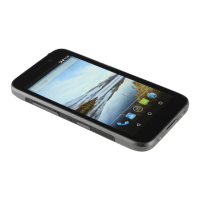
The Bittium Tough Mobile 2 is a robust smartphone designed for secure communication and reliable performance in demanding environments. It runs on the Android™ operating system, offering a familiar user experience with added security features.
The Bittium Tough Mobile 2 functions as a secure mobile communication device, integrating advanced hardware and software security measures to protect user data and privacy. It supports standard smartphone functionalities such as making calls, sending messages, browsing the internet, and running various applications. A key differentiating feature is its enhanced security architecture, including hardware-based tamper detection that can erase all data if a tampering event is detected. This ensures the integrity and confidentiality of sensitive information. The device also incorporates a special Privacy Mode, which intentionally disables certain functionalities like microphones, Bluetooth, and cameras to prevent device-based spying attempts.
The device is equipped with a range of physical keys for quick access to specific functions. These include dedicated volume keys, an emergency key, and a Push to Talk (PTT) key, which can be configured for various applications. The power key serves to turn the device on/off and to lock/unlock the screen. Status indicator LEDs provide visual cues for battery status, charging, and notifications, ensuring users are always aware of the device's state.
Getting started with the Bittium Tough Mobile 2 involves inserting the SIM card(s) and an optional Micro SDHC card into the SIM tray. The device supports both primary and secondary Nano SIM cards, or a Micro SDHC card in the dual mode slot if only one SIM is used. The SIM tray is designed to maintain water and dust resistance, with a rubber seal that should be kept clean.
Upon initial power-up, users are guided through a Security Wizard to set up the device, including a screen lock code and various security settings. The number of setup steps may vary depending on the specific security features enabled. The device's display can be activated by pressing the power key or a programmable key, and the screen is unlocked by swiping upwards and entering the screen lock code.
The Bittium Tough Mobile 2 offers several programmable keys to enhance usability. The PTT key and the Emergency key can be configured to perform desired functions, allowing for quick access to critical applications or actions. The Privacy Mode key, when pressed for approximately 2 seconds, activates a special mode that disconnects microphones, disables Bluetooth and device cameras, reduces sensor accuracy, and activates Silent Mode, providing a high level of privacy protection. If a call is received while in Privacy Mode, the user needs to deactivate the mode to enable the microphone.
The device's operating temperature range is from -20°C to +55°C, indicating its suitability for use in various environmental conditions. However, battery capacity and device performance may be limited in extreme temperatures. An intelligent battery charging control system is in place to ensure battery safety and extend operating life by limiting charging in extremely hot and cold conditions.
Maintaining the Bittium Tough Mobile 2 primarily involves ensuring its physical integrity and keeping its software updated. The device is factory tested to be IP67 resistant to dust and water, meaning it can withstand dust ingress and temporary immersion in water. However, intentional underwater immersion or use in a shower is not recommended and will invalidate the warranty. The rubber seal around the SIM tray is crucial for maintaining water and dust resistance and should be kept clean.
Software updates are an important aspect of maintenance, ensuring the device has the latest security patches and functionalities. Users can manually check for and install available software updates via the device's settings. The device also supports over-the-air (OTA) updates, which can be scheduled for daily, weekly, or monthly intervals. To receive OTA updates, the device must have a minimum of 50% battery level.
The Bittium Tough Mobile 2 has an internal battery that is not user-replaceable. Any battery replacement, if required, must be performed by Bittium authorized service personnel. Opening the device by unauthorized individuals is prohibited and will trigger a tampering event, erasing all data and rendering the device unusable without Bittium service. This also invalidates the warranty.
In case of a need to forcibly restart the phone, users can press and hold the power button until the phone restarts. This can be useful for resolving minor software glitches.
The device is designed to be robust, but the display and back cover are made of glass and can break if dropped or subjected to significant impact. If the screen or back cover is broken or cracked, the device should not be used to prevent injury.
For any warranty support or service, users are advised to contact Bittium's support team. It is also recommended to create a backup of important data before sending the device for service. Only Bittium-approved chargers and accessories should be used to avoid potential damage or safety hazards.
 General
| Display Size | 5.2 inches |
|---|---|
| Resolution | 1920 x 1080 pixels |
| Processor | Qualcomm Snapdragon 670 |
| RAM | 4 GB |
| Internal Storage | 64 GB |
| Battery Capacity | 3000 mAh |
| Operating System | Android 9.0 (Pie) |
| Rear Camera | 12 MP |
| Front Camera | 5 MP |
| GPU | Adreno 615 |
| Expandable Storage | microSD, up to 256 GB |
| Water and Dust Resistance | IP67 |
| Shock Resistance | MIL-STD-810G compliant |
| Connectivity | Wi-Fi 802.11 a/b/g/n/ac, Bluetooth 5.0, NFC |
| GPS | Yes, with A-GPS, GLONASS, BDS, Galileo |
| Chipset | Qualcomm Snapdragon 670 |
| SIM | Single SIM (Nano-SIM) |
| Security Features | Hardware-based security |
| CPU | Octa-core (2x2.0 GHz Kryo 360 Gold & 6x1.7 GHz Kryo 360 Silver) |

 To Next Page