When possible, it's better to activate an SOS through the
with Global Rescue about the nature of your emergency.
To cancel an SOS from the Bivy Stick, press and hold
the SOS button for 5 seconds. Once the red light stops
TRACKING
You can start tracking your location by pressing the
Check In button for 5 seconds. While tracking, your loca-
tracking. Stop tracking by pressing the Check In button
for 5 seconds. You can later view this track by going to
BIVY STICK MOUNTING SYSTEM
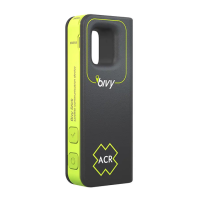
The Bivy Stick comes ready to adapt to any GoPro®
mounting system. This is done by using the provided
¼" - 20, 2-prong GoPro® mount adapter. Thread the
adapter into the back of the Bivy Stick, then attach to the
GoPro® mounting system of your choice.
NOTE: If attaching to the outside of a vehicle or location
that may see high wind speeds, vibrations or force, you
should use a secondary tether to ensure you do not lose
or damage your Bivy Stick.
CHARGING YOUR BIVY STICK
The Bivy Stick charges using a USB-C cable and can
be charged via any USB charge port. Use the supplied
USB-C to USB-A cable or any other USB-C cable. Charge
time is 2-4 hours depending on power source. Charge
and a USB-C to USB-C cable.
TECH SPECS
Battery Type: Lithium Ion Polymer
Weight: 3.35 oz / 95 g
GoPro® is a registered trademark of GoPro, Inc. of
product and does not endorse this product.
7


 To Next Page
 Loading...