EasyManua.ls Logo

BIXOLON SLP-D420E - 5-2 Printer Settings with Utility Program

BIXOLON SLP-D420E
29 pages
Print Icon
To Next Page IconTo Next Page
To Previous Page IconTo Previous Page
Loading...
Rev. 1.04
- 17 -
SLP-D42**
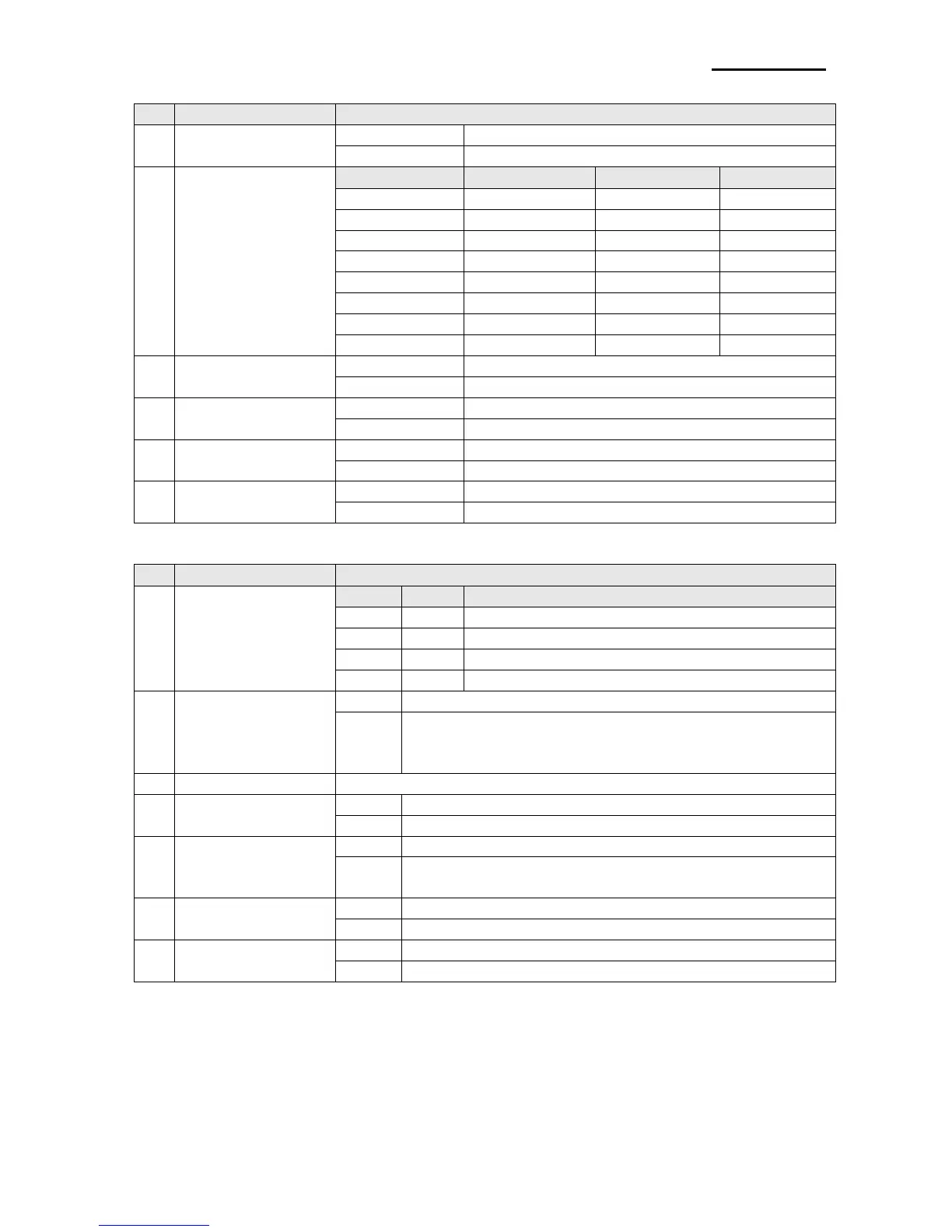
[Table 1] Dip Switch 1
No
Functions
Details
1-1
Speed Selection
Off
5.0 ips
On
6.0 ips
1-2
1-3
1-4
Density Selection
4
3
2
Density
Off
Off
Off
6
Off
Off
On
8
Off
On
Off
10
Off
On
On
12
On
Off
Off
14
On
Off
On
16
On
On
Off
18
On
On
On
20
1-5
Exhibition
Selection
Off
Normal Mode
On
Demo Mode
1-6
Media Selection
Off
Label Paper
On
Thermal Continuous Paper
1-7
Auto Cutter
Off
Without Auto Cuter
On
With Auto Cuter
1-8
Back Feed Option
Off
Back Feeding Enable
On
Back Feeding Disable
[Table 2] Dip Switch 2
No
Functions
Details
2-1
2-2
Baud Rate
Selection
2
1
Baud Rate
Off
Off
9,600 bps
Off
On
19,200 bps
On
Off
57,600 bps
On
On
115,200 bps
2-3
Media Detection
Off
Detect Gap
On
Detect Black Mark
1)Dip S/W 1-6 OFF: Reverse Side Black Mark
2)Dip S/W 1-6 On: Printed Side Black Mark (Option)
2-4
No Use
Default --- off
2-5
Emulation
Off
SLCS,EPL,ZPL
On
DPL
2-6
Busy Condition
Off
Receive Buffer Full
On
*Offline
*Receive Buffer Full
2-7
Paper End Sensor
Status
Off
Enable
On
Disable
2-8
Long Label
Split Printing
Off
Disable
On
Enable

Other manuals for BIXOLON SLP-D420E

Related product manuals