EasyManua.ls Logo

BIXOLON SRP352III - Connecting the Cables; USB Cable; Serial Cable(RS-232 C)

BIXOLON SRP352III
24 pages
Print Icon
To Next Page IconTo Next Page
To Previous Page IconTo Previous Page
Loading...
Rev. 1.03
- 8 -
SRP-350/352III
1-2 Connecting the Cables
You can connect the host computer to the printer by using the interface cable fit for the
specifications of the printer and the host computer (POS/ECR). You must use the drawer
fit for the specifications of the printer.
CAUTION
Before connecting any of the cables, make sure that both the printer and the host are
turned off.
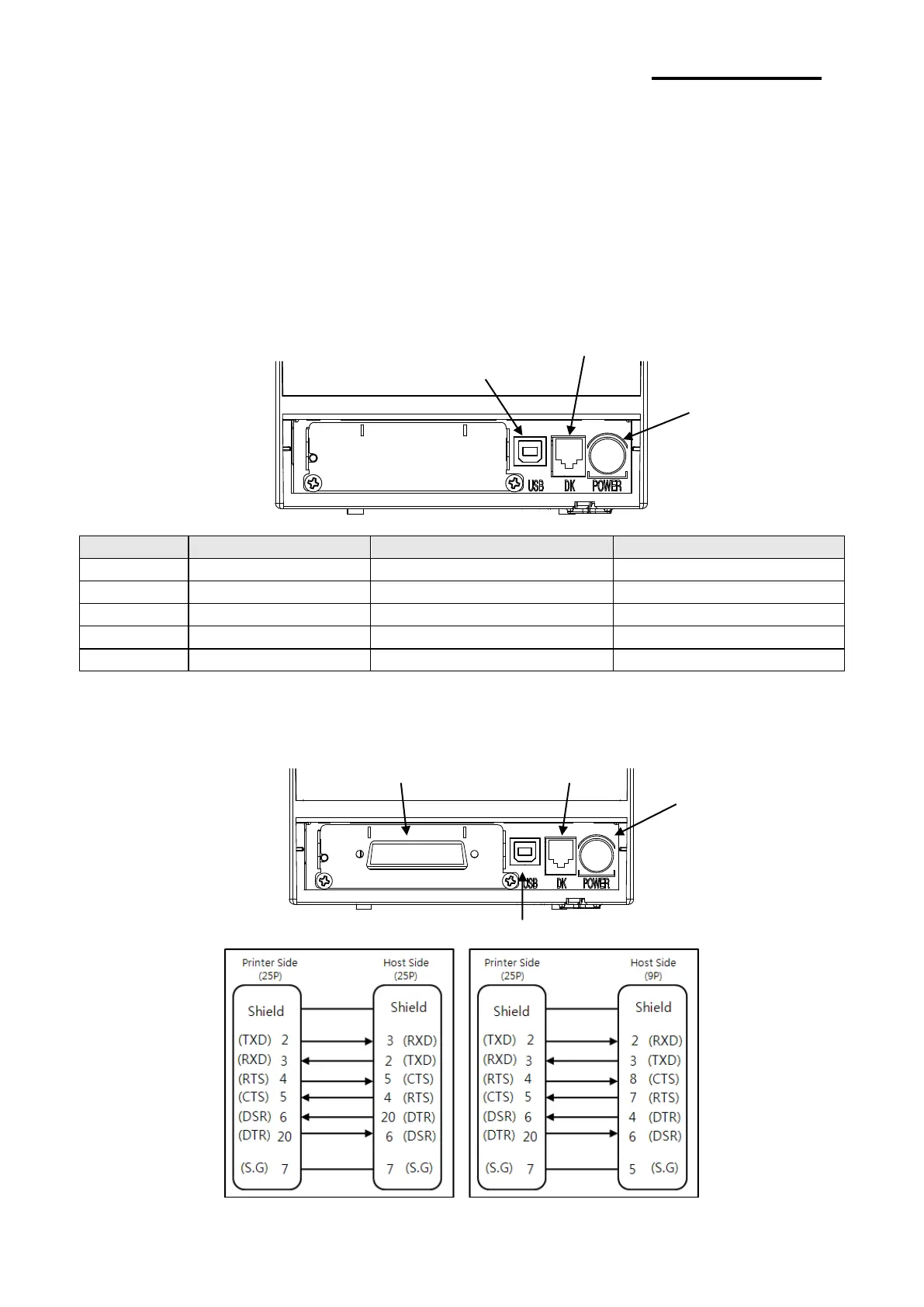
1-2-1 USB Cable
No.
Signal Name
Designation (Color)
Function
Shell
Shield
Drain Cable
Frame Ground
1
VBUS
RED
Host Power
2
D-
WHITE
Data Line (D-)
3
D+
GREEN
Data Line (D+)
4
GND
BLACK
Signal Ground
1-2-2 Serial Cable(RS-232C)
1-2-2-1 Single Interface

Cash Drawer
Connector
Power Connector
Serial Cable Connector
Cash Drawer
Connector
Power Connector
USB Connector
USB Connector

Related product manuals