Page 16
REMOTE CONTROL
SET UP & USE
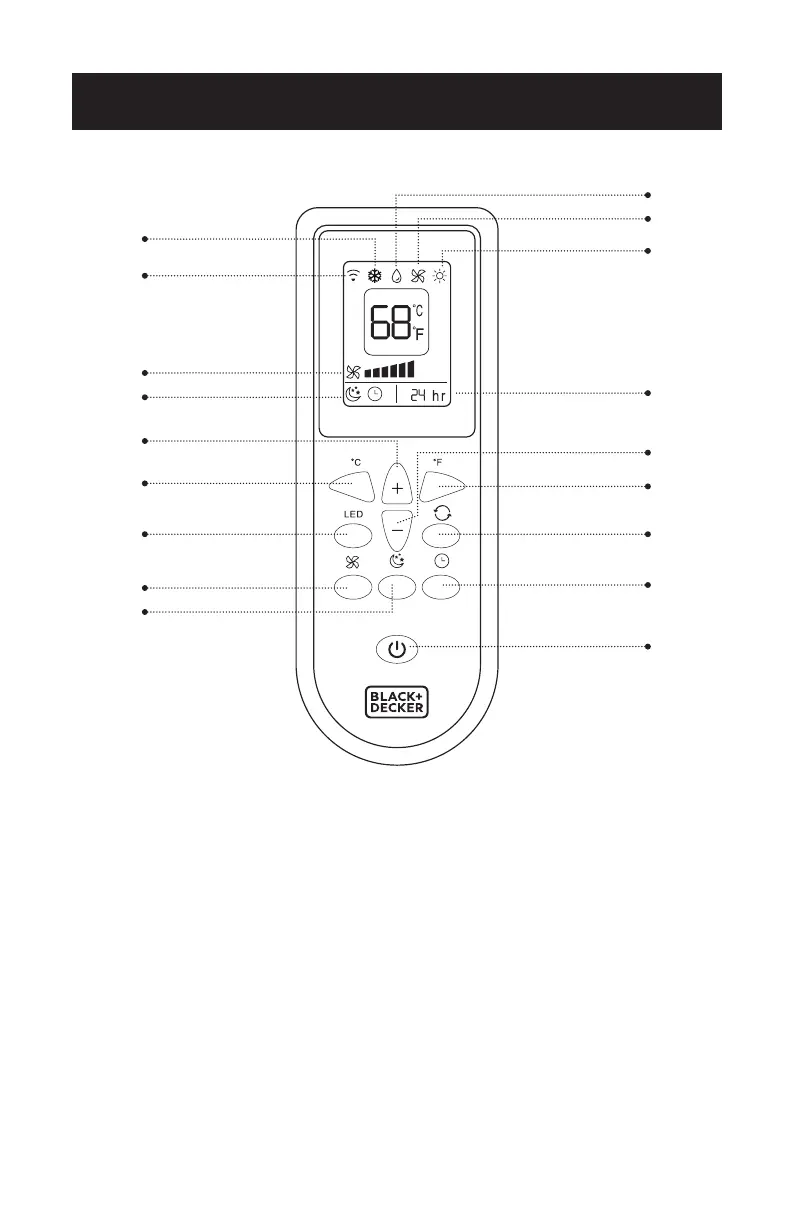
POWER BUTTON: Press to Turn ON or OFF
TIMER BUTTON: Used to set a delay start or shut down time.
MODE BUTTON: Press the button to scroll through COOL, DEHUMIDIFY, FAN or
HEAT (HEAT mode for models BPACT12HWT and BPACT 14HWT
only)
o
C SELECTOR BUTTON: Celsius Display ON
o
F SELECTOR BUTTON: Fahrenheit Display ON
INCREASE: Increase the temperature/time setting.
DECREASE: Decrease the temperature/time setting.
LIGHT ON/OFF BUTTON: Illuminates the LED screen on the unit.
FAN SPEED BUTTON: Use to select the Low, Medium or High fan speed.
SLEEP BUTTON: Gradually adjusts the temperature.
Remote Signal
Cool
Dehumidify
Fan
Timer Selection
o
F Selector Button
Increase Button
o
C Selector Button
Light On/O Button
Fan Speed Button
Sleep Button
Fan Speed
Sleep
Decrease Button
Mode Button
Timer Button
Power Button
Heat
(Heat models BPACT12HWT and
BPACT14HWT only)



 To Next Page
 Loading...