Quick Start Guide
TROUBLESHOOTING
Cooking Problem Solution
Food is cooking too quickly. Because the Infrawave™ Oven cooks food quickly, you may want to use default cooking
times the first time you cook a dish.
When I open the oven door to check If the oven door is opened during the cooking cycle, heaters will pause. To resume cooking,
on food, the heating cycle seems to stop. close oven door and PRESS the Start/Stop button.
Sometimes when I’m cooking, When using nonstick sprays, butter or margarine for cooking, you may notice a small amount
I notice smoke from the surface of smoke and browning. This occurs because these coatings will cook first.
of the pan. NOTE: Always start with a clean tray, pan or aluminum foil since any baked on food residue
will also cause smoke.
When I make a casserole, it tends With deep-dish casseroles (including lasagna), the top may brown more quickly than with
to brown too quickly on the top. conventional ovens. Place a piece of aluminum foil over your casserole dish during the
cooking process. Remove aluminum foil near the end of the cooking cycle to brown on top.
I want to adjust the number of minutes Any time during cooking, you can adjust the cooking time with the Up and Down arrows.
my food has left to cook, but I’ve already
started the cooking process.
I can’t find the exact food Choose the food that is closest to the one you want to cook.
I want to cook in the selection menu. -OR- If you have a recipe with temperature and time, you may choose the Convert Menu.
Quick Tips
Containers to use with your Infrawave™ Oven
1. The inside dimensions of this Oven are 10-5/16" x 11" x 6" This size allows for many different types of baking containers. Keep
interior dimensions in mind when purchasing cooking containers.
2. Metal, ovenproof glass without lids or ceramic bakeware may be used in your oven. Follow manufacturer’s instructions. Be sure the
edge of the container and the food being cooked is at least 1" (2.54 cm) away from upper heating elements.
3. Some frozen foods are packaged in paper or plastic containers suitable for microwave or regular ovens. Do not use paper or plastic
containers in the Infrawave™ Oven. Simply transfer food to an Infrawave™ Oven compatible container: If there are any questions
regarding the use of a specific container, contact the food manufacturer.
4. Some items which should never be used in your Oven:
• Glass lids on glass or metal bakeware. (If a cover is needed, use aluminum foil and be careful that it does not touch the
heating elements.)
• Air-tight packages such as sealed pouches or cans.
• Plastic wrapping such as oven roasting bags or paperboard covers.
• Containers larger than those recommended.
• Containers with warnings against use in range-type or toaster ovens.
A few notes on your Infrawave™ Speed Cooking Countertop Oven:
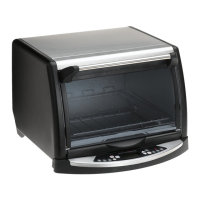
• During cooking, the interior lights will cycle on and off. This is because the Infrawave™ Oven doesn’t cook by a specific
temperature. It cooks by cycling its heater lights on and off.
•Abeep will sound when pressing most control panel buttons.
• Since infrared waves can go through glass, cooking can be improved with an oven-safe, glass dish.
• Holding down the UP or DOWN arrows will change the selection more rapidly.
Digital Control Panel
No Preheating Necessary.
During cooking, heater lights cycle on and off.
Using the Infrawave™ Speed Cooking Countertop Oven is simple!
To get started, please refer to the quick and easy directions below.
To adjust cooking time, PRESS
1
PRESS
To select the type of Pizza and accept default time, PRESS
Pizza
To find the type of Pizza you want to cook, PRESS
until your selection appears.
2
3
PIZZA SELECTIONS
INCLUDE:
Regular (Frozen)
Rising crust (Frozen)
French bread pizza (Frozen)
Fresh/Deli
Note: Default time is the Infrawave™
Oven suggested time for a typical portion
of the food you are cooking. You may
increase or decrease the cooking time for
your preferred level of doneness.

 Need help?
 General




 To Next Page