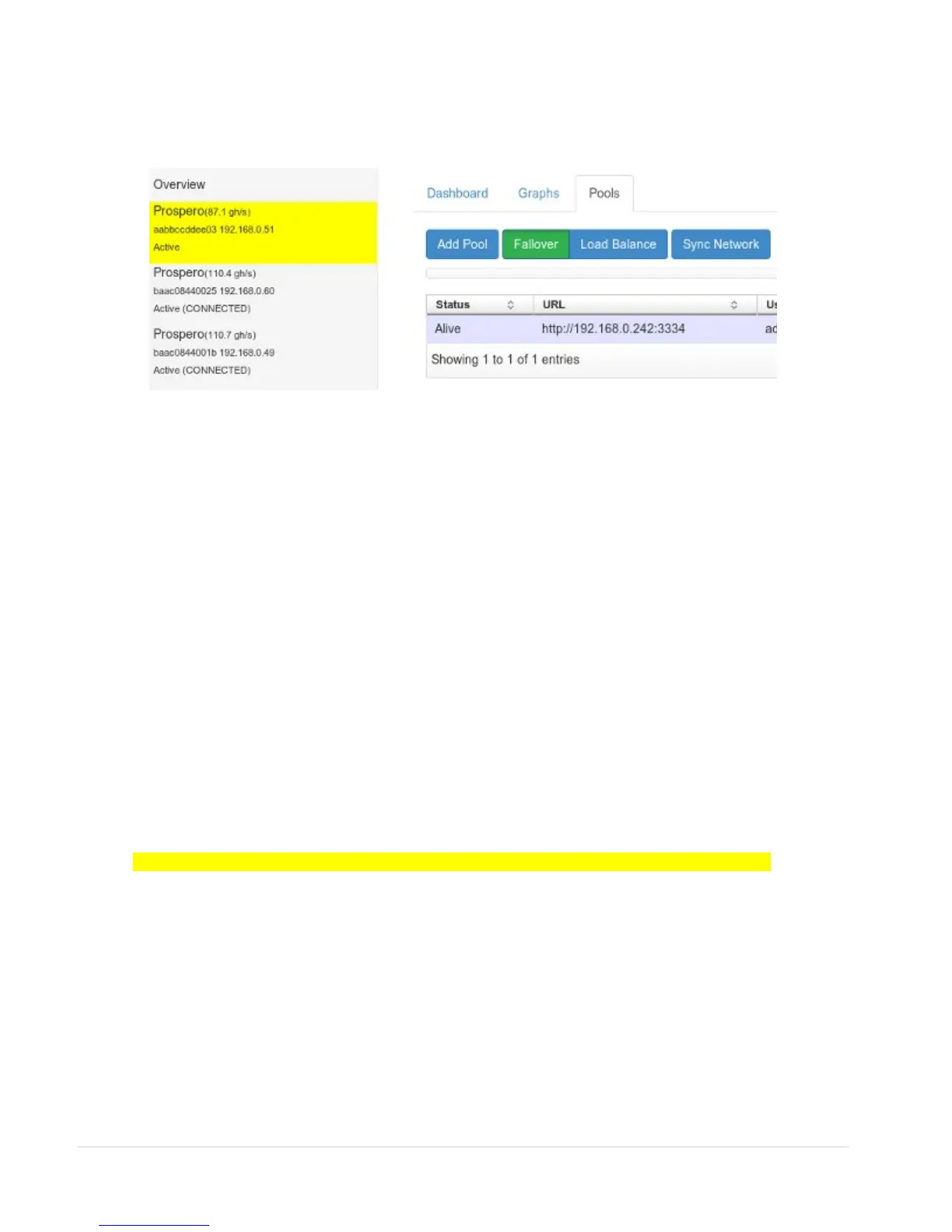
Setting up the Pool.
The first thing you will want to do is add a pool. Select a Prospero on the left, then select
the “Pool” tab, and “Add Pool”
You can use any pool that is compatible with cgminer. For pool recommendations, see the
Back Arrow Support forums.
You can add multiple pools, and run them in either Fallover or Load Balance mode. It is
advisable to do this, as pools can go off-line, leaving your Prosperos with nothing to hash.
In Fallover mode, pools higher up the list are given priority. In Load Balance mode, they
are all given equal share.
Sync Network
If your have multiple Prosperos, you may want them all to use the same Pool settings.
Just click “Sync Network”, and your configuration will be sent to all your miners on the
network.
IV. LCD Status & Configuration (where fitted)
Note: if the LCD display is missing, you can access it from a web browser http://<ip address>/lcd
Login details (default)
USER: user
PASSWORD: blackarrow
5 | P a g e


 To Next Page