Chapter 2: Overview
724-746-5500 | blackbox.com
Page 13
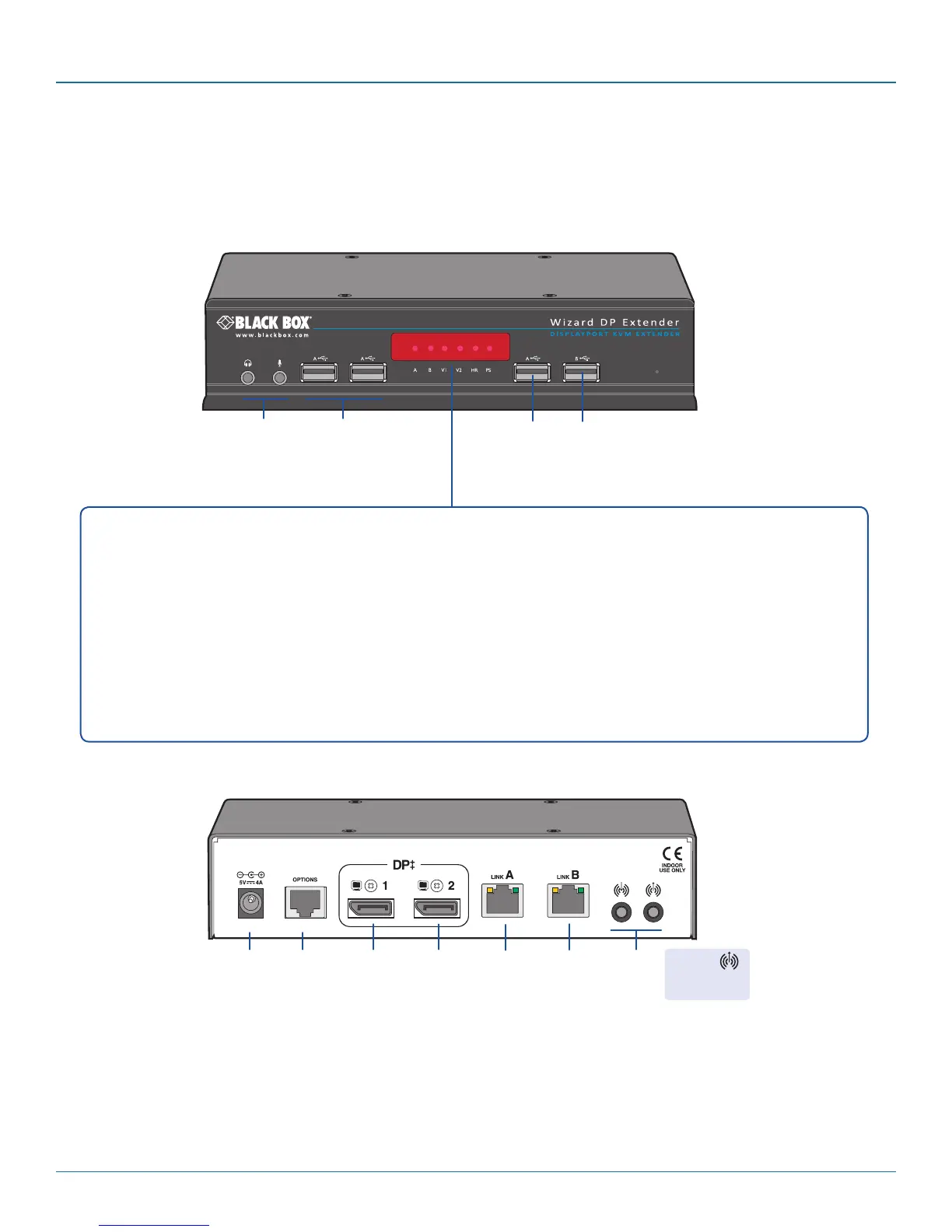
2.6.3 Receiver - front
Hi-Speed
USB port
2.6.4 Receiver - rear
True
Emulation
USB port
Headphone/
microphone
sockets
True
Emulation
USB ports
Primary
DisplayPor t
video
output
Audio
line
in/out
Power
input
Secondary
DisplayPort
video
output
Multi
function
Serial
port
Optional
B link
Main
A
link
Line Out
jack supports
mini-TOSLINK
Indicators
These six indicators clearly show the key aspects of operation:
• A On Main A link is connected.
Flashes Main A link is not connected.
Off No power is present.
• B On Optional B link is connected.
Off Optional B link is not connected.
• V1 On Video port 1 is connected and receiving video.
Flashes Video port 1 is connected but not receiving video.
Off Video port 1 is not connected.
• V2 On Video port 2 is connected and receiving video.
Flashes Video port 2 is connected but not receiving video.
Off Video port 2 is not connected.
• HR On High Rate mode is active.
Flashes High Rate mode is preferred but cannot be established, LR
mode active.
Off Low Rate mode is active.
• PS On Power connected.
Flashes Upgrade error (other indicators show error code).
Off No power.








 To Next Page