Chapter 3: Installation
724-746-5500 | blackbox.com
Page 27
From the Line
Out socket of
your audio
device
From your
speakers or
the Line In
socket of your
audio device
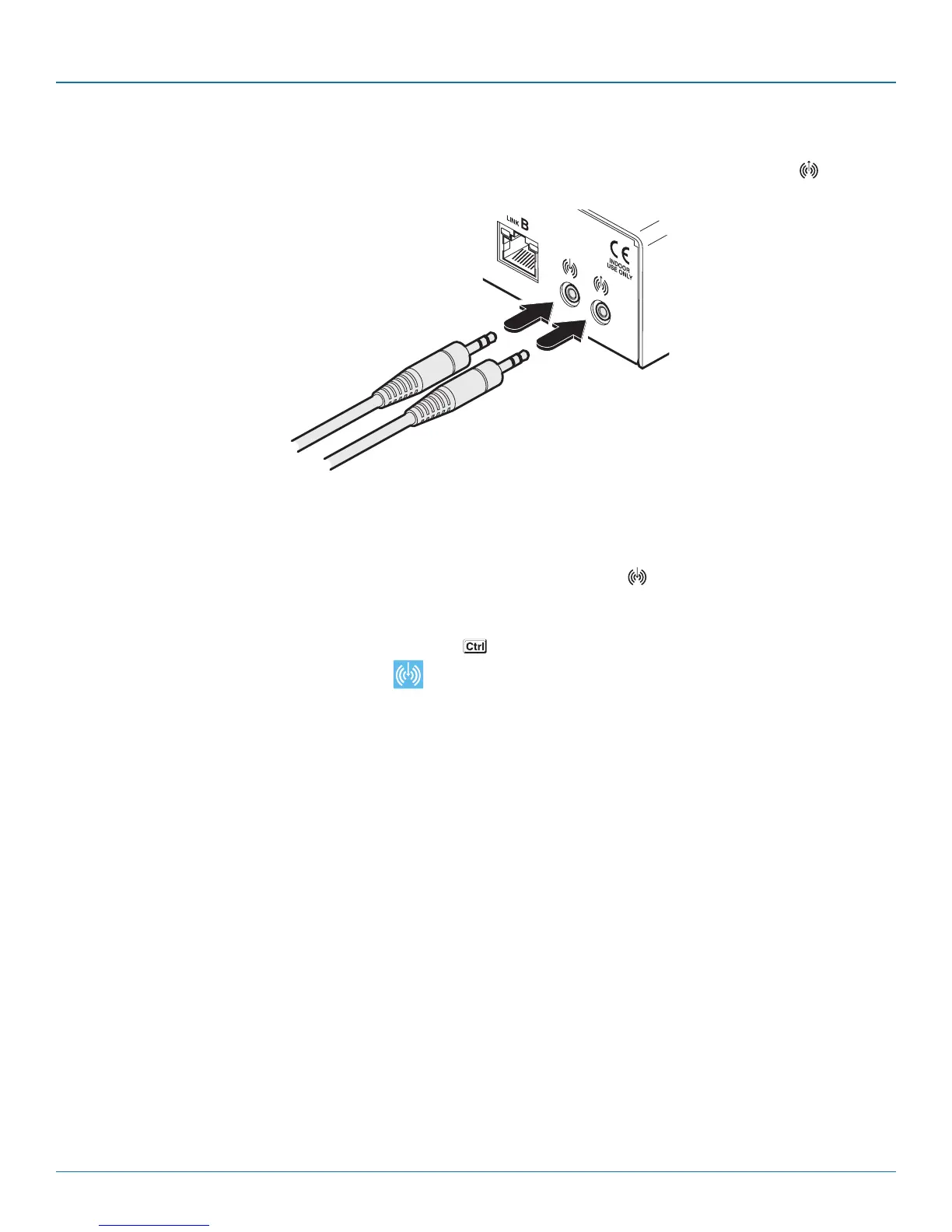
2 Connect the 3.5mm jack from the Line Out socket of your audio device to the Line In socket on the rear panel of the
receiver unit.
3 Ensure that the Line In input is selected using the hotkey switch: Once the Wizard DP Extender receiver is powered on, use a
USB keyboard attached to one of the A ports and press the key three times in succession. Then press the 2 key (not from
the numeric keypad), to select Line In mode. The icon will be displayed on screen to confirm your selection.
continued
3.2.9.2 To connect speakers/line in/analog line out
1 Connect the 3.5mm jack from your powered speakers or the Line In socket of your audio device to the Line Out socket on
the rear panel of the receiver unit.








 To Next Page