Chapter 4: Configuration
877-877-2269 | blackbox.com
Page 33
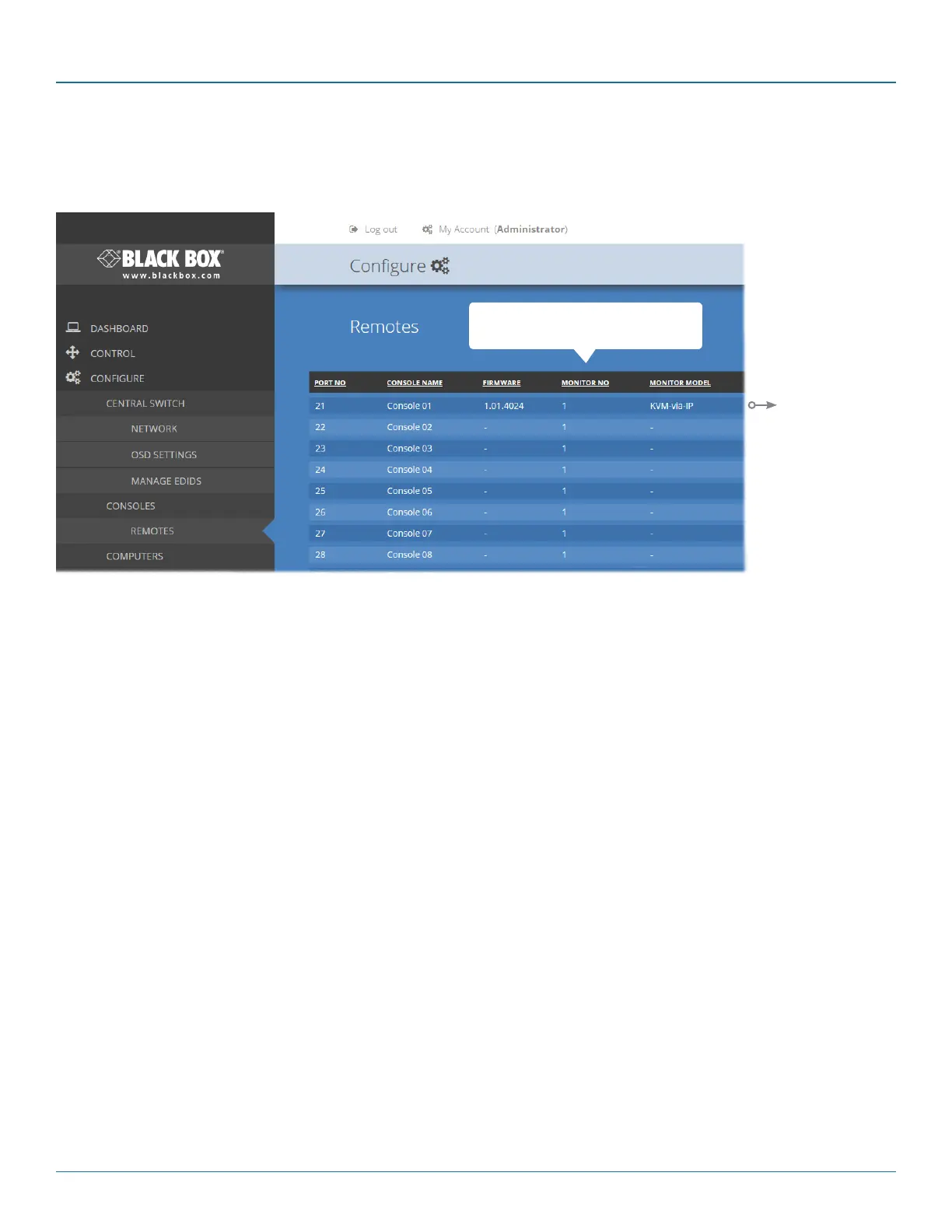
Click a heading to reorder the whole list in
ascending or descending order according
to the entries within the chosen column.
4.7 Configure > Consoles > Remotes
At the heart of each console (the collective term for a set of peripherals connected to the DCX system) is a remote unit called a
DCX-DVR module.
Listed in order of the switch port to which they are attached, this page shows various details for each DCX-DVR module:
• Firmware - the current internal software version for each DCX-DVR module.
• Monitor No - an index number for each video display. The first monitor for any console will be indexed as ‘1’. Where a
console has more than one video display associated with it (by using additional DCX-DVR modules), this column will show
‘2’, ‘3’, etc. against the secondary, tertiary, etc. DCX-DVR module(s).
• Monitor model - indicates the video display model as reported to the DCX-DVR module to which it is connected.
• Unique ID - (shown only when the Maintenance > Settings > Web UI Mode is set to Advanced) this column displays the
unique identifier hardwired into every DCX-DVR remote module.
View details
Click to view
remote details.
See page 34.


 To Next Page