Max Express Ethernet Switch LB9217A-R2 & Applicable Modules
18
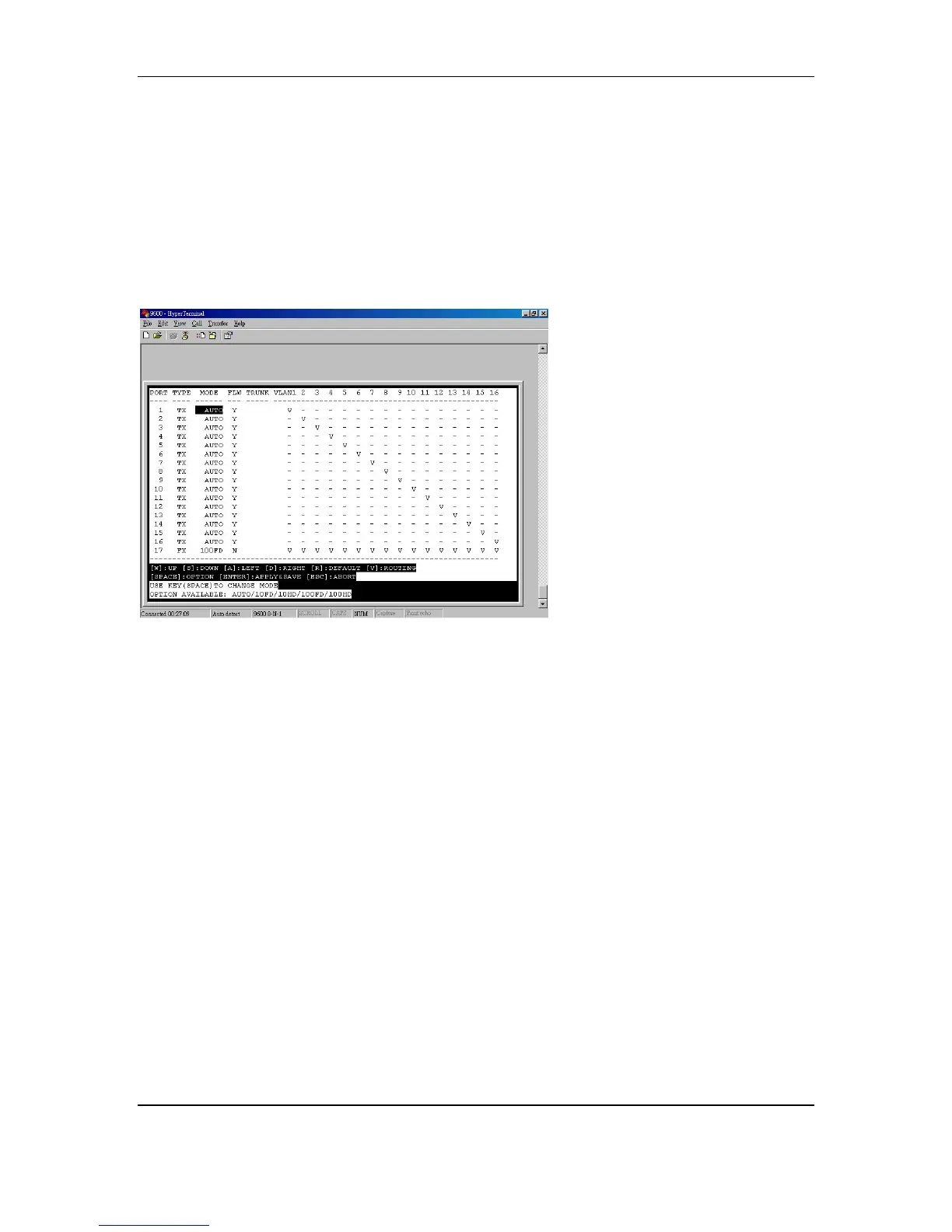
y Press [ENTER] to apply and save the setting, then all the other ports will be
assigned to each different VLAN group and use the desired port as the routing
(uplink) port
For example, here we have the port 17 assigned as routing (uplink) port. The port
1 ~ port 16 are divided into each different VLAN groups. And the user on the
port 1 ~ port 16 can uplink through the port 17 only and can not communicate
with each other.
MAC-based Trunking & Settings
Trunking is also called link aggregation, which serves as a shortcut to increase
the bandwidth on your network. Trunking is a method of physically linking
together several ports to act as a single port with higher bandwidth. This
functionality allows scaling of bandwidth.
The 17-Port Switch supports trunking of up to 4 ports, either 2-port or 4-port.
For a 100BaseTX/FX network, you will gain 400Mbps bandwidth when you trunk
two ports, each of 200Mbps. The more ports you trunk, the more bandwidth you
gain.
Follow these steps to configure the 2-port trunking.
y Move the cursor to TRUNK column
y Move the cursor and select port 1
y Press [SPACE] and show T to port1 and port2
y Press [ENTER] to apply and save the setting



 To Next Page