30
5. Set the values to “50” for the Delay and Interference.
6. Set the value to “0” for the Threshold and Sensitivity.
7. Slowly turn the Interference knob until the high frequency pitch becomes quiet. It should be set
directly at the point where it is muted.
8. Very slowly turn the Delay knob in the other direction until a “Ticking” sound is heard.
9. The desired tick rate is about 3 - 5 ticks per second. To fine tune the tick rate, use the Threshold
knob.
6.3 Calibration of Discrimination
After the unit has been ground balanced, the unit must be calibrated to discriminate between ferrous
and non-ferrous metals. This is a very simple procedure:
1. Find a clear area that does not have metallic objects.
2. Push the "Calibration" button.
3. During the calibration process the monitor shows "Calibration".
4. Swing the unit level to the ground left and right until the monitor returns to normal.
5. Go over a piece of ferrous metal to see the "FE" indication on the screen.
6.4 Operation
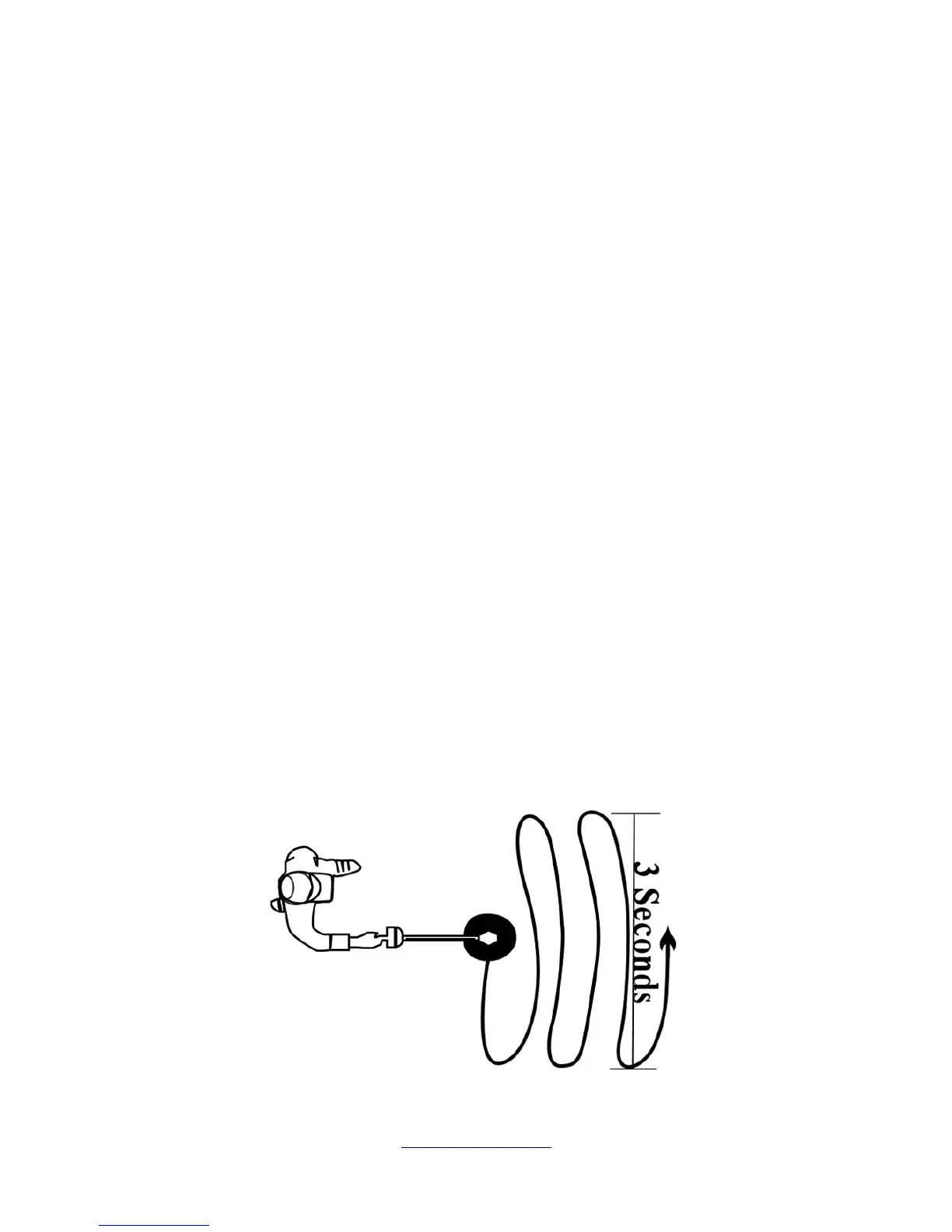
The unit needs to swing slowly over the ground or area to be scanned. It is important not to change the
height of the coil during the scanning procedure. If the unit is too close to the ground it is possible that
the coil will receive feedback from the ground itself. If this happens, simply swing the coil a little higher
above the ground.
In illustration 6.1 is a description showing the approximate time required to sweep from one side to the
next side.


 To Next Page