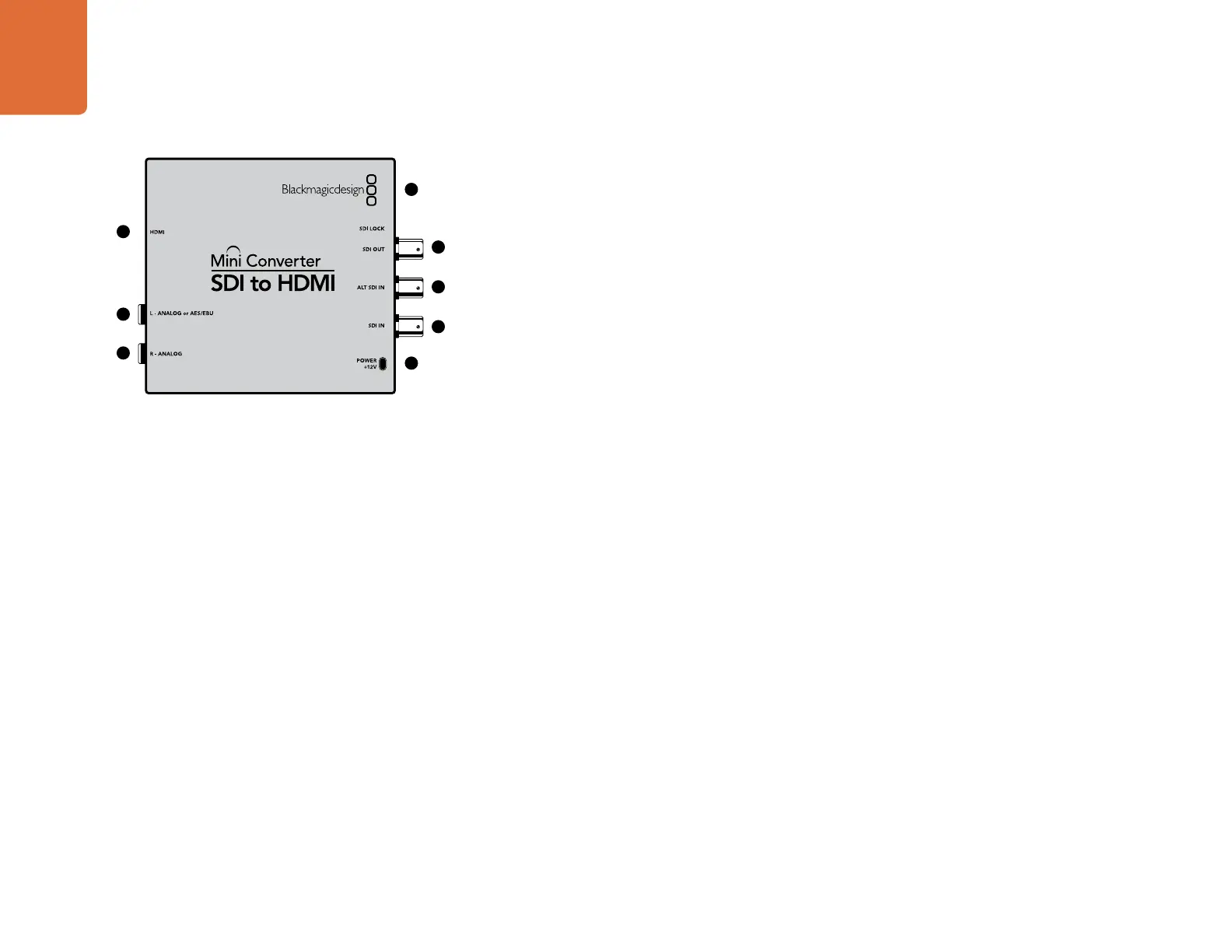
Mini Converter SDI to HDMI
14
Blackmagic Mini Converter SDI to HDMI
Connect a huge range of HDMI displays and video projectors to SDI based equipment. Your Mini Converter
SDI to HDMI automatically detects between SD/HD/3G-SDI and converts to HDMI with embedded audio,
plus balanced AES/EBU or analog audio out.
Connectors
1. HDMI
HDMI type A video output.
2. L - ANALOG or AES/EBU
Balanced left channel analog audio, or AES/EBU digital audio output on a 1/4" TRS connector.
3. R - ANALOG
Balanced right channel analog audio output 1/4" TRS connector.
4. MINI-B USB PORT
Connects to the Converter Utility software via your Mac OS X or Windows computer. The Mini Converter’s
internal software is also updated using the USB port.
5. SDI OUT
SDI video output on a BNC connector.
6. ALT SDI IN
Redundant SDI input is provided as an optional back up.
7. SDI IN
Primary SDI input.
8. POWER +12V
12 volt power supply input.
1
2
3
4
5
7
8
6
Mini Converter SDI to HDMI













 To Next Page