Mini Converter UpDownCross
30
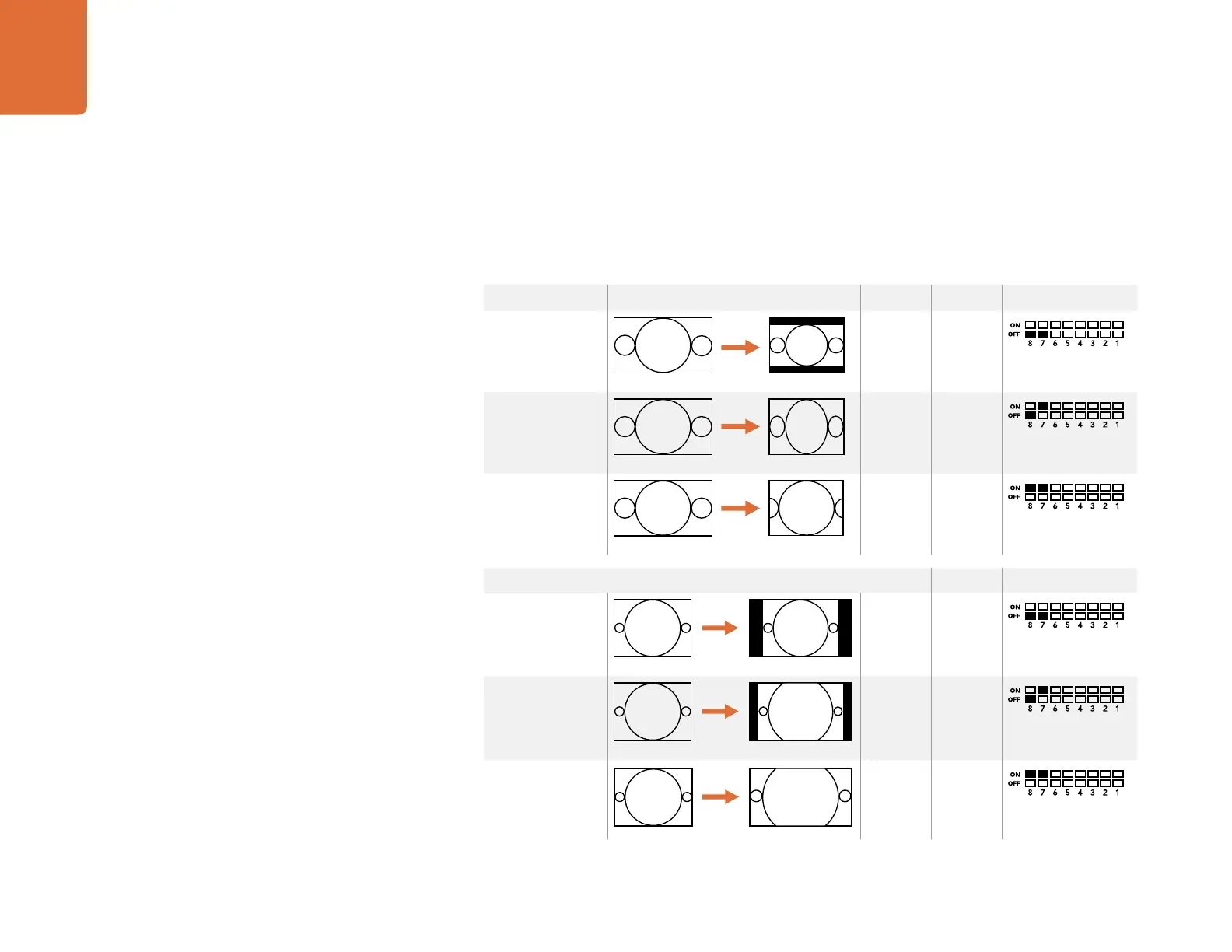
Down conversion Switch 8 Switch 7 Switch Diagram
Letterbox
16:9 Ratio Image 4:3 Ratio Display
OFF OFF
Anamorphic
16:9 Ratio Image
4:3 Ratio Display
OFF ON
Center Cut
16:9 Ratio Image
4:3 Ratio Display
ON ON
Up conversion Switch 8 Switch 7 Switch Diagram
4:3 Pillarbox
16:9 Ratio Display4:3 Ratio Image
OFF OFF
14:9 Pillarbox
4:3 Ratio Image
16:9 Ratio Display
OFF ON
16:9 Zoom ON ON
Mini Switches
Mini Converter UpDownCross’ mini switches provide the following settings:
Switch 8 - Aspect Ratio Conversion
Combinations of switches 8 and 7 set the video aspect ratio when up or down converting. For example,
when down converting, the letterbox aspect ratio is applied by setting switches 8 and 7 to the OFF position.
4:3 Ratio Image
16:9 Ratio Display













 To Next Page