Page 14
SET UP & USE
RINSE AID DISPENSER
The rinse aid is released during the final rinse to prevent water from forming droplets
that can leave spots and streaks on your dishes. It also improves drying by allowing
water to sheathe o the dishes. Your dishwasher is designed to use liquid rinse aids.
The rinse aid dispenser is located inside the door next to the detergent dispenser. To
fill the dispenser, open the cap and pour the rinse aid into the dispenser until the level
indicator turns completely black. The volume of the rinse aid container is about 110ml.
FUNCTION OF RINSE AID
Rinse aid is automatically added during the last rinse, ensuring thorough rinsing, and
spot and streak free drying.
ATTENTION!
Only use branded rinse aid for dishwasher. Never fill the rinse aid dispenser with
any other substances. (e.g. Dishwasher cleaning agent, liquid detergent). This would
damage the appliance.
WHEN TO REFILL THE RINSE AID DISPENSER
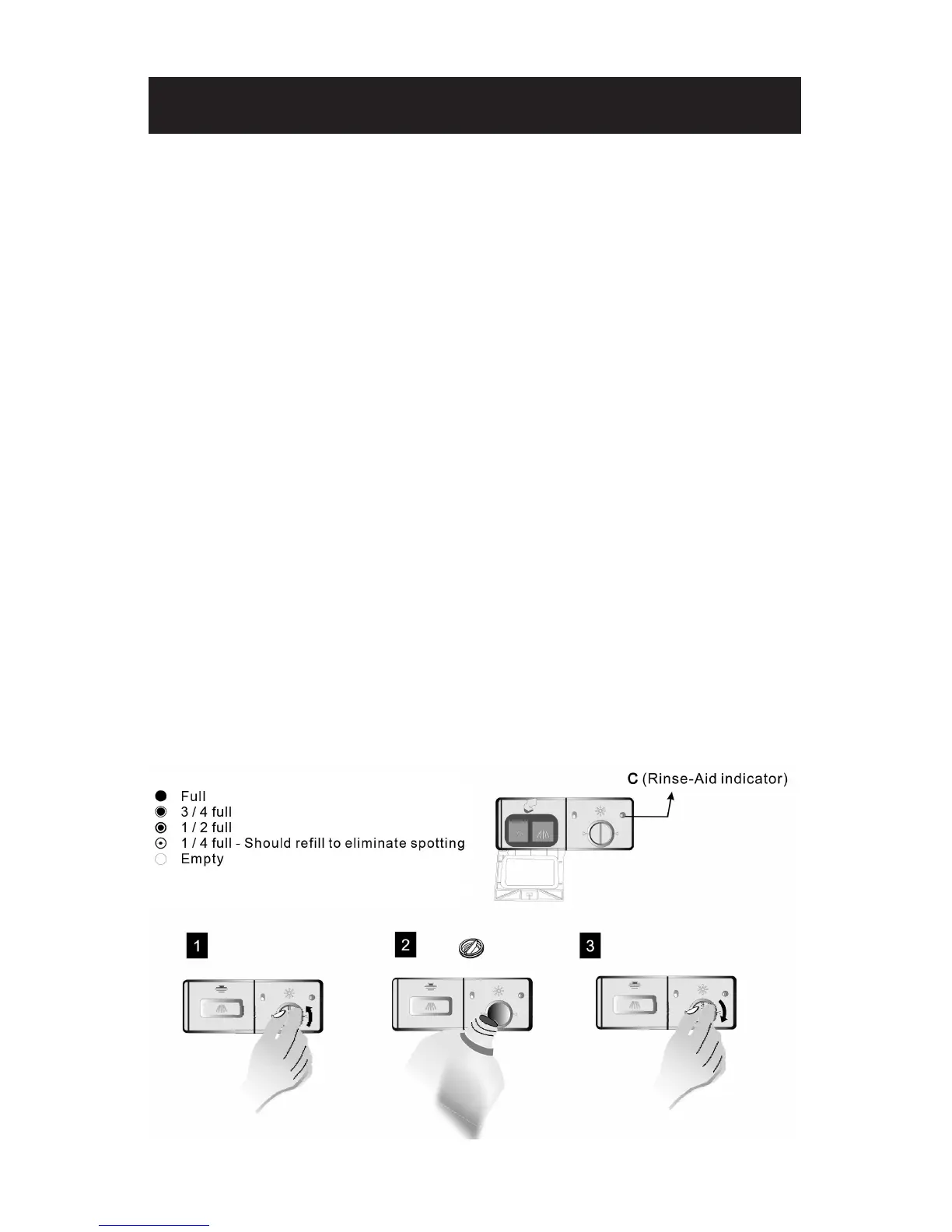
If there is no rinse-aid warning light in the control panel, you can judge the amount
of rinse-aid by the color of the optical level indicator “C” located next to the cap.
When the rinse-aid container is full, the whole indicator will be dark .As the rinse-aid
diminishes, the size of the dark dot decreases. You should never let the rinse aid get
below 1 / 4 full.
As the rinse aid diminishes, the size of the black dot on the rinse aid level indicator
changes, as illustrated below.
1. To open the dispenser, turn the cap to the “open” (left) arrow and lift it out.
2. Pour the rinse aid into the dispenser, being careful not to overfill.
3. Replace the cap by inserting it aligned with “open” arrow and turning it to the
closed (right) arrow.


 To Next Page