
 Need help?
Do you have a question about the Blackstar ID Core BEAM and is the answer not in the manual?
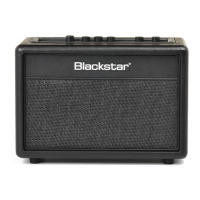
Welcome to the Blackstar ID:Core BEAM amplifier, a result of extensive R&D for guitarists.
Highlights the amplifier's innovation, home environment design, and audio playback capabilities.
Connect your guitar here using a quality screened lead.
Selects instrument type and preamp voicing; 12 Blackstar Voices in two banks.
Adjusts overdrive/distortion for electric guitar or compression for other voices.
Volume controls instrument level; ISF adjusts tonal signature between US/UK.
Describes controls for MOD, DLY, and REV effects, including focus and state indicators.
Details how to change effect type and adjust effect parameters like level and speed.
Sets effect rate/time and accesses advanced features via the Tap switch.
Connects amplifier to PC/Mac for INSIDER software and audio recording.
Connect external audio sources for playback and to play along with.
Natural tone output for headphones, recording devices, PA systems.
Enables wireless music streaming and pairing with Bluetooth devices.
Details Discoverable and Scanning modes for Bluetooth device connection.
Covers power switch, DC input, and footcontroller connection.
Storing and recalling user-defined patches via the amplifier or software.
Covers USB audio output options including Reamping Mode.
Adjusts Super Wide Stereo, playback volume, USB recording level, and effect speed.
 General
| Power Output | 20W |
|---|---|
| Weight | 3.9 kg |
| Technology Type | Digital |
| Effects | Reverb |
| Connectivity | Bluetooth, USB, MP3/Line In |
| Number of Channels | 2 |
| Inputs | 1 x 1/4" Instrument Input |
| Outputs | USB |
| EQ | Patented ISF (Infinite Shape Feature) |


 To Next Page