
 Need help?
Do you have a question about the Blackstar Studio 10 6L6 and is the answer not in the manual?
Covers basic usage, cleaning, installation, and general precautions.
Alerts regarding voltage, grounding, and potential electrical shock risks.
Precautions for operating in different environments and avoiding damage.
Information on permissible noise levels and preventing hearing damage.
Connect your guitar to the amplifier using a screened lead.
Adjusts amplifier response from clean to harmonically rich overdrive.
Engages built-in drive circuit for dynamic crunch or smooth legato sounds.
Modifies sound character by adjusting treble and bass frequencies.
Sets the overall level of the reverb effect applied to the sound.
Controls output volume and can push the power stage into saturation.
Power indicator light, standby, and power on/off switches.
Location and specifications for mains and H.T. fuses, and power lead connection.
Connect external speaker cabinets or the internal speaker.
Line output emulating speaker characteristics for recording or PA.
Connect external effects units via send and return sockets.
Port for connecting the footswitch to control drive and reverb.
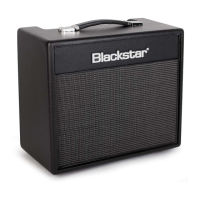
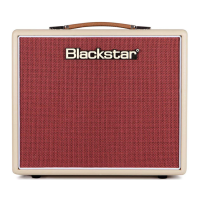
The Blackstar Studio 10 6L6 is a 10-watt, single-ended, Class A valve combo amplifier designed to deliver classic 6L6-driven tones in a compact format suitable for home, studio, and smaller live performances. This amplifier is the result of extensive research and development by the Blackstar team, who are experienced musicians dedicated to providing high-quality products.
The Studio 10 6L6 amplifier features an ECC83 valve in its preamp stage, contributing to its dynamic sound with extended highs and lows. The core of its distinctive character comes from the 6L6 power valve, which is influenced by classic American amplifiers. This valve produces a bright clean sound and, when pushed hard using the Master Volume, delivers a hot lead tone with natural compression.
The amplifier offers a versatile tonal range. The Gain control allows users to adjust between a clean response and a medium overdrive. Lower settings (counter-clockwise) provide a clean sound, while increasing the Gain clockwise enriches the sound harmonically, leading to a classic overdrive. A dedicated Drive Select switch, inspired by Blackstar's HT-DRIVE pedal, engages a built-in drive circuit. This circuit can take the sound from a dynamic crunch to a smooth, singing legato. This switch must be pressed to enable the use of a compatible footswitch for engaging the Drive.
The Tone control provides further sound shaping by adjusting the balance between treble and bass frequencies. Counter-clockwise settings result in a warmer, darker sound, while clockwise rotation brightens the tone.
A specially-voiced Reverb effect is integrated into the amplifier, with its level controlled by the Reverb knob. Turning the control clockwise increases the amount of reverb, while fully counter-clockwise disables it.
The Master Volume control manages the overall output volume of the amplifier. Increasing this control clockwise not only boosts the volume but also pushes the Class A power stage into saturation, contributing to the amplifier's characteristic tone.
For connectivity and expanded functionality, the Studio 10 6L6 includes a range of professional features. It has multiple speaker outputs to accommodate various cabinet configurations. The '1x16 Ohm' output is for a single 16 Ohm extension speaker cabinet or the internal loudspeaker. The '1x8 Ohm or 2x16 Ohm' outputs can connect either a single 8 Ohm extension cabinet or two 16 Ohm cabinets. It's crucial to correctly match the impedance of the amplifier and speakers to prevent damage.
A cabinet emulated line output is provided for silent practice, recording, or feeding the live sound into a PA system. This output emulates the tonal characteristics of a guitar speaker cabinet and delivers a natural valve overdrive tone. The signal for this output is taken directly after the power amp, ensuring that the tonal characteristics of the Class A configured 6L6 power valve and output transformer, when pushed into saturation, are captured. This output requires a stereo jack lead to function correctly and also accommodates headphones for silent practice.
The amplifier features an effects loop with a selectable level switch (+4dBV/-10dBV). This allows users to integrate either professional equipment (+4dBV setting) or guitar-level effects pedals (-10dBV setting). The Effects Loop Return is where the mono output of an external effects unit is connected, and the Effects Loop Send is for connecting the mono input of an external effects unit.
A footswitch input is included, and a footswitch is supplied with the amplifier. This footswitch enables convenient engagement of the Drive function.
To operate the amplifier, first, plug your guitar into the Input using a good quality screened guitar lead. Ensure the power cord is connected to a compatible power outlet. The Power switch (9) turns the amplifier on and off; it should always be turned on before the Standby switch (8). The Power Indicator Light (7) illuminates when the amplifier is switched on.
The Standby switch (8) enables or disables the speaker output. For silent recording or practice, placing this switch in the standby position will silence the internal speaker while allowing the emulated output to continue functioning. This is particularly useful when using the Speaker Emulated Output for headphones or direct recording.
Adjust the Gain control (2) to achieve your desired clean or overdriven sound. Engage the Drive Select switch (3) for additional crunch or smooth legato tones. Fine-tune the tonal balance with the Tone control (4) and add ambience with the Reverb control (5). The Master Volume (6) controls the overall loudness and can be used to push the power stage into saturation for more expressive tones.
When connecting external speakers, refer to the provided table in the manual to ensure correct impedance matching. Always use a good quality screened lead for the Speaker Emulated Output and remember that a stereo jack lead is required for this output to function.
For effects integration, set the Effects Loop Level switch (6) according to the type of external effects unit being used (professional or guitar-level). Connect the effects unit's output to the Effects Loop Return (7) and its input to the Effects Loop Send (8).
The supplied footswitch can be connected to the Footswitch input (9) to conveniently toggle the Drive function during performance.
The Blackstar Studio 10 6L6 is designed for reliability, but proper maintenance is essential for its longevity and performance.
Safety Precautions: Always read and follow all safety instructions provided in the manual. Do not open the equipment case as there are no user-serviceable parts inside, and high internal operating voltages are present. Refer all servicing to qualified service personnel.
Cleaning: Clean the amplifier only with a dry cloth. Avoid using liquids or abrasive cleaners.
Loudspeaker Connection: Before switching the unit on, ensure the loudspeaker is connected as described in the handbook, using the manufacturer-recommended lead. Incorrect impedance matching can damage the amplifier.
Hearing Protection: High loudspeaker levels can cause permanent hearing damage. Avoid the direct vicinity of loudspeakers operating at high levels and wear hearing protection if continuously exposed to high levels.
Troubleshooting: If the product does not operate normally when the operating instructions are followed, refer the product to a qualified service engineer. Unauthorized modification of this equipment is expressly forbidden by Blackstar Amplification Ltd.
Disposal: All electrical and electronic products should be disposed of separately from the municipal waste stream via designated collection facilities appointed by the government or local authorities.
 General
| Power | 10W |
|---|---|
| Speaker | 1 x 12" Celestion Seventy 80 |
| Channels | 1 |
| Inputs | 1 x 1/4" (instrument) |
| Effects Loop | Yes |
| Type | Tube |
| Tubes | 1 x ECC83, 1 x 6L6 |
| Reverb | Yes |
| EQ | Bass, Middle, Treble |
| Outputs | 1 x 1/4" (emulated output) |



 To Next Page