Need help?
Do you have a question about the BlackSys CH-200 and is the answer not in the manual?
General warnings and guidelines for safe usage to prevent damage.
Precautions for installation to ensure proper function and safety.
Notes and potential issues regarding GPS functionality and reception.
Guidelines and precautions for memory card usage and management.
Warnings and limitations for Advanced Driver Assistance Systems (ADAS) features.
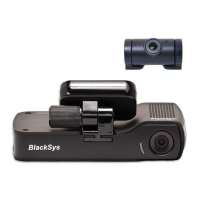
Lists standard components provided with the product for initial setup.
Identification of front and rear parts of the main product unit.
Identification of left and right side ports and connectors.
Guide for installing the main unit and front camera assembly.
Instructions for connecting and mounting the rear camera.
Information on memory card usage for recording and storage.
Basic procedures for starting, stopping, and managing recordings.
Meaning of LED indicators and voice prompts for product status.
Instructions for downloading and using the BlackSys mobile application.
Steps to connect the product to your smartphone via the BlackSys app.
Guide for installing and using the BlackSys Viewer PC software.
Step-by-step guide for performing firmware updates.
Information on downloading firmware and PC viewer software.
Guide for formatting SD card using a computer.
Instructions for formatting SD card directly on the device.
Duration and conditions of the product's warranty coverage.
 General
| GPS | Yes |
|---|---|
| Wi-Fi | Yes |
| G-Sensor | Yes |
| Parking Mode | Yes |
| Video Resolution (Front) | 1920x1080 (Full HD) |
| Video Resolution (Rear) | 1920x1080 (Full HD) |
| Lens | Glass lens |
| Night Vision | Yes |
| Operating Temperature | -20°C to 70°C |

 To Next Page