29
USER MANUAL
5-4-1 Using BlackSys App - SD Card
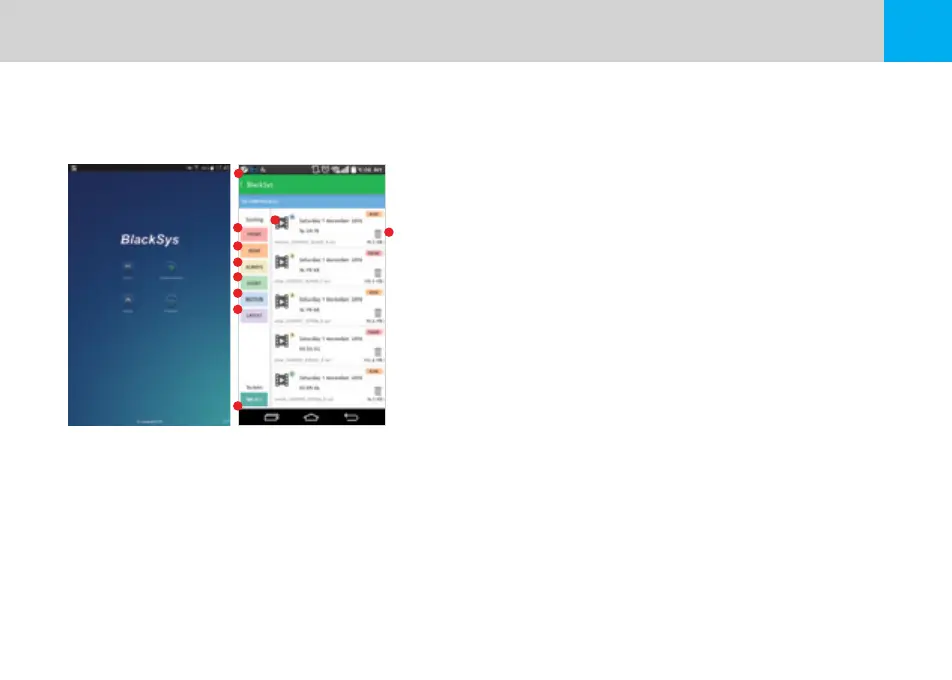
※ You can view your recorded footage saved on the SD Card right from the BlackSys App.
1. Navigation : Navigate to the Main Screen
2. Front Camera : Display all footages except Front Camera
3. Rear Camera : Display all footages except Rear Camera
4. Always Video : Display all footages except Always Recording mode
5. Event Video : Display all footages except Event Recoding mode
6. Motion Detection Video : Display all footages except Motion Detection mode
7. Customize : Arrange order of footage by time sequence (ascending/descending)
8. Play : View footage file
9. Delete : Delete footage file
10. Wi-Fi : Navigate to ‘BlackSys Connection’
1
2
3
4
5
6
7
10
8
9


 To Next Page