30
CAMMSYS BLACKBOX
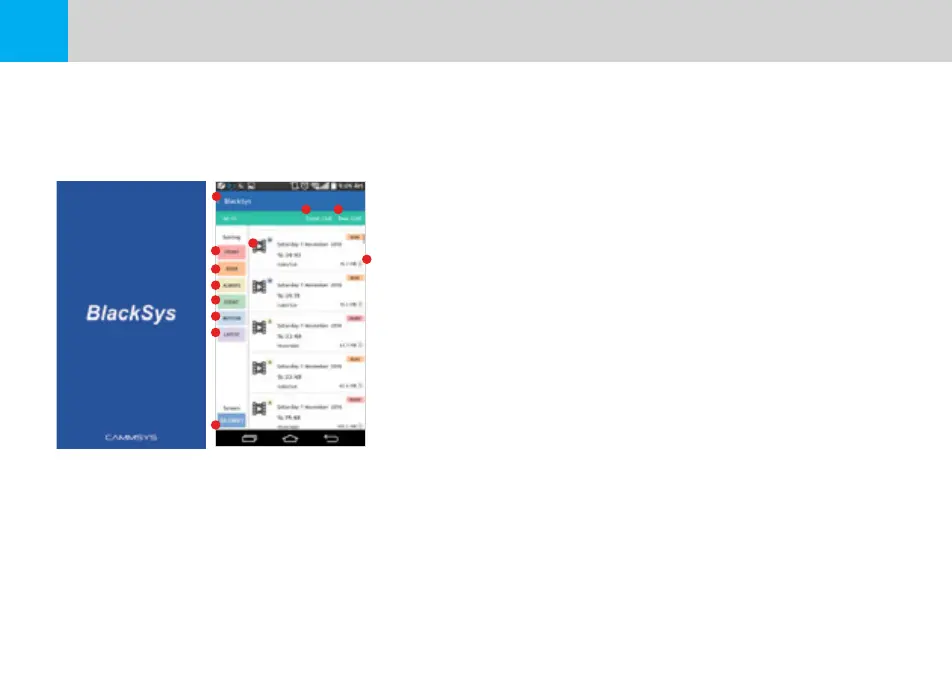
5-4-2 Using the BlackSys App - BlackSys Connection
※ Connect with your BlackSys product to view captured footage.
※ Green indicates a successful connect on the Main Screen.
1. Navigation : Navigate to the Main Screen
2. Front Camera : Display footage captured by the Front Camera
3. Rear Camera : Display footage captures by the Rear Camera
4. Always Video : Display footage captured in Always Recording mode
5. Event Video : Display footage captured in Event Recoding mode
6. Motion Detection Video : Display footage captured in Motion Detection mode
7. Customize Order : Arrange order of footage by time sequence
(ascending/descending)
8. Play : View footage file
9. Download : Save footage file onto your Smartphone as a movie clip
※ File path may vary depending on Smartphone and OS.
10. SD Card : Navigate to ‘SD Card’
11. Front Camera LIVE : View a live video stream from the Front Camera
12. Rear Camera LIVE : View a live video stream from the Rear Camera
[Disconnect Wi-Fi] [Wi-Fi Connection]
1
2
3
4
5
6
7
10
8
9
11 12


 To Next Page