31
USER MANUAL
5-4-3 Using the BlackSys App - Configuration
※ Configuration only available when BlackSys product is connected to your Smartphone.
※ Menu items may vary depending on BlackSys model.
※ While saving changed value, either black box and smart phone have to be turned on.
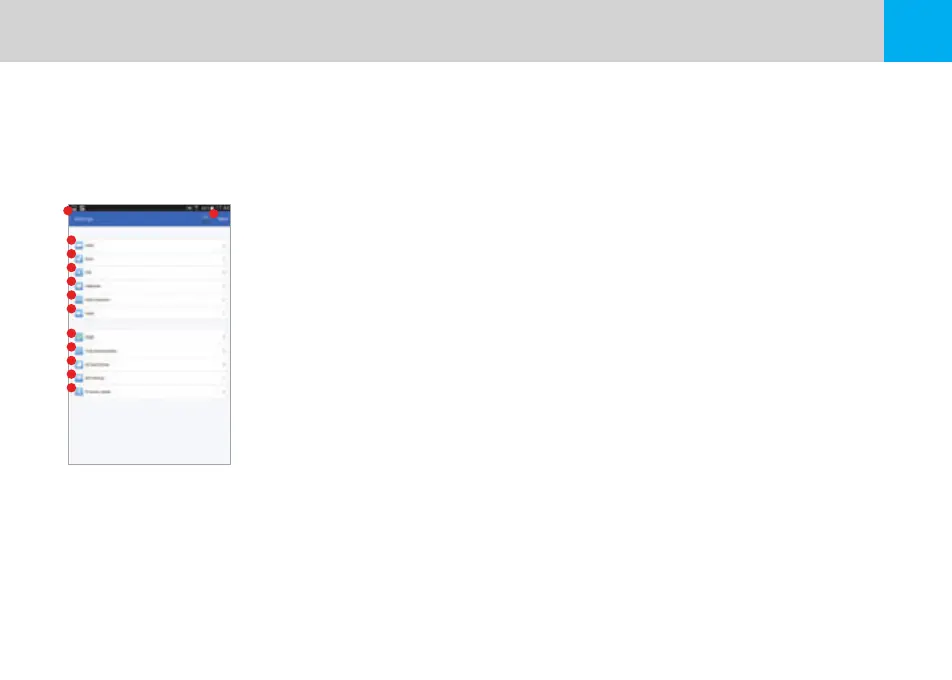
1. Navigation : Navigate to the Main Screen
2. Save Changes : Changes will be saved and applied
3. Video : Configure video settings
4. Basic : Configure basic settings & functions
5. GPS : Configure GPS settings
6. Additional : Additional settings and functions
7. Motion Detection : Configure setting for Motion Detection
8. Audio : Configure audio quality and settings
9. Reset : Reset all settings applied to product to default factory settings
10. Time Synchronization : Synchronize product time with Smartphone
11. SD Card Format : Format SD card
12. Wi-Fi Settings : Verify changes to the Wi-Fi network of the product
3
4
5
6
7
8
9
10
11
1
2
12
13


 To Next Page