34
CAMMSYS BLACKBOX
3. PC Viewer Instructions
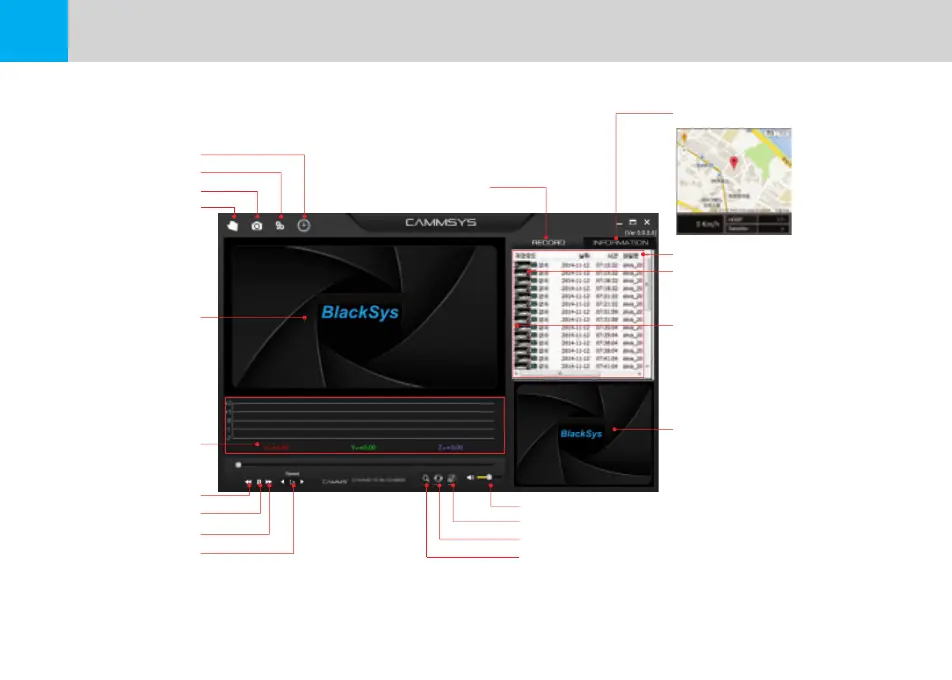
Time configuration
Configuration
Save recorded video
Folder open
Mian Viewer screen
G-Sensor Data Review
Move to 10sec. before
Pause
Move to 10sec. after
Video play speed control
Volume control
Full screen
Switch between Main/Sub videos
Enlarge / ShrinK
※ In case of receiving poor GPS signal or disconnecting internet, map information
of GPS may not be displayed.
※ It is only interlocked automatically with upper version than explorer 7.
※ Use “Full screen” to watch the video in Full HD.
Play List
Map View
Play list and event information
Front view indicator icon
File name of front view video :
alwa_20171112_071532_F.mp4
Rear view indicator icon
Sub Viewer screen :
alwa_20171112_071532_R.mp4
Rear view video


 To Next Page