938375V2APK1/1-0321
3
Package Contents:
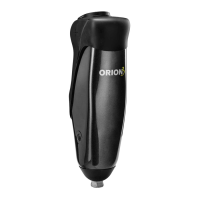
This document describes the V2 version of the Orion3 knee.
These instructions are for the user. Please keep these instructions.
The term device is used throughout this manual to refer to Orion3.
Please read all these instructions for use, paying particular attention to the sections regarding
safety and maintenance.
Application
The device is to be used exclusively as part of a lower limb prosthesis.
Intended for single user.
The device is a microprocessor-controlled knee prosthesis that provides swing and stance control
and adapts to variable cadence. It has a programmable stance yield setting for secure stance
control on stairs, ramps and during active gait with a cadence range from slow walking to fast
walking.
The knee also provides an additional standing support mode for enhanced stability. The set-up
procedure is through an easy to use App interface via a Bluetooth® connection to the on-board
module.
Features
• Microprocessor-controlled stance and swing
• Standing support mode that controls knee exion for standing
• App based set-up via a built-in Bluetooth® link
• Up to 3 days of normal use from the internal rechargeable Li-ion battery pack
• 3 User modes
• Activity monitoring of dierent activities
In addition the device oers enhanced stability:
• Active control of heel rise during walking
• Dynamic stair descent with easy initiation of knee exion with customizable yield rate
(resistance level increases with knee exion angle)
• Supportive resistance to exion as soon as the knee stops exing
• Increased supportive resistance to exion to prevent ‘stumbles’ associated with instability at
heel strike
• Supportive yield for sitting down
1. Knee prosthesis
2. Detachable Cosmetic Cover
3. User Guide
4. Cable Bag and accessories
i) Battery Charger
ii) Battery Charger AC power socket outlet adapter(s)
1 Description and Intended Purpose


 To Next Page
 Loading...