938375V2APK1/1-0321
8
6 Battery Charging
Please familiarize yourself with the charging information in this section.
The batteries are not eld replaceable and will be replaced as necessary when
serviced.
If the device is subjected to temperatures lower than -10 °C (14 °F) it must be returned
to be inspected for possible damage to the battery pack.
1. The battery should only be charged in temperatures between 10˚C to 40˚C (50˚F to
104˚F).
2. Only charge the batteries in the device using the charger supplied with the product.
Do not use this charger for charging any other device.
3. The battery charger can be used with an electrical outlet that is rated
between 100 V and 240 V AC, 50/60 Hz.
4. Never connect the charger while still wearing the limb.
5. During charging no power is delivered to the device control system.
6. The knee module may become warm during charging but should never be too hot
to touch. There should be no unusual smell, if there is immediately switch OFF[O]
the battery, unplug the charger from the electrical supply and contact your service
provider.
7. Do not ret the knee until the charger has been disconnected.
8. Always recharge the device before use if it has not been used for an extended period
of time.
The device contains Li-ion type rechargeable batteries. Please read and comply with the
safety information. Failure to do so may cause the battery to become hot, explode, or
ignite and cause serious injury.
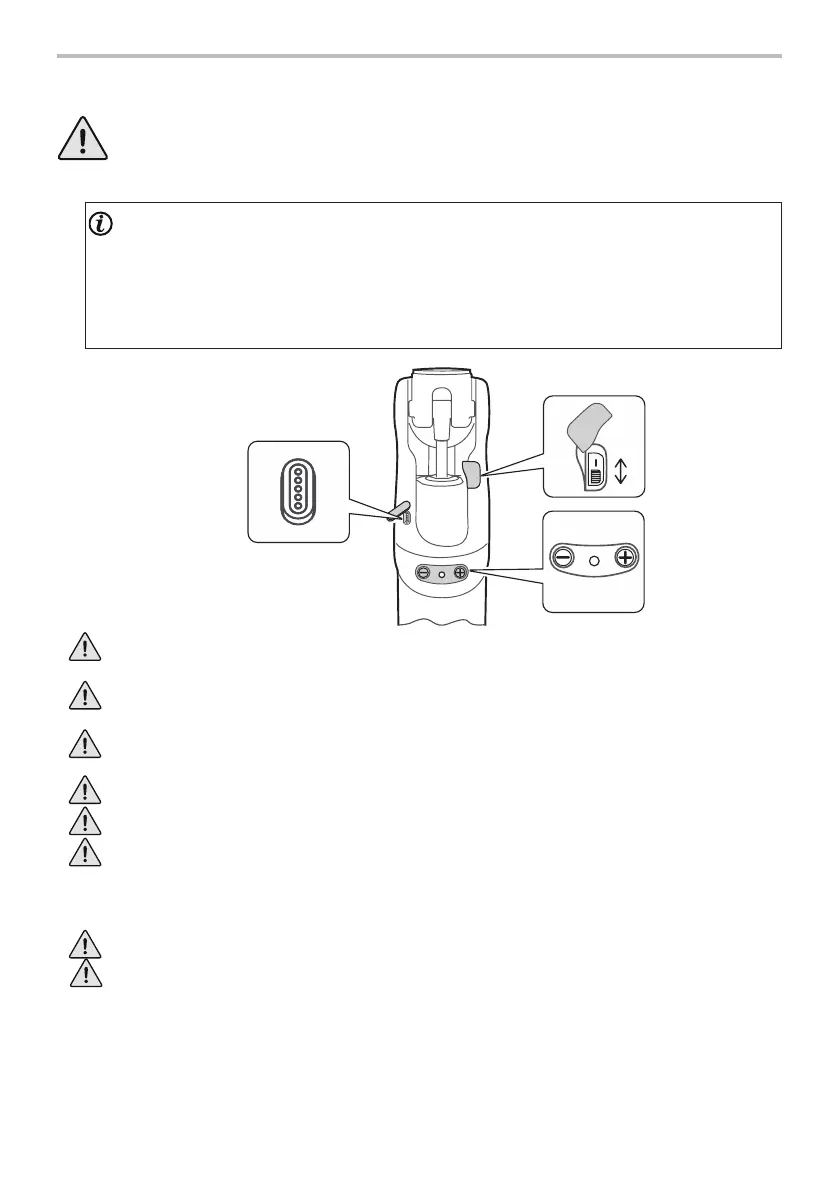
Battery
On/O
Switch
[+], [-]
Buttons
and LED
Magnetic
Charging
Terminal


 To Next Page