EasyManua.ls Logo

Blink IQ 200 Series - User Manual

Blink IQ 200 Series
37 pages
Print Icon
To Next Page IconTo Next Page
Loading...
Charge on.

Questions and Answers

  • E
    Elizabeth Mclaughlin DDSAug 16, 2025
    What does 'Out of Service: Internal Maintenance' mean on a Blink IQ 200?
    • F
      fwashingtonAug 16, 2025
      If the Blink Battery Charger is 'Out of Service' due to 'Internal Maintenance', wait until the unit has completed its internal maintenance and becomes available.
  • H
    hernandezalbertAug 19, 2025
    What does 'Out of Service: Station Disabled' mean on a Blink IQ 200?
    • M
      Ms. Christina Ruiz DVMSep 12, 2025
      If the Blink Battery Charger displays 'Out of Service: Station Disabled', call 1-888-998-BLINK (2546) for assistance.
  • M
    Misty WadeAug 22, 2025
    What to do if my payment card is declined at a Blink IQ 200?
    • E
      elizabethmclaughlinAug 22, 2025
      If your payment card is declined when using the Blink Battery Charger, it indicates an issue with your card or account. Please call 1-888-998-BLINK (2546) for assistance.
  • J
    Joseph LeeAug 25, 2025
    Why does my Blink Battery Charger show a 'Station Unavailable' screen?
    • T
      Thomas SimonAug 26, 2025
      If you see a 'Station Unavailable' screen on the Blink Battery Charger, you can touch the 'Hours of Operation' link on the screen to check the configured hours. Alternatively, you can re-configure the default hours of operation using the web portal. If the problem persists, call 1-888-998-BLINK (2546) for assistance.
  • J
    jennifer07Aug 28, 2025
    What to do if there is a fault with no reset on Blink IQ 200?
    • C
      colin68Aug 28, 2025
      If there is a fault with no reset on the Blink Battery Charger: - Record the Error Code. - Wait for the system to recover from the fault. - If the issue persists, call 1-888-998-BLINK (2546) for assistance.
  • M
    Michael LozanoAug 30, 2025
    How to fix a fault with automatic reset on a Blink Battery Charger?
    • M
      Maria TorresAug 30, 2025
      If there is a fault during the automatic reset of the Blink Battery Charger: 1. Record the Error Code. This will help in identifying the issue. 2. Wait 15 minutes to allow the system to automatically recover, or you can manually reset it by touching the RESET button. 3. If the problem persists, call 1-888-998-BLINK (2546) for assistance.
  • T
    tamara10Sep 3, 2025
    What to do for a fault with manual reset on Blink IQ 200 Battery Charger?
    • D
      Diane GutierrezSep 3, 2025
      If there is a fault during the manual reset of the Blink Battery Charger: 1. Record the Error Code. 2. Touch the RESET button to manually reset the system. 3. If the problem continues, call 1-888-998-BLINK (2546) for assistance.
  • J
    Jeffrey BarnettSep 6, 2025
    What to do if the selected Blink unit is invalid?
    • L
      Lori BentonSep 6, 2025
      If the selected Blink unit is invalid (Kiosk Only), re-confirm the Unit # and try again. If the issue persists, call 1-888-998-BLINK (2546) for assistance.
  • M
    Michael KellerSep 9, 2025
    Why is my Blink Code not valid?
    • J
      Jesus YatesSep 9, 2025
      If the Blink Code is not valid, it indicates an issue with the card or account. Please call 1-888-998-BLINK (2546) for assistance.
  • B
    Brian NguyenSep 12, 2025
    Why is Blink Code access unavailable on the Blink IQ 200?
    • M
      Mark HartSep 12, 2025
      If Blink Code access is unavailable, it means the unit is offline and cannot authorize Blink Codes using a Central System. Call 1-888-998-BLINK (2546) for assistance.

Summary

Important Safety Instructions

Safety and Grounding

Essential safety and grounding procedures prior to device installation.

Conduit & Breaker Size Guide

Guide for selecting appropriate conduit and circuit breaker sizes for installation.

Mounting Options

Details various methods for mounting the Blink EV charging station.

Product Specifications

Installation Instructions

Tools Required for Installation

Lists all necessary tools for the installation process.

Installation Procedure

Step-by-step guide for physically installing the Blink charging station.

Setup Instructions

Operating Instructions

Starting a Charge Session

Detailed steps to initiate and begin an electric vehicle charging session.

Configuration

Troubleshooting

Troubleshooting Table

A table listing common issues, their screen displays, and recommended actions.

Customer Support

Blink IQ 200 Series Specifications

General IconGeneral
Connector TypeSAE J1772
Voltage208-240 VAC
ConnectivityWi-Fi, Cellular (optional)
EnclosureNEMA 3R rated enclosure
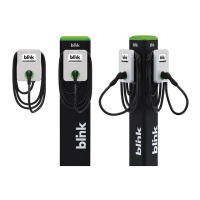
MountingWall or Pedestal Mount
Input Voltage208-240 VAC
Output Voltage208-240 VAC
Charging Ports1
CompatibilityAll SAE J1772 compliant vehicles
Protection FeaturesOvercurrent, overvoltage, undervoltage, ground fault protection

Related product manuals