11
EN
INSTAllATIoN blUeboT App
7
10
8
11
9
12
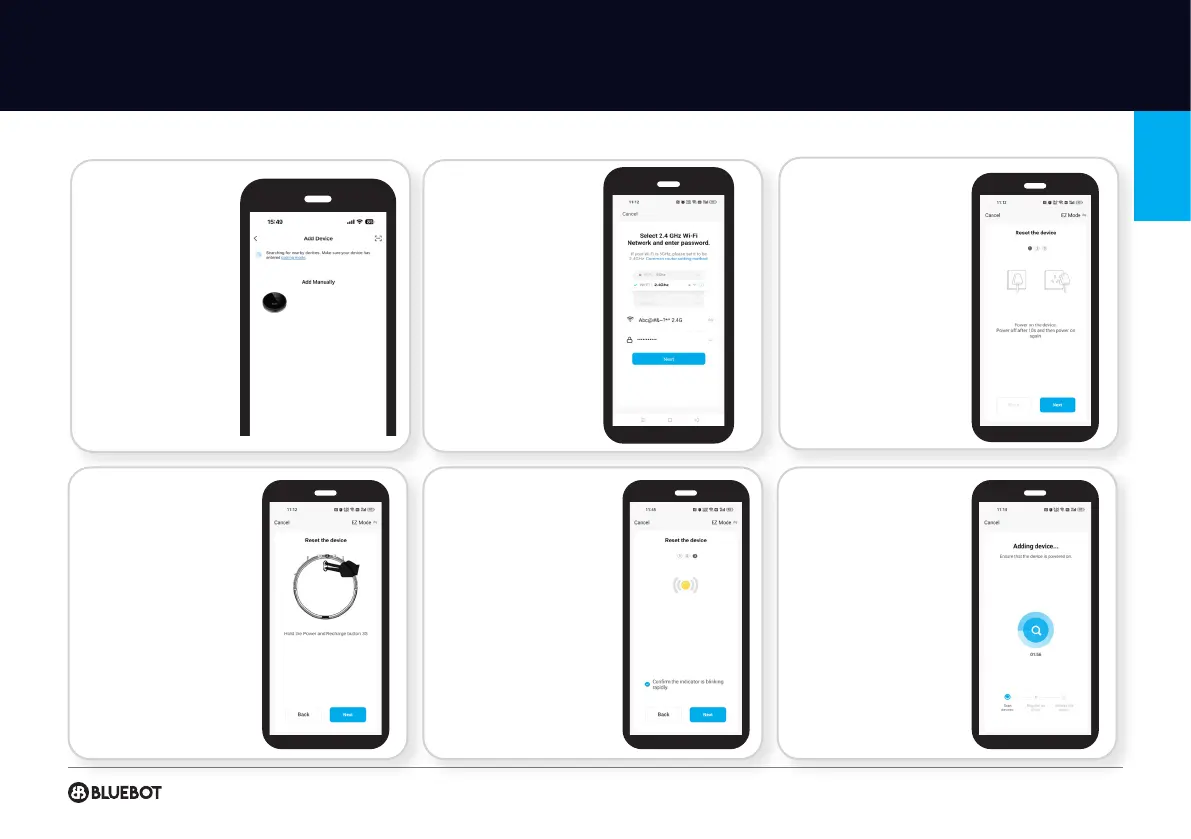
Select the
Bluebot EZ1
Reset the device:
Power on the device.
Power off after 10s and
then power on again.
After done, press “Next“ to
continue.
Reset the device:
Hold the Power and
Recharge button for 3s.
After done, press “Next“ to
continue.
Reset the device:
Click: “Confirm the
indicator is blinking
rapidly.”, then press “Next“
to continue.
Your robot is connecting
to the Bluebot app, please
wait till connection is
complete.
Select your 2.4Ghz
wifi network, enter the
password and press
confirm.
Note: a 2.4 Ghz
connection only will work.
BLUEBOT EZ1


 To Next Page