7
EN
3. INSTAllATIoN INSTrUcTIoN | roboT & cHArGING STATIoN
PRODUCT ASSEMBLY
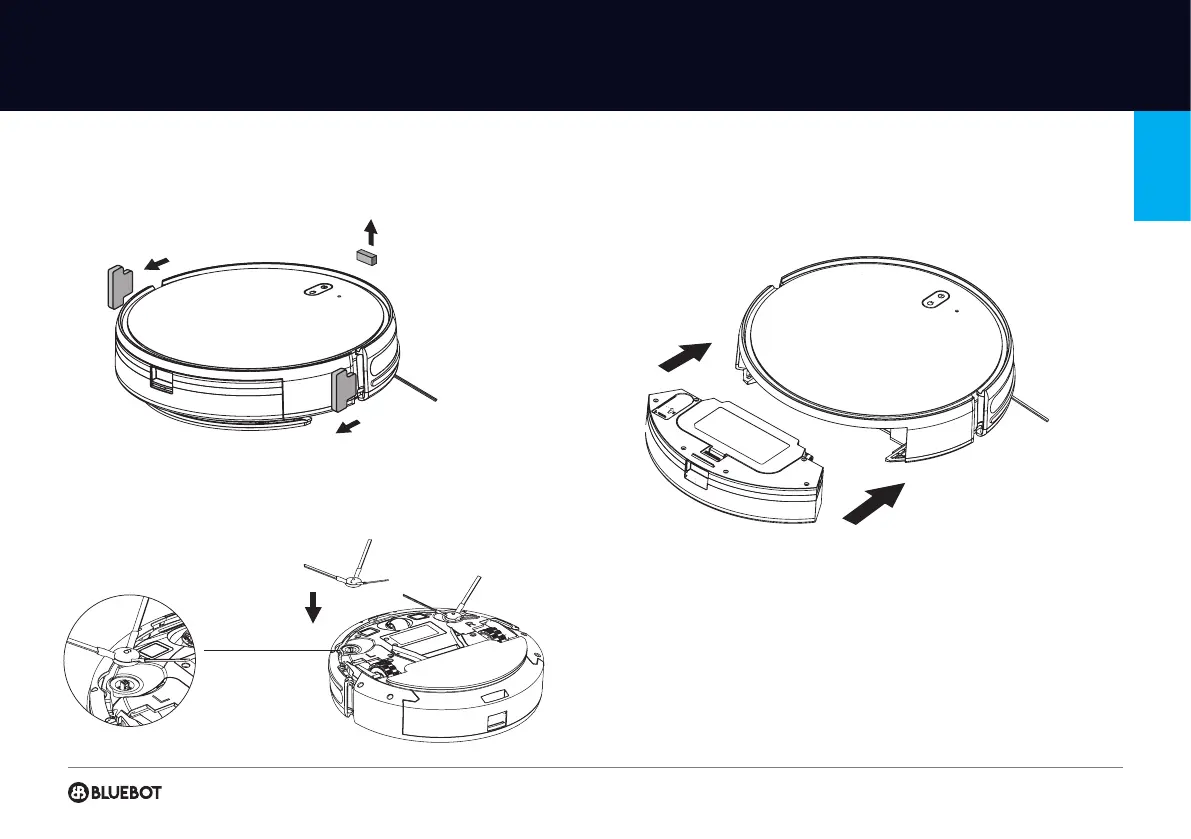
1 Please remove the protective foams from the robot.
2 Install the brushes. Make the left side-brush (L) and the right-side brush (R)
correspond to L and R on the bottom casing, keep pressing L and R and the side
brushes. They are installed when you hear a “click” sound.
3 Place the 2-in-1 combi watertank in the robot.
4 Install the charging station. The recharging indicator light ashes during charging
and it’s steady on when charging is nished. The charging time is about 3 hours.
5 Fully charge the robot (before 1st time use)
6 Connect with Bluebot app (optional)
7 Start cleaning


 To Next Page