18
mAiNTeNANce
COMPONENT MAINTENANCE
Regular maintenance
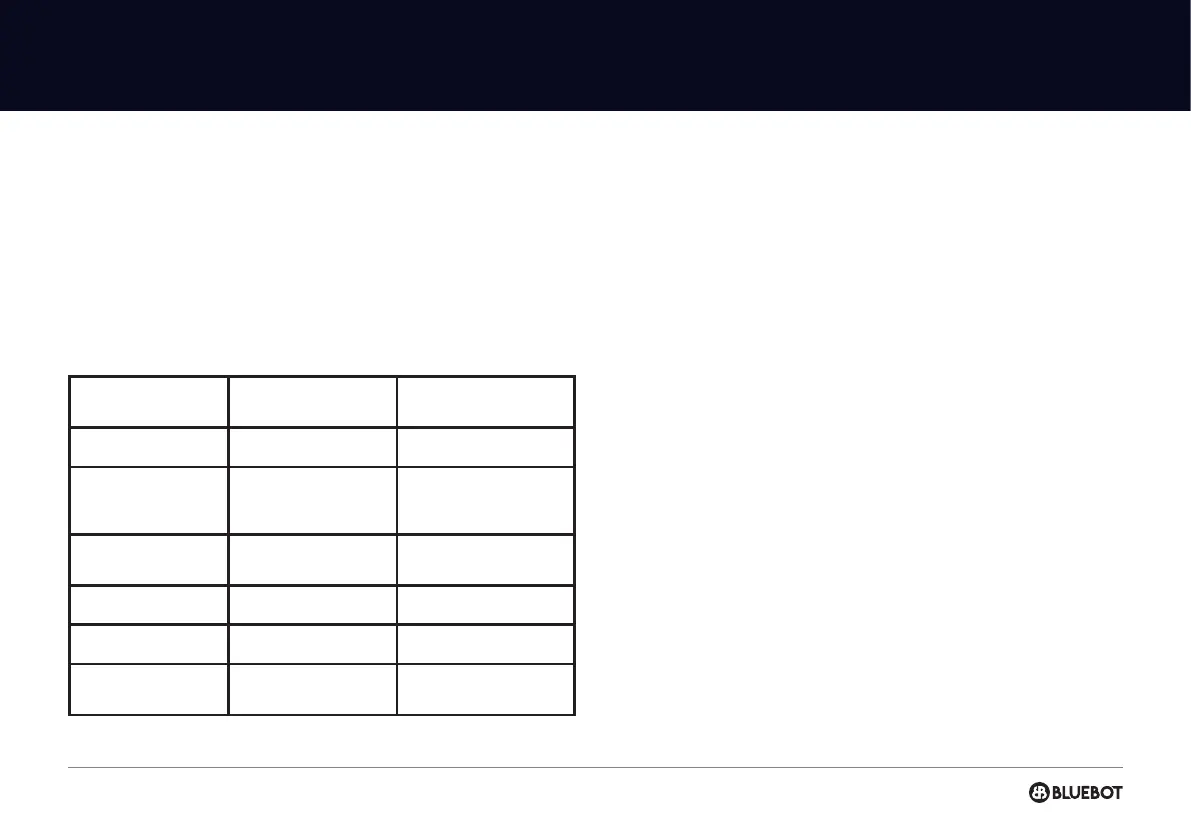
To achieve the best cleaning eect, clean and maintain the robot regulary
according to below table. Determine the frequency of cleaning and
maintenance according to your use habits.
BATTERY
· The robot is furnished with high-performance lithium-ion batteries.
· To maintain battery performance, please keep the robot charged in daily use.
· If the machine is left unused for any length of time, please shut down and
keep it properly.
· Charge it at least every three months to avoid damaging batteries due to
excessive discharge.
FIRMWARE UPGRADE
· Upgrade rmware using the Bluebot app. If new rmware is detected,
upgrade it according to the report.
· The battery level should be ≥ 50% during rmware upgrade, so if needed the
machine should be placed on the charging station to charge before the rmware
upgrade takes place.
SYSTEM RESET
· If you need to reset the robot, please switch it o and on again.
PARTS
CLEANING
FREQUENCY
REPLACEMENT
FREQUENCY
Filter
Weekly Every 2 months
Side brush
Weekly
Every 3 to 6 months
or when it is obviously
damaged
Sensor
Monthly
When it is obviously
damaged
Charging pins
Monthly -
Universal wheel
Monthly -
2-in-1 combi tank
Weekly | After each use
When it is obviously
damaged


 To Next Page