EasyManua.ls Logo

Bluetti AC180 - Understanding the LCD Screen

Bluetti AC180
21 pages
Print Icon
To Next Page IconTo Next Page
To Previous Page IconTo Previous Page
Loading...
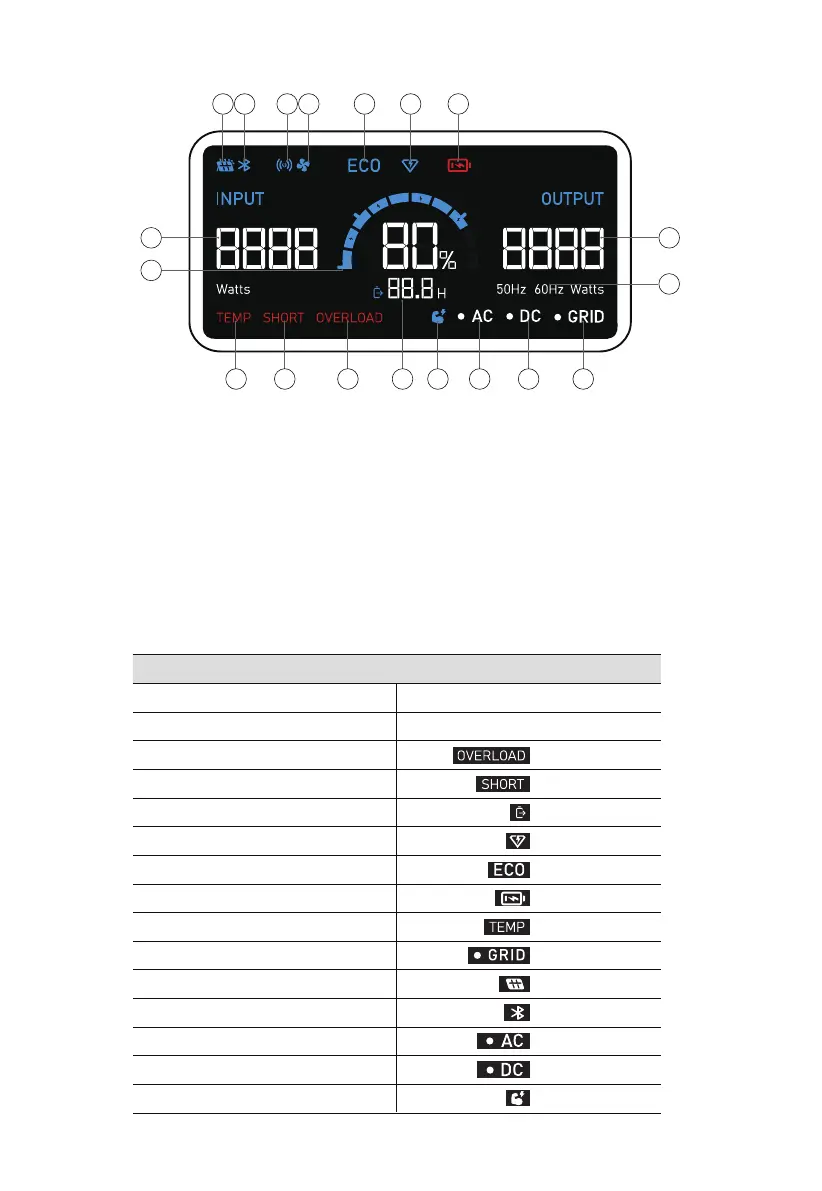
4.2. LCD Screen
Startup
Shutdown
Overload
Short circuit
Charging
Turbo Charging
ECO mode enabled
Battery low
Abnormal temperature
AC Input
DC Input
Bluetooth connected
AC output enabled
DC output enabled
Power Lifting mode enabled
flashes
flashes
displays
displays
displays
displays
flashes
displays
displays
displays
displays
displays
displays
LCD Instructions
1 2 3 4 5 6 7
8
9
12 13 14 15 16 17 18 19
10
11
DC Input
Bluetooth
Wireless charging
Fan
ECO Mode
Turbo charging
Low voltage alert
Input power
Battery capacity
Output power
AC frequency
Temperature anomaly alert
Short circuit alert
Overload alert
Remaining time indicator
Power Lifting mode
AC indicator
DC indicator
AC input connected
LCD lights up
LCD lights off
JUST POWER ON14

Related product manuals