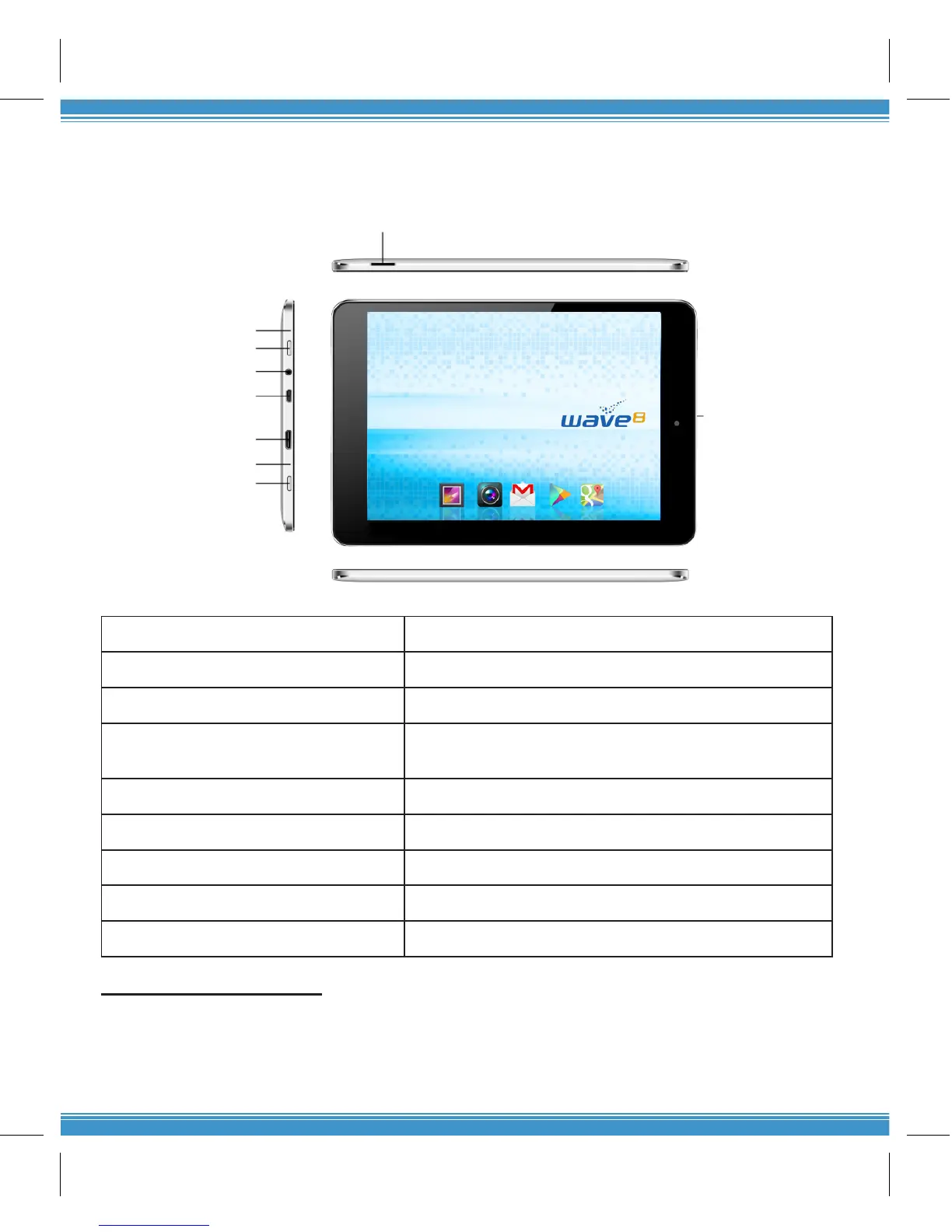
SECTION 2: HARDWARE BUTTONS AND PORTS
Hardware Buttons and Ports
1
2
3
4
5
6
7
8
9
1. Microphone Built-in microphone
2. Power Button Turn the Tablet On or Off
3. Earphone Port Connect 3.5mm earphone for audio
4. USB Interface/ Charging port Connect to PC to transfer les or charge the battery
with power adapter
5. Mini HDMI Port Connect HDMI cable to high resolution screen
6. Reset Reboots the system
7. Back Hard button for Back
8. TF Card slot Increase memory with Micro SD card
9. Camera Lens for photos
Switch the Tablet On or Off
To turn on the Tablet, press the power button for three (3) seconds
To turn off the Tablet, press the power button for three (3) seconds. Click Power Off > Click OK.
To go to standby mode or screen saver, press the power button briey
To force shutdown, press the power button for twelve (12) seconds


 To Next Page