12EN
I. Mode selection ( / button)
HOW TO USE
Quick start
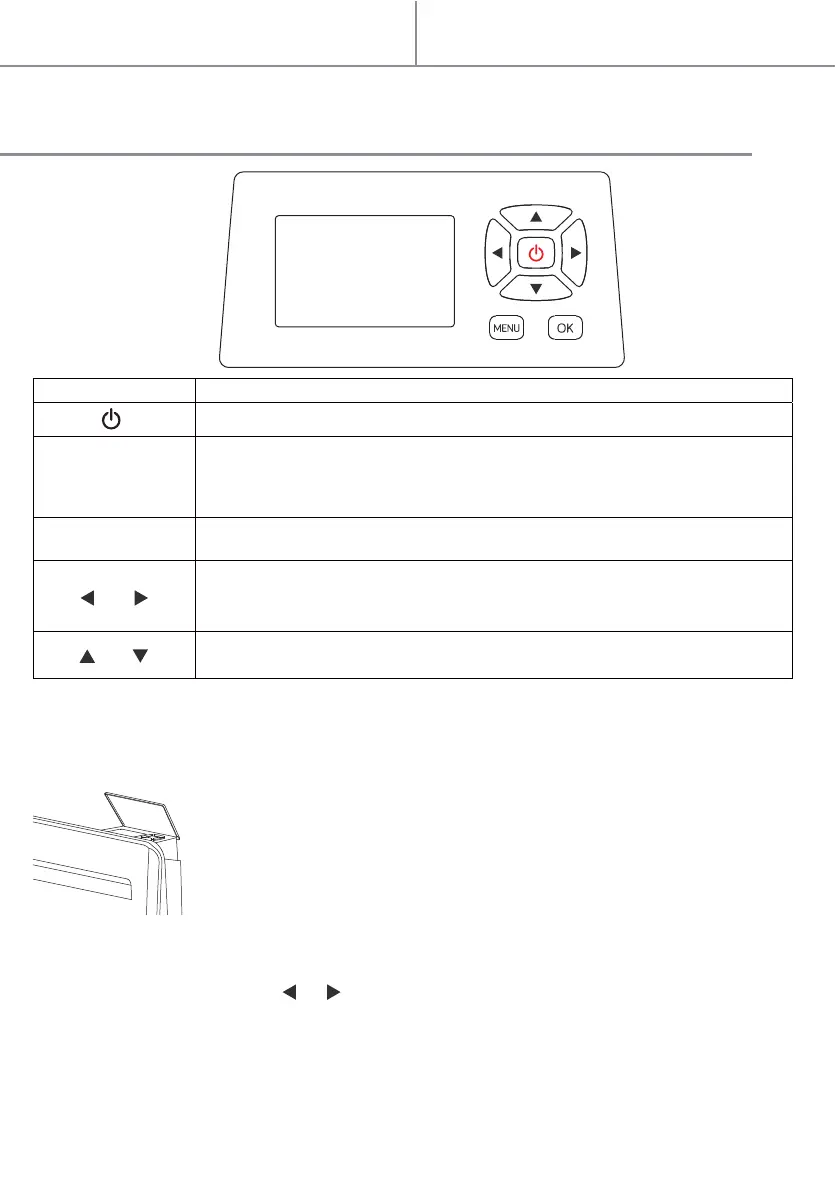
CONTROL PANEL
When first use the machine, there will be some slight smell. It is normal. The smell will
disappear after heater working for an hour.
Button
MENU
OK
/
Function
Standby
Short press to enter setting menu: 1. Time setting; 2. program modes
setting; 3. presence detection mode.
Press for 3 seconds, activate/ inactivate keyboard lock.
Confirm button
Under working status: shift working mode (Comfort/Eco / Program modes
or Fil Pilote/ Window detection mode/ Anti-freeze)
Under setting status: shift options by left and right
Under working status: adjust temperature
Under setting status: shift options by up and down
BEFORE USING THE APPLIANCE, PLEASE OPEN THE LID OF THE CONTROL
PANEL.
/
1. For the first time you use the device, after you connect to the power supply and
after that the clock is set, the device will be in standby mode, and you can press the
standby button to enter comfort mode.



 To Next Page