OZONE MONITOR BMT 932 Manual, Rev. 02/2021
20
Auto Concen-
tration
View
Parameters
Set
Parameters
Main Menu
ENTER
SCROLL
BACK
Press Scroll for
at least 2 s
PIN-Protection
Ch1 Concen-
tration
Ch2 Concen-
tration
Ch3 Concen-
tration
Ch4 Concen-
tration
Ch5 Concen-
tration
Ch6 Concen-
tration
Deactivated channels are skipped
Expressions printed bold in the following sections of text always relate to the contents of the
instrument menus.
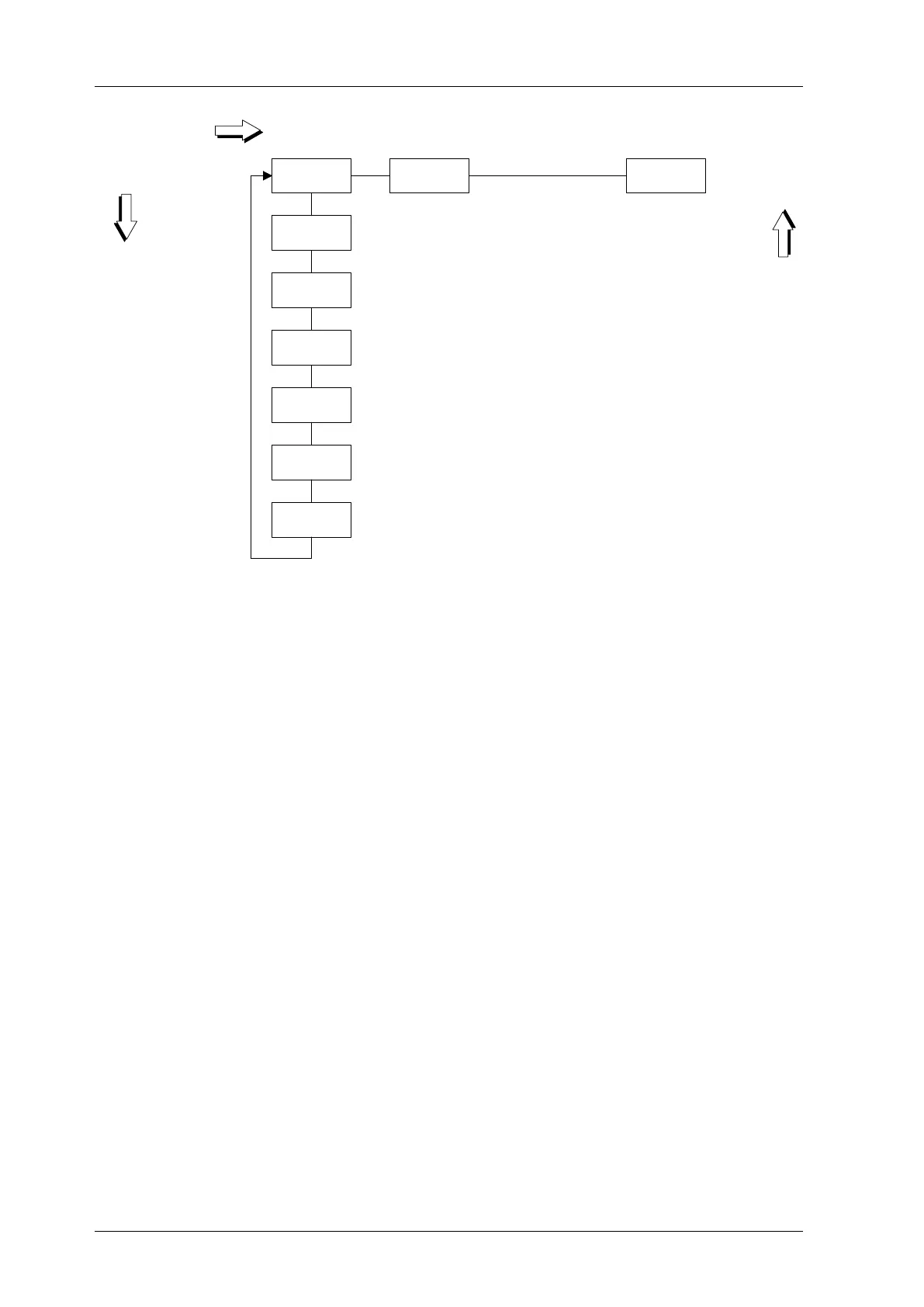
The button SCROLL / SET moves to the right within the menu, the key ENTER downwards
and the button BACK moves upwards. The SCROLL action will continue on the left side, once
it has reached the right side of the diagram. This is also valid for the later explained menus View
Parameters and Set Parameters.
From now on, when relating to the multi-functional key SCROLL / SET only the function
meant in the context will be mentioned.
In multi-channel instruments, the two measurement modes available are Auto and Manual. In
Auto mode the monitor will sequently measure concentrations on all active channels (see p. 28)
in 20 s intervals. If in Auto mode the ENTER button is pressed the instrument will change to
Manual mode, meaning that only one channel will be sampled continuously. Each time ENTER
is pressed in Manual mode, the monitor will select the next active channel. If ENTER is pressed
while the highest active channel is selected, the instrument will return to Auto mode.
Coming from Auto mode, the display will show concentrations on the different channels, when
pressing the ENTER key. This is a convenient way to do a fast check on concentrations on sam-
ple channels, without having to wait for measurement cycles to complete.
In single-channel instruments, the ENTER key does not provide the functions described above.
Starting with Concentration pressing the button SCROLL will lead to View Parameters. After
pressing ENTER the parameters can be viewed, but they cannot be changed. The BMT 932 will
go on measuring concentrations in all position of the menu system.


 To Next Page