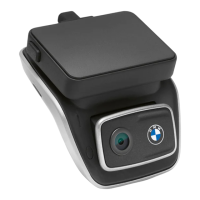
The BMW Advanced Car Eye 3.0 Pro is an original BMW accessory designed to monitor your vehicle both while driving and when parked. It utilizes intelligent sensors to record risky traffic situations, attempted break-ins, and accidents. The product is intended for installation by a BMW dealership.
Function Description
The Advanced Car Eye 3.0 Pro (ACE 3.0 Pro) acts as a dashcam system, recording videos and taking pictures. It consists of a front camera and an optional rear camera. The recorded media is saved on a microSD™ card, which is included with the product (64 GB). The system automatically switches on and off with the vehicle's ignition, but can also be manually controlled.
The device operates in two primary modes: Driving mode and Parking mode.
In Driving mode, when the vehicle is started, the status LED illuminates, accompanied by a voice announcement.
- Continuous recording: While driving, videos are recorded in 1-minute segments and stored in the "DRIVING" folder. These can be viewed on the LCD touchscreen under "Recordings > Driving."
- Incident recording: If an impact is detected, the system records video from 10 seconds before to 50 seconds after the incident. These recordings are stored in the "INCIDENT" folder and can be accessed via "Recordings > Driving Events" on the touchscreen. Users can choose between continuous and incident recording.
In Parking mode, the product automatically activates after the engine is turned off and a defined "Exit phase" time has elapsed.
- When motion or an impact is detected in Parking mode, a video is recorded for 10 seconds before and after the event. These are saved in the "PARKING" folder and can be viewed via "Recordings > Parking Events."
- The "Exit phase" is an adjustable period allowing the driver to leave the vehicle after the engine is off. The "Entry phase" is a similar adjustable period for the driver to enter before the engine is turned on. Videos recorded during these phases are stored in the "Driving" folder and do not count as parking incidents.
The device also supports Manual recording (REC), allowing users to take pictures or start manual video recordings by pressing the REC button on the front camera. These recordings are saved in the "SNAPSHOT" folder and can be viewed under "Recordings > Manual." Manual video recordings capture 10 seconds before and 50 seconds after the button press.
HDR (High Dynamic Range) can be activated for the front camera to enhance video luminance and colors, providing brighter highlights, darker shadows, and a wider range of intense colors.
Night Vision is a feature that improves video recording in low-light conditions, making recordings brighter than those without Night Vision. This is achieved through real-time image signal processing (ISP) and is particularly useful for parked vehicle recordings at night.
GPS functionality adds speed information and current location to recordings and enables a vehicle location function. This feature allows users to find their parked vehicle easily using the ACE 3.0 app. Pictures and videos taken by the front and rear cameras in Parking mode, along with the vehicle's location on a digital map, are saved in the app (if GPS is enabled).
Voice recognition offers a hands-free solution to control the camera. It is available in English, German, Korean, Chinese, and Japanese. Commands can be activated by saying "Hi Camera" followed by the desired command. Voice recognition can be toggled on/off via the ACE 3.0 Pro display (Settings > System Settings > Voice recognition) or by holding the microphone button for at least 3 seconds.
Usage Features
The ACE 3.0 Pro can be operated via its LCD touchscreen or the BMW Advanced Car Eye 3.0 app.
Touchscreen operation:
- The Live view screen displays the current driving speed, GPS connection status, date and time, and recordings from both front and rear cameras.
- The "Recording List" allows users to play and watch recorded videos, categorized into Driving, Driving Events, Parking Events, Manual, and Favorites.
- Recordings can be added to "Favorites" to prevent automatic deletion.
- The touchscreen also provides access to various settings.
ACE 3.0 app operation:
- The app allows for direct control of the ACE 3.0 Pro, viewing, and archiving recorded events on a smartphone.
- Connection to the smartphone is established via Bluetooth. Only one smartphone can be connected at a time.
- The app facilitates firmware updates, which are automatically transmitted and installed when the camera is connected to the smartphone. Custom settings are retained after updates.
- The app's main bar and the ACE 3.0 Pro display offer access to Settings, allowing users to customize features.
Camera settings accessible via the app or touchscreen include:
- Audio Recording: Toggle sound recording on or off.
- REC Button Action: Choose whether the recording button takes a video or a picture.
- HDR: Turn HDR on or off.
- Night Vision: Turn Night Vision on or off.
- Channel setting: Select "Only Front camera" or "Front and Rear camera" (if installed). Changing this setting formats the camera, requiring prior backup of recordings.
- Brightness-front/rear: Adjust the brightness for each camera.
Recording settings include:
- Driving mode: Select Continuous recording or G-Sensor mode. Changing this formats the camera, requiring prior backup.
- G-Sensor sensitivity (Driving mode): Adjust sensitivity for driving incidents.
- Entry phase/Exit phase: Set the duration (one to five minutes) for these phases.
- Parking mode: Select Radar + G-Sensor, G-Sensor only, or OFF.
- G-Sensor sensitivity (Parking mode): Adjust sensitivity for G-Sensor events in Parking mode.
- Radar Sensitivity: Adjust sensitivity for motion detection in Parking mode.
Volume settings allow adjustment of beep sounds and voice guidance volume.
System settings include:
- Language: Select the language for voice announcements.
- Country/Region: Select the country/region where the camera is used.
- Date and time: Set automatically or manually.
- Voice gender: Select gender for voice announcements.
- Voice recognition: Turn on/off and select language.
- Security LED: Turn on/off (may be mandatory in some countries).
- Overlays: Turn on/off display of date, time, speed, and GPS in recordings.
- Speed unit: Select desired unit for speed.
- GPS: Turn GPS on or off. Note that GPS may be restricted or unavailable in some countries due to legal reasons.
- Reset ACE: Options to reset the device, erase all recordings, or erase all recordings and settings.
- Wi-Fi frequency: The device uses a 5 GHz band for faster transmission, but can switch to 2.4 GHz if the smartphone does not support 5 GHz.
Maintenance Features
- microSD™ Card Management: The product comes with a microSD™ card. To prevent data loss or corruption, the memory card should only be inserted or removed when the product is turned off.
- Protective Film Removal: Before initial use, the protective film must be removed from the front and rear camera lenses.
- Mounting and Removal: The front camera can be mounted or removed by simultaneously pressing buttons on both sides of the camera mount. Proper alignment of the groove at the bottom of the camera mount with the product is necessary for secure attachment. Removing the front camera also disables the rear camera.
- Resetting the product: A factory reset (deleting all recordings and settings) can be performed by pressing and holding both the power button and the record button (REC) simultaneously for several seconds. Alternatively, it can be done via the ACE 3.0 PRO display: System Settings > Reset Settings.
- Data Backup: When important events (incident recordings) occur, it is recommended to back up the video or picture data to the ACE 3.0 app or an external memory to prevent automatic removal.
- Firmware Updates: The ACE 3.0 app facilitates firmware updates, ensuring the device runs with the latest software and features. BMW recommends enabling automatic updates.
- Disposal of Electrical Devices: The product must be collected separately and recycled in an environmentally friendly manner at the end of its lifespan, in accordance with European Directive 2012/19/EC and national laws.
- Legal Compliance: Users are responsible for checking local legal requirements regarding the use of the ACE 3.0 and its app. If use is prohibited, the front camera must be removed, which disables the rear camera. Videos of public places recorded with the ACE 3.0 must not be published online.

 Need help?
 General

 To Next Page