F48�Information�and�Communication
6.�Android�Devices
30
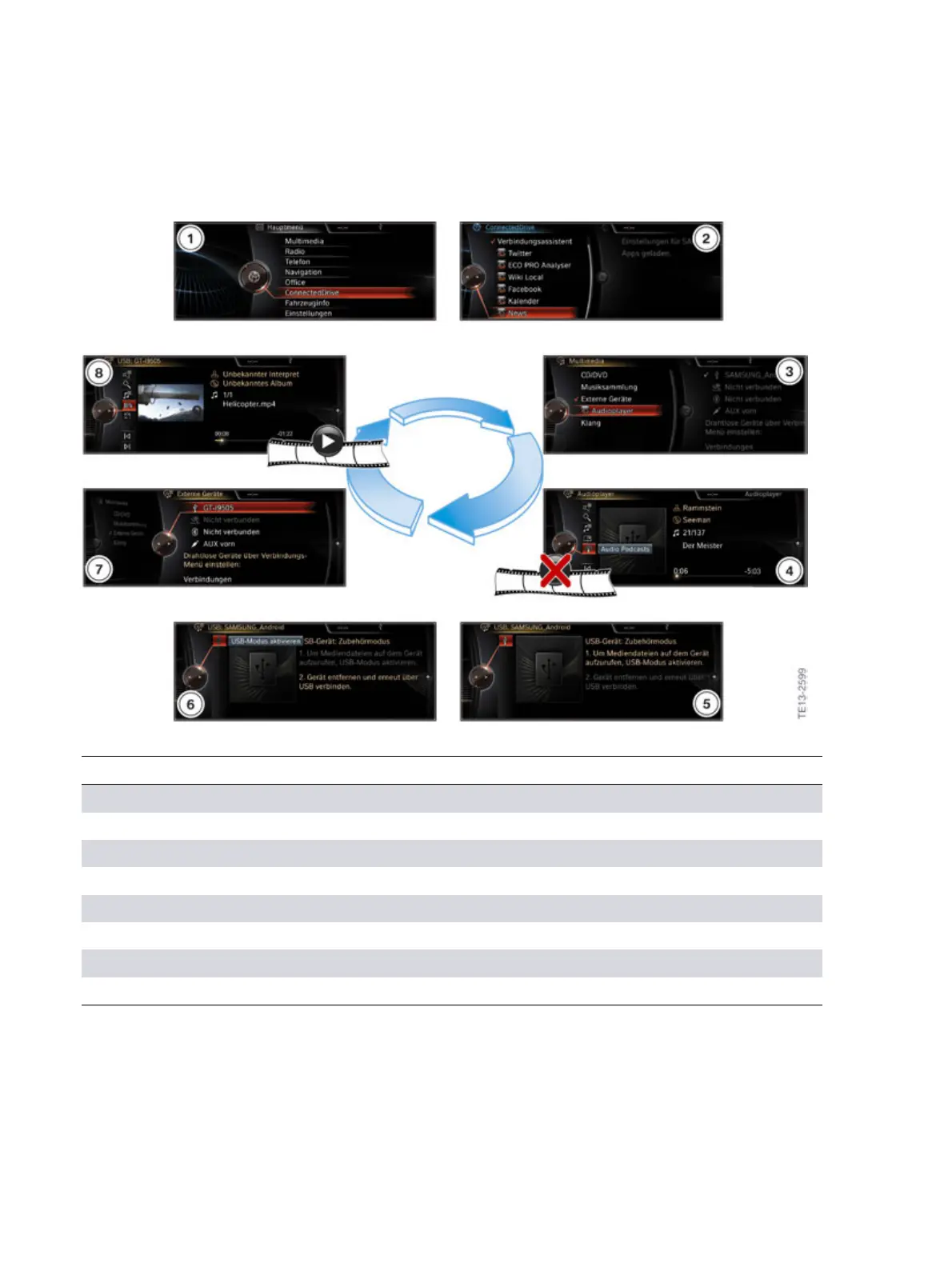
6.3.3.�Accessory�mode�activation
Accessory�mode
Index Explanation
1 "Start"�main�menu�(USB�mode)
2 Connection�assistant�in�the�ConnectedDrive�menu�after�connection
3 "Audio�player"�Accessory�mode
4 Accessory�mode�(not�possible�to�play�videos)
5 Change�from�Accessory�mode�to�USB�mode
6 Activate�USB�mode
7 USB�mode
8 Not�for�US
Android�smartphones�are�either�connected�to�the�vehicle�via�the�snap-in�adapter�or�a�USB�cable.
A�new�snap-in�adapter�is�available�for�many�Android�smartphones.�The�"Snap-in�Adapter�Connected
Universal"�is�suitable�for�different�mobile�phones.�The�antenna�is�connected�inductively�via�a�coupling
antenna�without�any�contact.�Further�information�on�the�snap-in�adapter�can�be�found�in�the�product
information�bulletin�"Information�and�Communication�System�News�I/2014".



 To Next Page