Settings
Pull on the bottom edge or press the lower edge
in order to adjust the tilt.
Switching the screen in the rear
on/off
Press button on the bottom edge of the
screen.
The respective screen is switched on/off.
If rear entertainment was switched off when ena‐
bling the rear seat, refer to page 68, the sys‐
tem cannot be switched on from the rear.
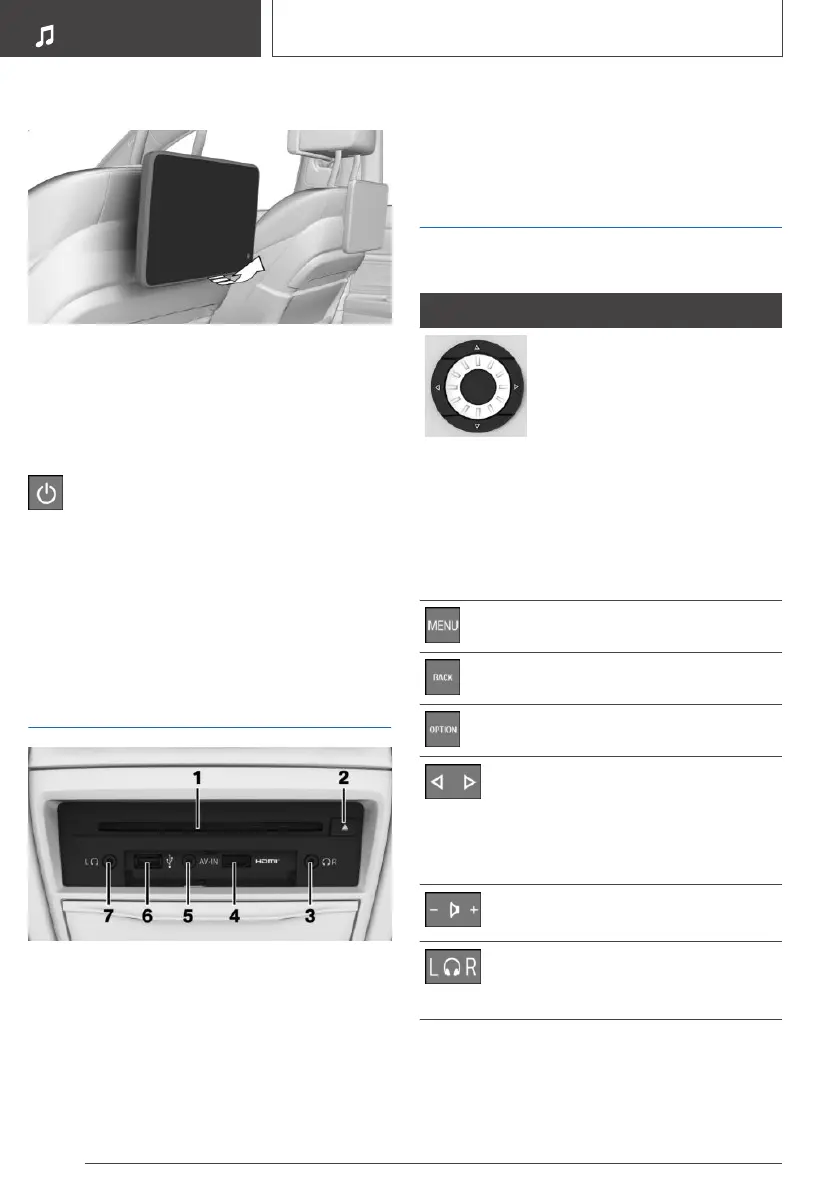
Rear CD/DVD/Blu-ray
player
1 CD/DVD/Blu-ray slot
2 CD/DVD/Blu-ray ejection
3 Headphone connection, right
4 HDMI/MHL connection
5 AUX-IN port
6 USB port
7 Headphone connection, left
Remote control
Control elements
Button Function
Operating concept is the same
as for the front Controller.
Turn the wheel: highlight a
menu item.
Press the middle button: con‐
firm selection.
Pressing arrow keys corre‐
sponds to moving the Control‐
ler: switching between displays,
operating the DVD/Blu-ray
menu.
Opens the main menu.
Open the previous display.
Open the Options menu.
Press the left or right button:
changes the station, track, or
chapter.
Press and hold the left or right
button: fast forward/rewind.
Press the left or right button:
adjusts the volume.
Push the switch to the left or
right: toggles between the
screens.
The transmission time of the remote control is
limited by law. To execute a function again, press
or turn the respective button again.
Seite 64
ENTERTAINMENT
Rear entertainment
64
Online Edition for Part no. 01402989211 - II/18



 To Next Page