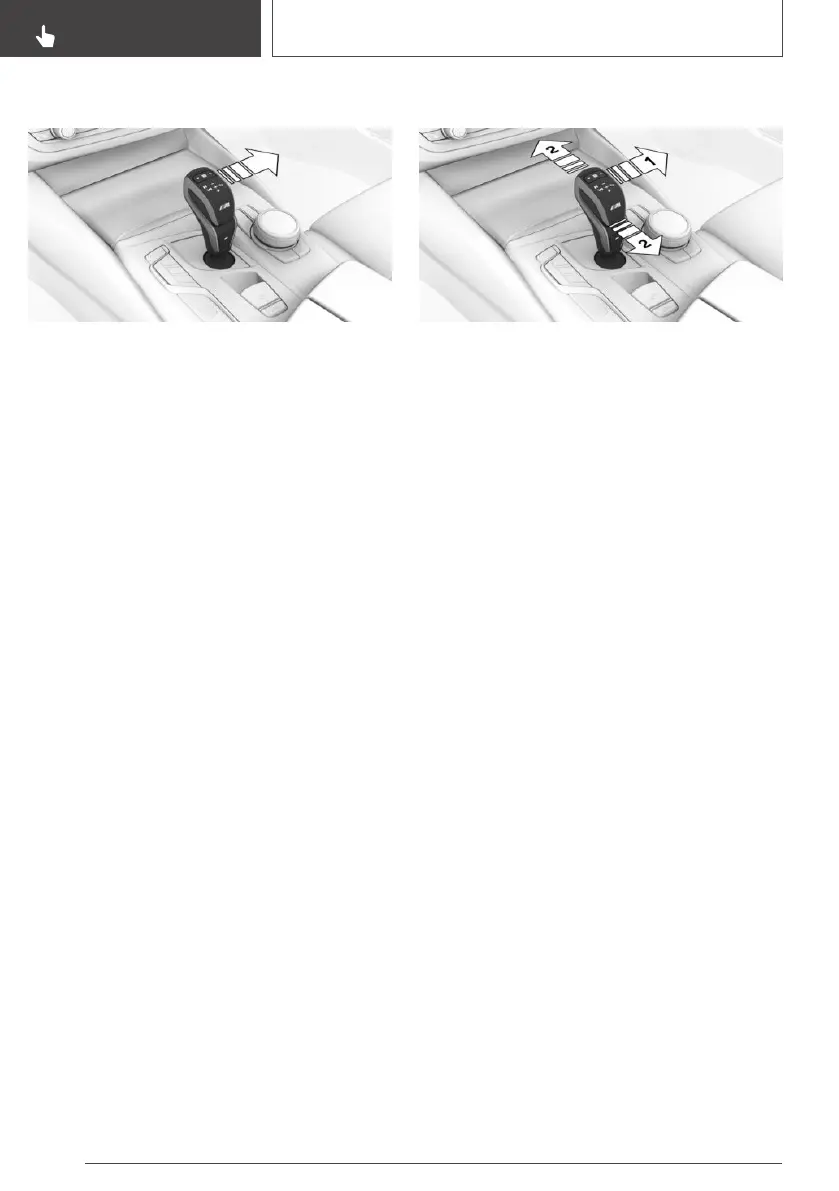
Activating drive mode
Push the selector lever out of the centre position
in the D/S direction.
Drive mode is activated. The gear engaged ap‐
pears on the instrument cluster together with a
D, for example 1 D.
Deactivating Drive mode
Push the selector lever out of Drive mode in the
D/S direction. Sequential mode is active.
The gear engaged appears on the instrument
cluster, for example 1.
Sequential mode D/S
Principle
In sequential mode, it is possible to shift gears
manually using the selector lever or the shift pad‐
dles without taking your foot off the accelerator.
General
Shortly before a minimum speed depending on
the gear, it automatically downshifts.
When maximum engine speed is reached, there
is no automatic upshift in sequential mode and
the kick-down is deactivated.
Driving off is possible even in 2nd gear on a level
carriageway, for example, on icy roads.
Activating sequential mode
Push the selector lever out of Drive mode in the
D/S direction, arrow 1, or shift gears via the se‐
lector lever, arrows at 2.
Sequential mode is activated. The gear engaged
appears on the instrument cluster, for example 1.
Deactivating sequential mode
Push the selector lever out of the centre position
in the D/S direction. Drive mode is active.
The gear engaged appears on the instrument
cluster together with a D, for example 1 D.
Changing gear
Principle
In sequential mode, it is possible to shift gears
manually using the shift paddles or the selector
lever.
Shift paddles on steering wheel enable fast gear‐
shifting without taking hands off steering wheel.
General
Gearshift
Gear shifting is only carried out if the engine
speed and vehicle speed are appropriate, for ex‐
ample, the transmission will not shift down if the
engine speed is too high.
The lowest possible gear is selected by simulta‐
neously operating the kick-down and moving the
selector lever forward or actuating the left shift
paddle.
Seite 138
CONTROLS
Driving
138
Online Edition for Part no. 01402989787 - II/18



 To Next Page