Displays
Vehicle equipment
This chapter describes all standard, country-spe‐
cific and special equipment available for the
model series. Therefore equipment which is not
installed in your vehicle, for example on account
of the optional equipment selected or the coun‐
try specification, may also be described here.
This also applies to safety-relevant functions and
systems. Comply with the relevant laws and reg‐
ulations when using the corresponding functions
and systems.
Instrument cluster
General
The displays in the instrument cluster can some‐
times differ from the illustrations in this Owner's
Handbook.
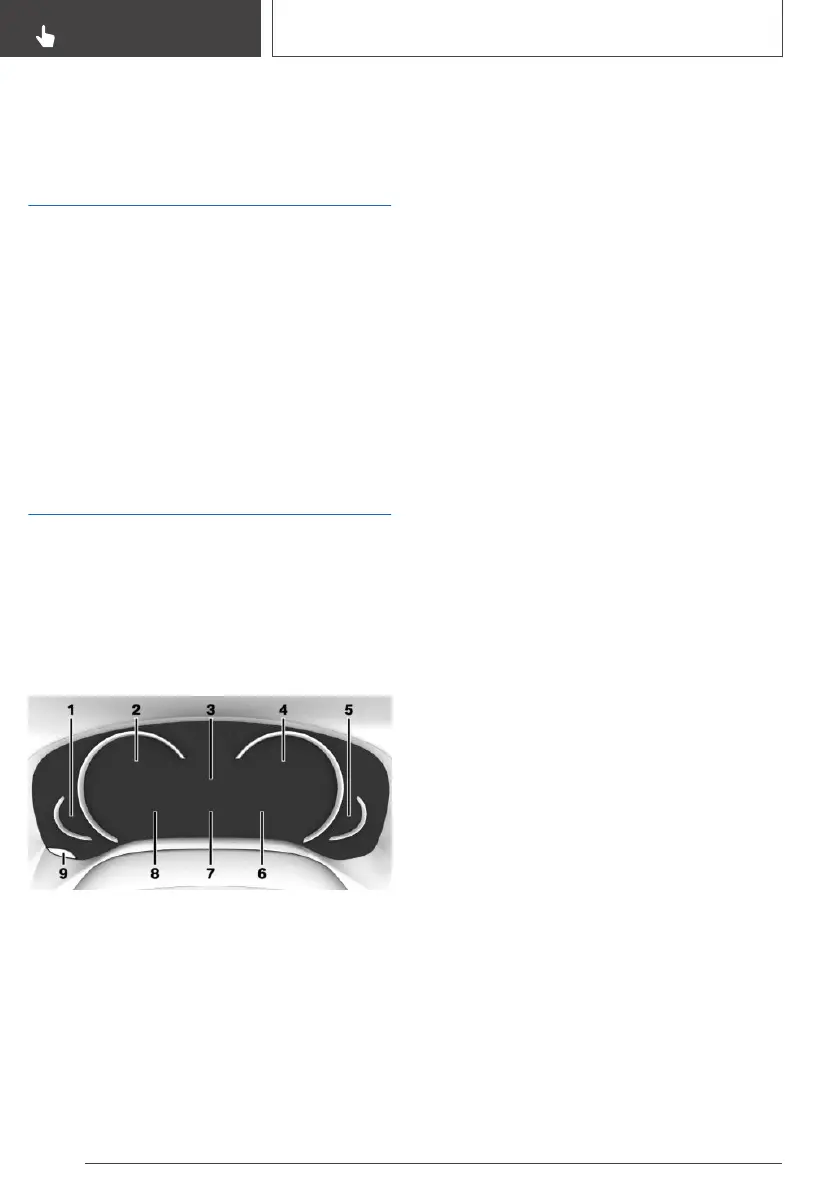
Overview
1 Fuel gauge 148
Range 151
2 Speedometer
3 Drive dynamic systems 150
Gear display, Drivelogic 150
4 Revolution counter 149
Selection lists 155
Navigation display
Shift Lights 162
5 Engine temperature 149
6 Outside temperature 149
7 Variable displays
Check Control 145
On-board computer 156
Service requirements 151
8 Variable displays
Speed Limit Info 153
Time 149
9 To reset the trip distance recorder 157
Setting the operating mode
Principle
The instrument cluster can be set to 3 different
operating modes.
To adjust
Via iDrive:
1.
"My Vehicle"
2. "iDrive settings"
3. "Displays"
4. "Instrument cluster"
5. Select the desired setting:
▷ "STANDARD": all displays in the instru‐
ment cluster are active.
▷ "REDUCED": the displays in the instru‐
ment cluster are reduced to the minimum
necessary.
▷ "INDIVIDUAL": all displays in the instru‐
ment cluster are active. Individual displays
can be selected separately.
Seite 144
CONTROLS
Displays
144
Online Edition for Part no. 01402989787 - II/18



 To Next Page