The setting is saved for the currently used driver
profile.
Selecting displays in the Head-Up
Display
Via iDrive:
1. "My Vehicle"
2. "iDrive settings"
3. "Displays"
4. "Head-up display"
5. "INDIVIDUAL" or "M view"
6. Select the desired setting.
The setting is saved for the currently used driver
profile.
M View
General
In the M view, the displays on the Head-up Dis‐
play switch from the standard view to a more
sporty, M-specific view.
With navigation system: if the shift lights are ac‐
tive, no navigation contents will be shown in the
Head-Up Display.
Activating/deactivating the M view
Via iDrive:
1.
"My Vehicle"
2. "Setup"
3. "Head-up display M view"
The setting is saved for the currently used driver
profile.
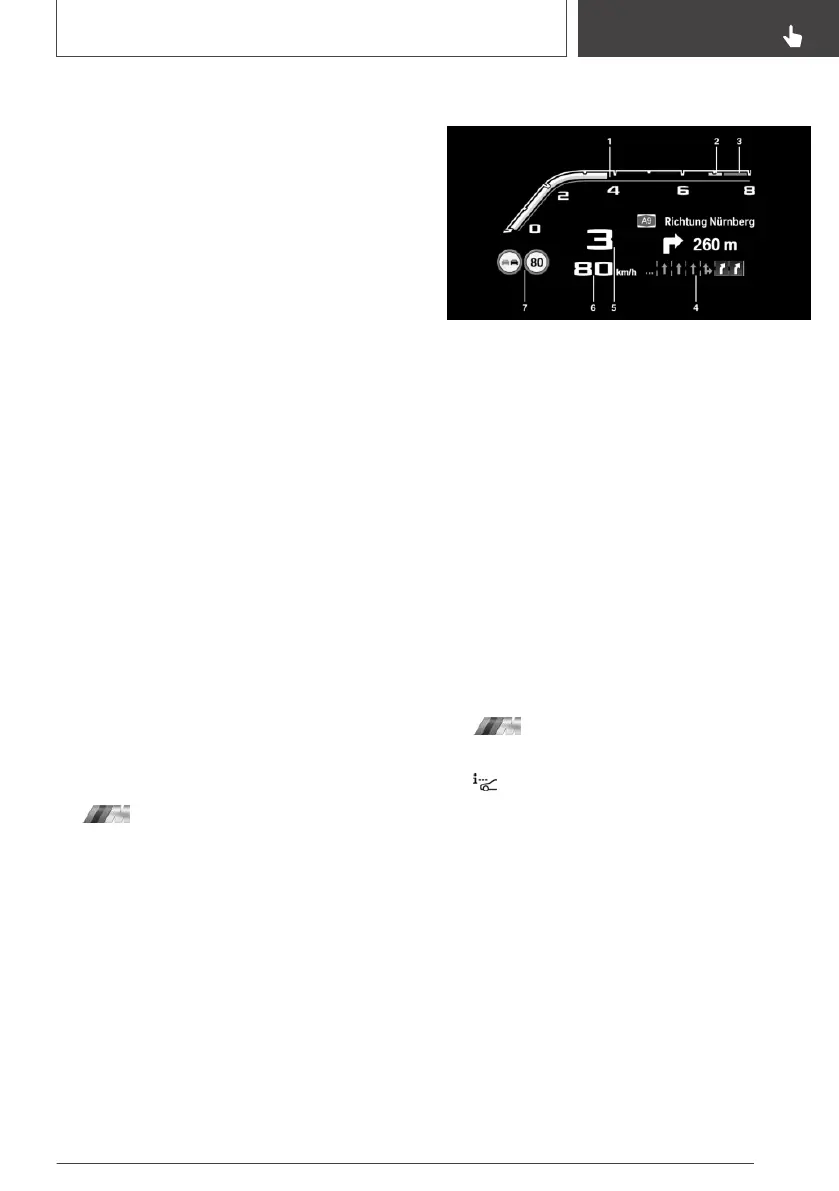
Display
1 Current engine speed, highlighted
2 Forewarning field, engine speed display
3 Red warning field, engine speed display
4 Navigation/Shift lights
5 Gear display/warning messages
6 Speed
7 Speed Limit Info with overtaking restriction
display
Setting the view in M Setups
In the M Setups, various settings for the vehicle
can be made for the Head-Up Display.
Via iDrive:
1.
"My Vehicle"
2. "Setup"
3. "Configure M1" or "Configure M2"
4. "Head-up displ."
5. Select the desired setting:
▷ "M view": the selected M Setup always
shows the M view in the Head-Up Dis‐
play.
▷ "Standard view": the selected M Setup al‐
ways shows the standard view in the
Head-Up Display.
▷ "Unchanged": when Setup M1 or Setup
M2 is activated, the view that is currently
set in the Head-Up Display remains ac‐
tive.
Seite 161
Displays
CONTROLS
161
Online Edition for Part no. 01402989787 - II/18



 To Next Page