Overview
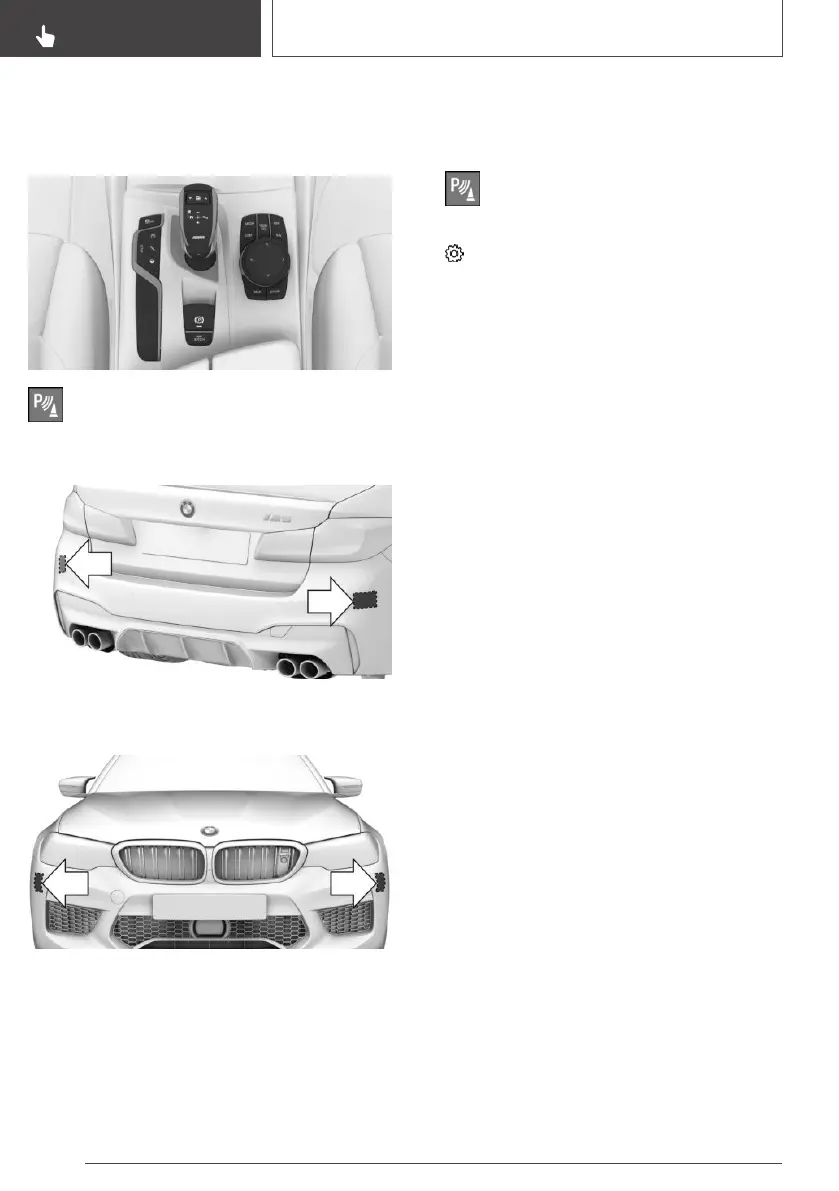
Button in the vehicle
Park Assistant button
Radar sensors
The radar sensors are located in the rear
bumper.
Depending on the equipment installed, there are
two additional radar sensors in the front bumper.
Keep the bumpers clean and unobstructed in the
area of the radar sensors.
Switching on/off
Activating/deactivating the system
1.
Press the Park Assistant button.
2. Tilt the Controller to the left.
3. "Settings"
4. "Cross-traffic alert"
5. "Cross-traffic alert"
Switching on automatically
If the system was activated on the Control Dis‐
play, it is switched on automatically as soon as
Park Distance Control PDC or Panorama View is
active and a gear is engaged.
The system is switched on at the rear when re‐
verse gear is engaged.
Depending on the equipment installed, the sys‐
tem is switched on at the front when a forward
gear is engaged.
Switching off automatically
The system switches off automatically in the
following situations:
▷ If walking speed is exceeded.
▷ When steering and lane control assistant is
active: after driving for a particular distance.
▷ During active parking with the Park Assistant.
Seite 252
CONTROLS
Driver Assistance Systems
252
Online Edition for Part no. 01402989787 - II/18



 To Next Page