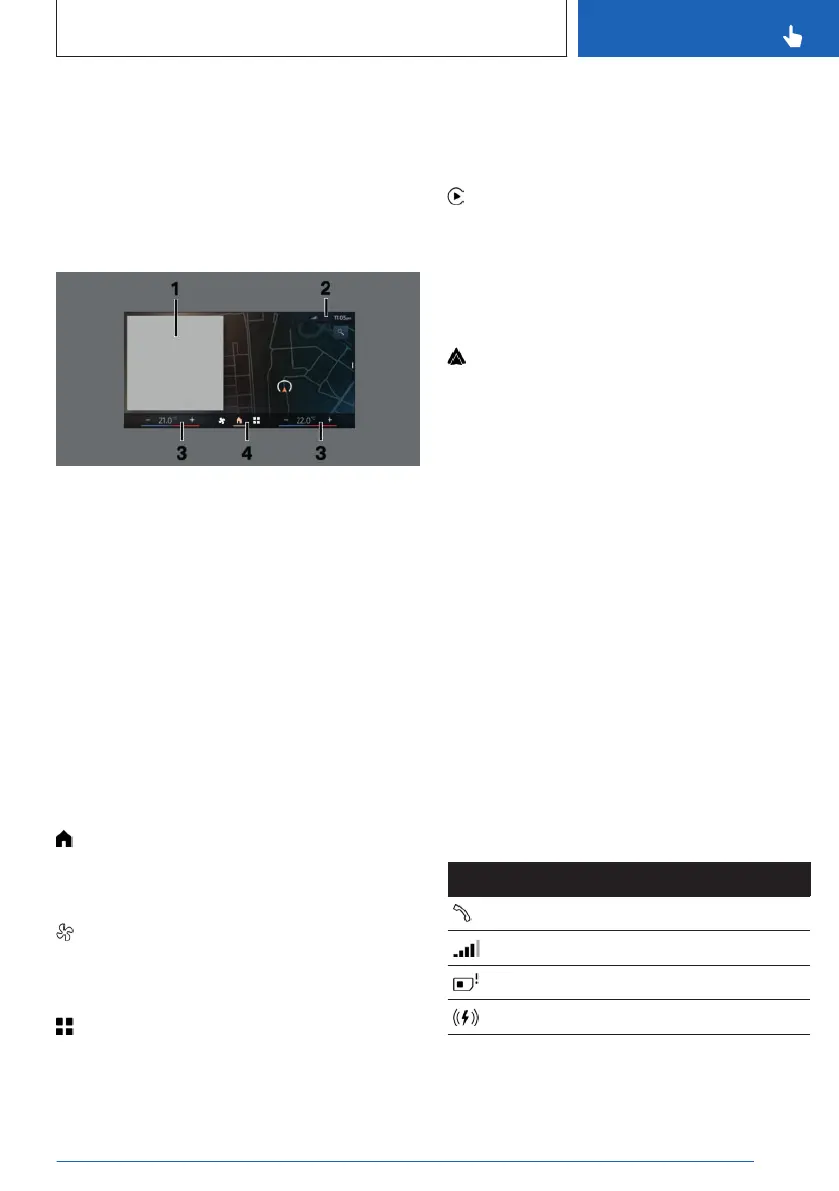
Main menu
General information
The main menu on the control display is div-
ided into different areas.
Overview
1 Widgets
2 Status information
3 Temperature setting
4 Menu bar
Menu bar
General information
The menu bar may not be displayed when us-
ing third-party apps. To display the menu bar
again, swipe up from the lower edge of the
control display or press a button.
Main menu
The main menu can be opened from any
menu.
Climate menu
The Climate menu provides access to all
climate control functions.
Menu Apps
The Apps menu provides access to all apps
and vehicle functions. You can use a filter to
make it easier to find a specific app. The last
selected filter is stored. To display the desired
app, change the filter as necessary.
Apple CarPlay©
The Apple CarPlay menu is displayed in
the main menu depending on national-market
version and connected function. Apple CarPlay
enables the secure use of certain functions of a
compatible Apple iPhone via iDrive.
Android Auto©
The Android Auto menu is displayed in
the main menu, depending on national-market
version and associated function. Android Auto
enables the secure use of certain functions of a
compatible Android smartphone via iDrive.
Widgets
Widgets show real-time information and dy-
namic content such as the navigation map.
Widgets also serve as buttons and allow you to
jump to the respective menu or most important
functions.
Status information
General information
Status information is displayed at the top of
the control display in the form of icons. De-
pending on the equipment and national-mar-
ket version, different icons are available.
Telephone status information
Icon
Meaning
Active call.
Signal strength.
SIM card missing.
Wireless charging active.
Seite 47
BMW iDrive
CONTROLS
47
Online Edition for Part no. 01405A8A536 - VI/23



 To Next Page