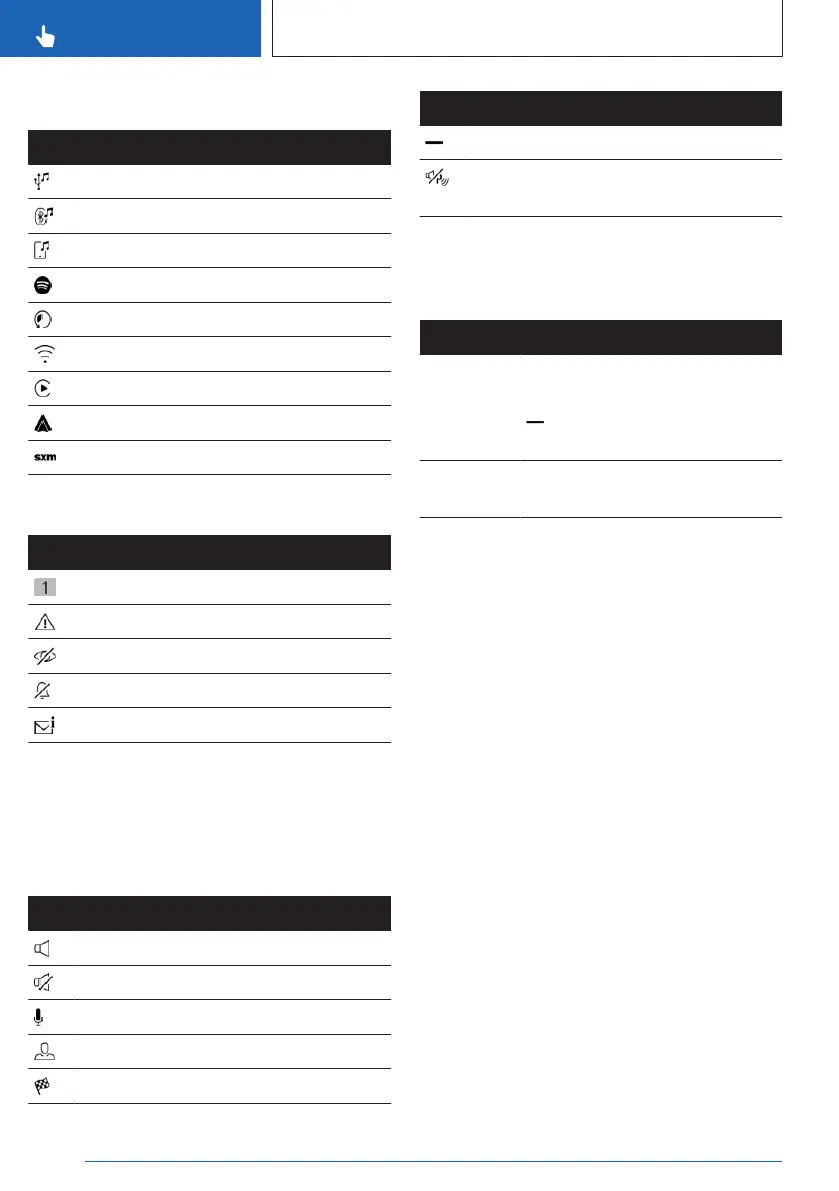
Entertainment status information
Icon Meaning
USB audio.
Bluetooth audio.
Smartphone audio.
Connected Music with Spotify.
Time shift.
Wi-Fi.
Apple CarPlay.
Android Auto.
Satellite radio is switched on.
Status information messages
Icon Meaning
Number of notifications.
Check Control message.
Suppress private information.
Do not disturb.
Message.
Additional information:
Owner's Manual for Navigation, Entertain-
ment, and Communication, refer to page 6.
Other status information
Icon
Meaning
Sound output active.
Sound output deactivated.
Activation word active.
BMW ID or driver profile.
Destination guidance active.
Icon Meaning
Go to quick access.
Park Distance Control: sound deacti-
vated.
Quick access
Certain functions and individual shortcuts can
be opened via quick access.
Function Operation
Show quick
link.
Swipe from top to bottom on the
control display.
Tap the icon at the top of the
screen.
Hide quick
link.
Swipe from the bottom up on
the control display.
Shortcuts
Principle
Shortcuts provide quick access to functions
such as those that are frequently used. Short-
cuts are opened via the quick link and can be
defined individually. The following functions,
for example, are defined as shortcuts:
▷
The radio stations.
▷ The navigation destinations.
▷ The phone numbers.
▷ The jump-ins to menus.
▷ The functions.
Saving shortcuts
Shortcuts can only be created with an active
BMW ID or a driver profile.
1.
Press and hold the desired function.
2. "Add to shortcuts"
Shortcuts can also be saved directly via the
quick link.
Seite 48
CONTROLS
BMW iDrive
48
Online Edition for Part no. 01405A8A536 - VI/23



 To Next Page