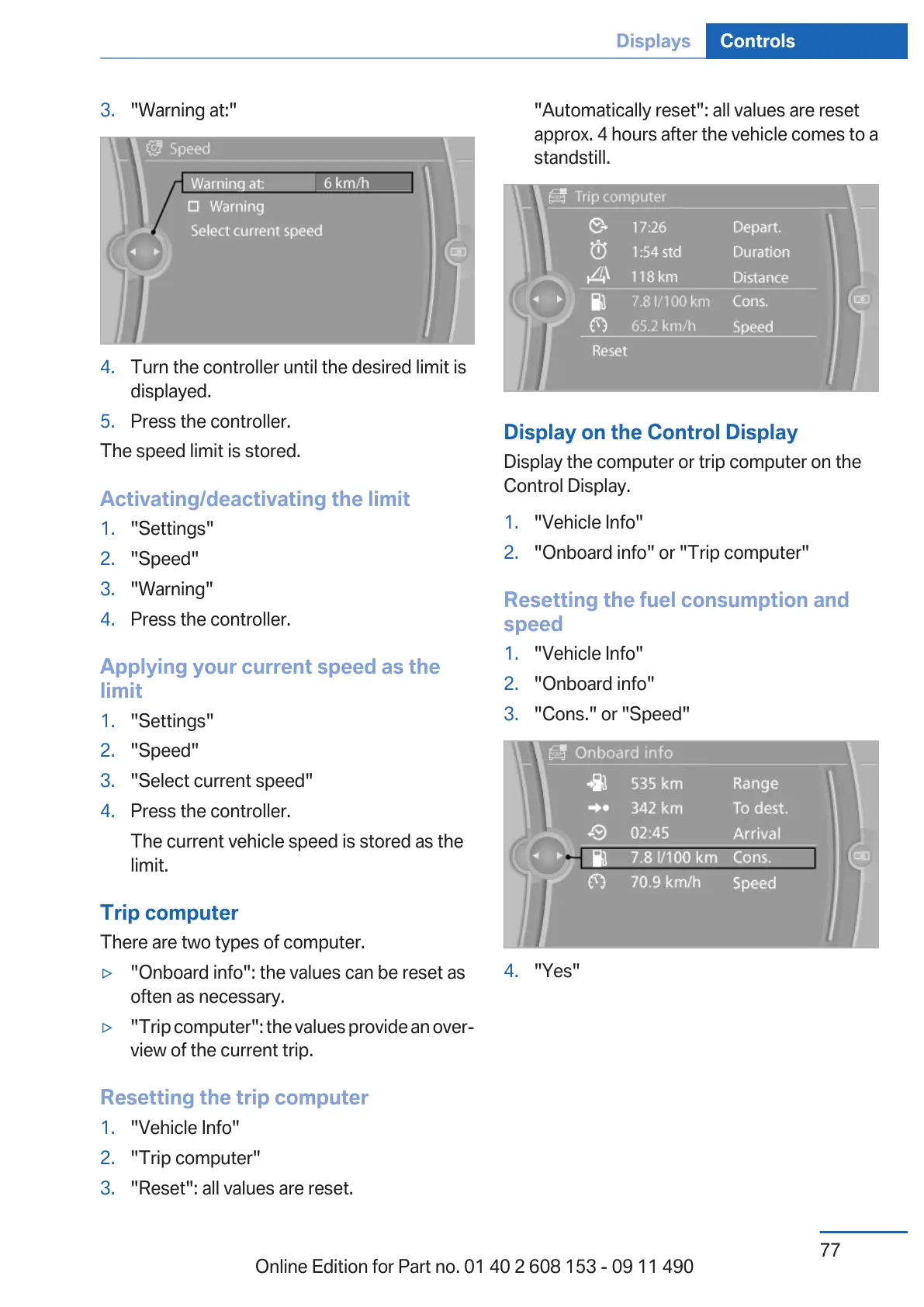
3. "Warning at:"
4. Turn the controller until the desired limit is
displayed.
5. Press the controller.
The speed limit is stored.
Activating/deactivating the limit
1.
"Settings"
2. "Speed"
3. "Warning"
4. Press the controller.
Applying your current speed as the
limit
1.
"Settings"
2. "Speed"
3. "Select current speed"
4. Press the controller.
The current vehicle speed is stored as the
limit.
Trip computer
There are two types of computer.
▷ "Onboard info": the values can be reset as
often as necessary.
▷ "Trip computer": the values provide an over‐
view of the current trip.
Resetting the trip computer
1.
"Vehicle Info"
2. "Trip computer"
3. "Reset": all values are reset.
"Automatically reset": all values are reset
approx. 4 hours after the vehicle comes to a
standstill.
Display on the Control Display
Display the computer or trip computer on the
Control Display.
1.
"Vehicle Info"
2. "Onboard info" or "Trip computer"
Resetting the fuel consumption and
speed
1.
"Vehicle Info"
2. "Onboard info"
3. "Cons." or "Speed"
4. "Yes"
Seite 77
Displays Controls
77
Online Edition for Part no. 01 40 2 608 153 - 09 11 490



 To Next Page