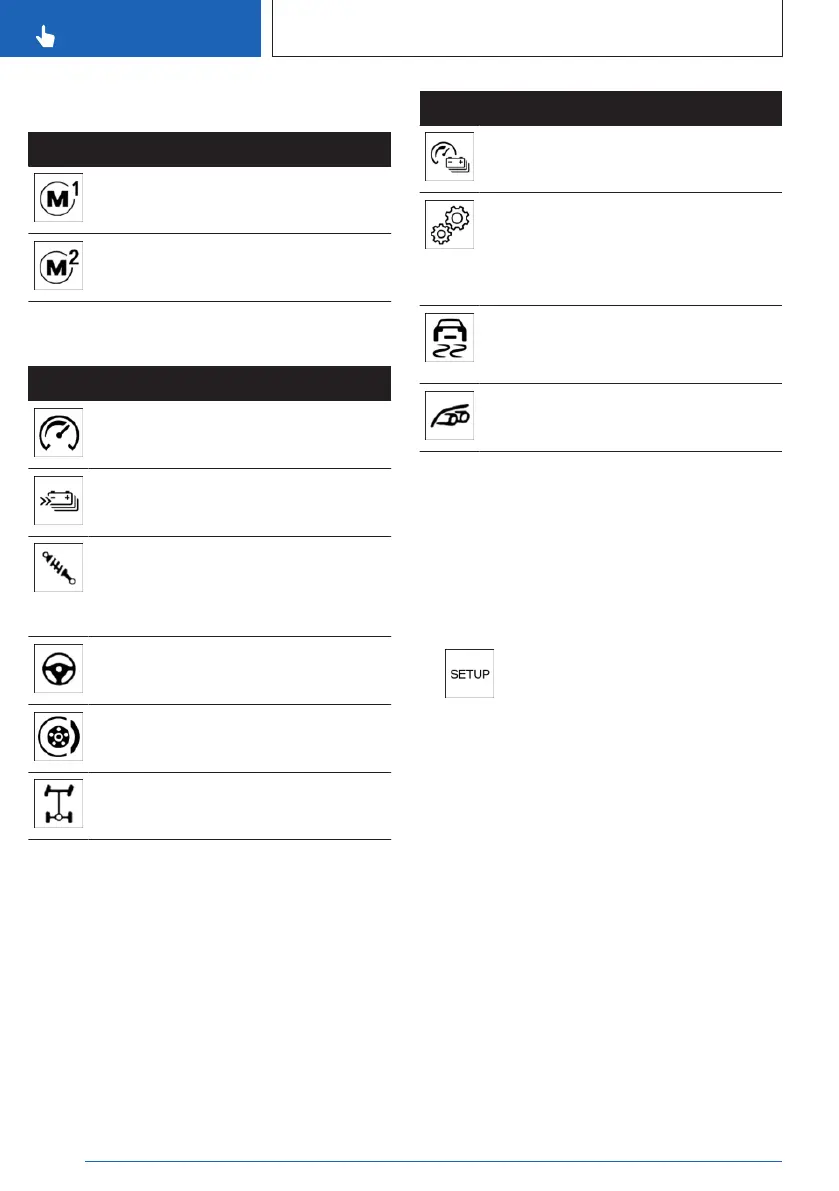
Buttons on the steering wheel
Button Function
M1 configuration
M2 configuration
Settings
Icon System
"Drivetrain": M Engine Dynamics
Control, refer to page 133, programs.
"Energy recovery": Energy recovery
modes, refer to page 118.
"Chassis": Programs of Adaptive
M suspension, refer to page 274, and
settings of Integral Active Steering,
refer to page 220.
"Steering": programs of Servotronic,
refer to page 212.
"Brake": programs of brake, refer to
page 213.
"M xDrive": programs of M xDrive, re-
fer to page 216.
The following systems can also be configured
for M1/M2:
Icon
System
"M HYBRID": programs of the M Hy-
brid, refer to page 133.
M Steptronic Sport transmission:
"Drivelogic": shift modes and Drive-
logic programs.
Drivelogic, refer to page 126.
"DSC": Dynamic Stability Control, re-
fer to page 214, and M Dynamic
Mode, refer to page 215.
"M Sound": Sound Control, refer to
page 134.
Operation via SETUP
General information
The settings from the SETUP button are ap-
plied directly. The settings are not saved.
Configuring M Setup
1.
Press the button.
2. Select the desired setting.
Operation via M1/M2
General information
The settings for the driving dynamics and drive
systems can be configured for the M1/M2 but-
tons and retrieved if required.
With activated M1 or M2 configuration, any
changes to the setting are immediately ap-
plied.
When M1/M2 is deactivated or reset, the driv-
ing dynamics and drive systems are reset to
their default settings.
Seite 210
CONTROLS
Driving stability control systems
210
Online Edition for Part no. 01405A8A608 - VI/23



 To Next Page