EasyManua.ls Logo

boblov T5 - Page 16

boblov T5
19 pages
Print Icon
To Next Page IconTo Next Page
To Previous Page IconTo Previous Page
Loading...
Off/3mins/5mins/10mins
Off/5mins/10mins/15mins/20mins
5mins
15mins
13
BOBLOV
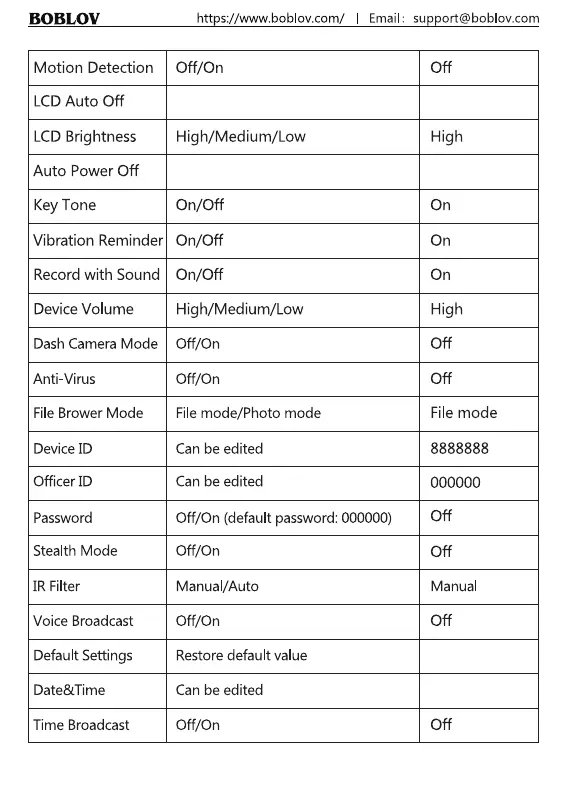
Motion Detection
LCD Auto Off
LCDBrightness
Auto Power Off
Key Tone
Vibration Reminder
Record with Sound
Device Volume
Dash Camera Mode
Anti-Virus
File Brower Mode
Device ID
Officer ID
Password
Stealth Mode
IR Filter
Voice Broadcast
Default Settings
Date&Time
Time Broadcast
https://www.boblov.com/ I Email :
Off/On
Off/3mins/5mins/1 Omins
High/Medium/Low
Off/5mins/1 Omins/15mins/20mins
On/Off
On/Off
On/Off
High/Medium/Low
Off/On
Off/On
File mode/Photo mode
Can be edited
Can be edited
Off/On (default password: 000000)
Off/On
Manual/Auto
Off/On
Restore default value
Can be edited
Off/On
13
support@boblov.com
Off
5mins
High
15mins
On
On
On
High
Off
Off
File mode
8888888
000000
Off
Off
Manual
Off
Off

Related product manuals