EasyManua.ls Logo

Bogen X300 - User Manual

Bogen X300
16 pages
Print Icon
To Next Page IconTo Next Page
Loading...
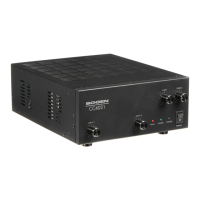
Black Max
Amplifier
X300, X450, & X600 Models
Installation and Use Manual
©
2005 Bogen Communications, Inc.
All rights reserved.
54-2063-0
1C
0506

Other manuals for Bogen X300

Questions and Answers

  • J
    Joseph PayneAug 9, 2025
    Why is there no sound coming from my Bogen X300?
    • M
      Michael JonesAug 9, 2025
      If there is no sound coming from your Bogen Amplifier, there might be several reasons: * The Level Controls might be turned down, so increase them. * There might be no signal from the source, so check the signal source. * The CH B Input Select might not be set or wired properly, so verify the CH B Input Select settings. * There might be poor or broken speaker wiring, so inspect the speaker wiring. * The speakers might be defective, so test or replace them.
  • O
    ocainAug 14, 2025
    What to do if my Bogen Amplifier has distorted sound?
    • M
      Melissa HillAug 14, 2025
      If your Bogen Amplifier has distorted sound, consider the following: * The input signal level might be too high, so reduce it. * There might be poor speaker connections, so check them. * The Lo-Cut Switch might be set to Flat, so adjust it. * The Input Sensitivity Switch might not be set correctly, so correct it. * Speaker transformers may be saturating at low frequencies, so enable the Lo-Cut filter and use additional Hi-Pass filtering. * The output might be below the minimum load rating, so ensure the correct load rating. * The amplifier might be exceeding the maximum power output rating, so reduce the output power.
  • R
    Richard ChangAug 18, 2025
    How to fix intermittent operation on a Bogen X300 Amplifier?
    • A
      allisonyoungAug 18, 2025
      To address intermittent operation in your Bogen Amplifier: * Check for a DC level at the signal input. * Adjust the load impedance if it's too low. * Check for short circuits at the speaker output. * Ensure proper ventilation clearances if the amplifier is too hot.
  • J
    Jessica RitterAug 25, 2025
    What causes noise or hum in my Bogen Amplifier?
    • J
      johnsondavidAug 25, 2025
      Noise or hum in your Bogen Amplifier can be caused by: * Poor electrical connections at the input, so improve them. * An input cable routed near AC cables, power transformers, or other EMI radiating devices, so re-route the input cable. * Electrically noisy devices operating on the same AC circuit, so isolate the noisy devices from the AC circuit. * Poor equipment grounding, so ensure all AC safety grounds are connected. * Make sure that all components in the audio chain are tied to the same ground and verify all components are grounded together.
  • S
    Stephanie TaylorAug 28, 2025
    How to troubleshoot a Bogen X300 that appears dead?
    • D
      Daniel HernandezAug 29, 2025
      If your Bogen Amplifier appears dead (no front status LED), check the following: * Ensure the amplifier is plugged in. * Test the AC outlet to make sure it is working. * Turn on the Power Switch. * If the Breaker (Power Switch) tripped, turn it off, then turn it back on. * Check Sequential Turn-On section for proper configuration if the Power Sequencing Switch is set wrong.
  • D
    Derek MeyerSep 3, 2025
    What to do if sequencing is not working correctly on my Bogen Amplifier?
    • T
      Tiffany MillerSep 3, 2025
      If the sequencing is not functioning correctly on your Bogen Amplifier, consider these steps: * Ensure AC power is supplied to the amplifier. * Turn on the Power Switch for the slave amp. * If the Breaker (Power Switch) tripped, turn it off, then turn it back on. * Turn on the Rear Power Sequencing Switch. * Check the sequencing wiring between amplifiers.

Bogen X300 Specifications

General IconGeneral
BrandBogen
ModelX300
CategoryAmplifier
LanguageEnglish

Related product manuals