
 To Next Page
D
djohnsonAug 13, 2025
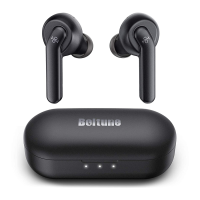
Why won't my BOLTUNE BT-BH021 Headphone earbuds turn on?
- Nnicholas70Aug 13, 2025
If your BOLTUNE Headphone earbuds won't turn on, the most likely cause is a low battery. Please charge them.

Why won't my BOLTUNE BT-BH021 Headphone earbuds turn on?
If your BOLTUNE Headphone earbuds won't turn on, the most likely cause is a low battery. Please charge them.
How to pair my BOLTUNE BT-BH021 earbuds with my device?
To pair your BOLTUNE Headphone earbuds with your device: * First, ensure your device is turned on and its Bluetooth function is activated. * Next, put the earbuds into pairing mode as instructed in the “Pairing” section.
What to do if my BOLTUNE BT-BH021 earbuds are not charging?
If your BOLTUNE Headphone earbuds are not charging: 1. Ensure that you place the earbuds properly into the charging case. 2. Make sure the charging case itself is fully charged.
Why can't my BOLTUNE BT-BH021 Headphone earbuds automatically find paired device?
If your BOLTUNE Headphone earbuds can't automatically find a paired device, deactivate the Bluetooth function of the previously paired device or clear 'Boltune BT-BH021' from its Bluetooth list.
How to improve poor sound quality on BOLTUNE Headphone earbuds?
To improve the sound quality of your BOLTUNE Headphone earbuds: * Make sure you are wearing the earbuds properly and keep them close to each other. * Place the connected device closer to the earbuds, or remove any obstacles between them. * Also, clear any debris from the earbuds.
Why is my BOLTUNE BT-BH021 Headphone earbuds connection unstable?
An unstable connection with your BOLTUNE Headphone earbuds may occur because obstacles shorten the effective distance. Also, try turning off other Bluetooth devices to reduce interference.
What to do if there's no sound in one BOLTUNE Headphone earbud?
If you experience no sound in one of your BOLTUNE Headphone earbuds in couple earbuds mode: * Place both earbuds back into the charging case, then take them out. They should pair automatically. * If pairing fails, restore them to factory settings as instructed in the “Clear Pairing List” section.
What to do if I can't hear the other party on my BOLTUNE Headphone during a call?
If you can't hear the other party during a phone call using your BOLTUNE Headphone, increase the volume to a higher level.
Lists the main product included in the package.
Includes six ear tips in different sizes for a comfortable fit.
Provides the necessary cable for charging the earbuds and case.
Contains comprehensive instructions for using the product.
Offers a brief overview to help users get started quickly.
Identifies the touch-sensitive area on the earbuds for controls.
Highlights the light that shows the status of the earbuds.
Locates the built-in microphone for calls and voice commands.
Details the points on the earbuds that connect for charging.
Illustrates the case used for storing and charging the earbuds.
Marks the port on the case for connecting the charging cable.
Indicates where the earbuds fit into the charging case.
Points to the light indicating the charging status of the case.
Advises on safe volume levels and listening habits to prevent hearing damage.
Warns against high temperatures, water exposure, and improper cleaning.
Highlights risks associated with the lithium battery and heat exposure.
Guides on selecting the best fitting ear tips from the package.
Provides visual instructions on correctly wearing the earbuds.
Explains how to place earbuds in the case for charging.
Details the process for connecting the case to a power source.
Describes how the earbuds automatically power on and off.
Covers connecting earbuds in couple or single earbud modes.
Provides steps to clear the earbuds' pairing history.
How to Play/Pause and control tracks using touch controls.
Instructions for increasing or decreasing the audio volume.
How to answer, hang up, or decline incoming phone calls.
How to activate the voice control feature.
Solutions for when earbuds fail to power on, likely due to battery.
Addresses problems with charging the earbuds or the charging case.
Troubleshooting steps for not finding the device or pairing failures.
Solutions for no sound in one earbud or poor sound quality.
Resolves issues related to call clarity or microphone performance.
Guidance on how to clean the earbuds and charging case properly.
Information regarding the Bluetooth word mark and logos.
Details on meeting FCC regulations for digital devices.
Guidelines for the correct disposal of electronic waste.
 General
| Model | BT-BH021 |
|---|---|
| Type | Over-Ear |
| Connectivity | Bluetooth 5.0 |
| Impedance | 32Ω |
| Driver Diameter | 40 mm |
| Frequency Response | 20 Hz - 20 kHz |
| Charging Time | 2 hours |
| Sensitivity | 105 dB |
| Water Resistance | IPX4 |
| Features | Built-in Microphone, Foldable Design |