EasyManua.ls Logo

BOLTUNE BT-BH023 - User Manual

BOLTUNE BT-BH023
18 pages
Print Icon
To Next Page IconTo Next Page
Loading...
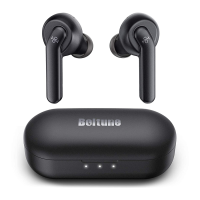
Model: BT-BH023
Active Noise Cancelling
True Wireless Stereo Earbuds
User Guide
11-26-2019
BT-BH023_V1.1
EUROPE
E-mail: support@boltune.net
EU Importer: ZBT International Trading GmbH
Address: Halstenbeker Weg 98C, 25462 Rellingen, Deutschland
NORTH AMERICA
E-mail: support@boltune.net
Shenzhen NearbyExpress Technology Development Co.,Ltd.
Address: 333 Bulong Road, Shenzhen, China, 518129
MANUFACTURER
ASIA PACIFIC
E-mail: support@boltune.net
JP Importer: 株式会社SUNVALLEY JAPAN
Address: 104-0032 東京都中央区八丁堀3丁目18-6 PMO京橋東9F
MADE IN CHINA

Questions and Answers

  • D
    Desiree WebsterAug 4, 2025
    Why does my BOLTUNE BT-BH023 have an unstable connection?
    • B
      Benjamin BallardAug 5, 2025
      An unstable connection can occur if there are obstacles between your device and the earbuds, which shortens the effective distance. Try turning off other Bluetooth devices to decrease interference.
  • J
    Joanna RothAug 10, 2025
    What to do if my BOLTUNE BT-BH023 fails to charge?
    • E
      Edward MillerAug 10, 2025
      Make sure you're placing the earbuds into the charging case properly. Also, ensure that the charging case itself is fully charged.
  • S
    schneidermarilynAug 15, 2025
    What to do if my BOLTUNE BT-BH023 has poor sound quality?
    • A
      Ashley HawkinsAug 15, 2025
      Ensure you are wearing the earbuds properly and keep them close to each other. Also, place the connected device closer to the earbuds or remove any obstacles between them. Finally, clear any debris from the earbuds.
  • S
    Seth SimsAug 20, 2025
    Why is there no sound in one earbud of my BOLTUNE BT-BH023 Headphone?
    • T
      Tammy HarringtonAug 20, 2025
      Place both earbuds back in the charging case and then take them out again; they should pair automatically. If the pairing fails, restore them to the factory settings as instructed in the “Clear Pairing List” section.
  • J
    john20Aug 25, 2025
    What to do if my BOLTUNE BT-BH023 charging case won't charge?
    • P
      pandersonAug 26, 2025
      Ensure that the charging cable is intact and properly plugged in.
  • Z
    zstanleyAug 29, 2025
    Why can't I hear the other party during a phone call with my BOLTUNE BT-BH023?
    • V
      Vanessa DunnAug 29, 2025
      Set the volume to a higher level.

Summary

PACKAGE CONTENTS

PRODUCT DIAGRAM

IMPORTANT SAFETY INSTRUCTIONS

Hearing Safety

Safety guidelines for earbud volume and awareness to prevent hearing damage.

Caution

Precautions regarding temperature, water exposure, cleaning agents, and physical impact.

HOW TO WEAR

Choose the Right Tips (Fig. 3)

Guidance on selecting the correct ear tips for a comfortable and secure fit.

Wear the Earbuds (Fig. 4)

Visual instructions on how to correctly insert earbuds into the ear for optimal performance.

USING YOUR EARBUDS

Charging the Earbuds

Steps for charging the earbuds by placing them into the charging case.

Charging the Charging Case

Instructions for charging the charging case via a USB charging adapter or port.

Power On (Fig. 8)

Automatic powering on of earbuds when the charging case lid is uncovered.

Power Off (Fig. 9)

Automatic powering off of earbuds when placed into the charging case and lid is closed.

Pairing

Couple Earbuds Mode

Instructions for pairing both earbuds simultaneously to a device.

Single Earbud Mode

Instructions for using only the left earbud for connectivity.

Clear Pairing List

OPERATION AND FUNCTIONS

CLEANING AND MAINTENANCE

TROUBLESHOOTING

WARRANTY AND SERVICE

BOLTUNE BT-BH023 Specifications

General IconGeneral
BrandBOLTUNE
ModelBT-BH023
CategoryHeadphone
LanguageEnglish

Related product manuals