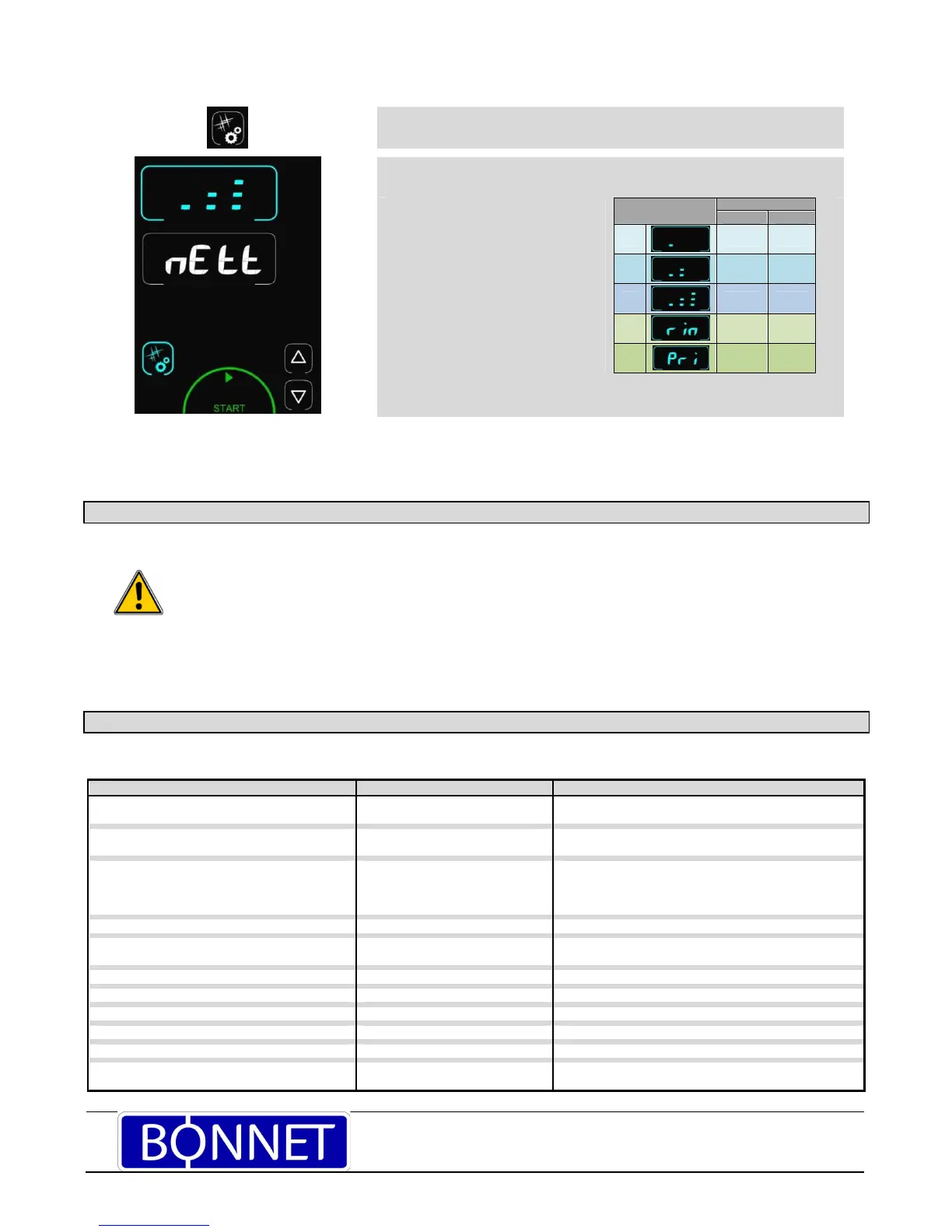
Pressing the Cleaning/Tools button gives access to the cleaning menu
Display shows “CLEA” (cleaning) in the timer zone and the intensity in the temperature
zone.
By default the last cycle used is displayed.
Possible selections:
- 3 cleaning intensities
- Rinse function
- Cleaning product priming function
2 min 2 min
The priming function allows the detergent delivery circuit to be refilled when the
container is changed so that efficiency is maintained
Pressing the “Start button” starts a wash cycle.
Pressing the Cleaning/Tools button or any
inactive zone exits this menu and returns to the
previous screen.
3 USB PORT SOCKET (ACCESSORY)
The USB port socket is fitted with silicone protective cover.
i31 : Electronics overheating: Temperature
reduced to 180°C
Cooking continues automatically at
a temperature below 180°C
Clean the lower and rear air intakes. If the problem
persists, call a service technician.
i33 : Core probe non function or not plugged in Cooking stops To continue cooking connect a probe or switch to timer
mode.
i81 : Water flow problem Reduced functionality or Pause
the cleaning
Check the valve and water pressure.
If this message appears during washing: the cavity must
be rinced thoroughly.
If the problem persists, call a service technician.
i82 : Sticking solenoid Reduced functionality Switch off and call a service technician.
E46 : Electronic communication fault Cooking stops Possible to launch safe mode: convection mode at
175°C (see guidance and info about the control screen).
E53 : Ventilation non function Cooking stops Switch off and call a service technician.
E61 : Ambient probe short circuit Cooking stops Switch off and call a service technician.
E62 : Ambient probe non function Cooking stops Switch off and call a service technician.
E68 : Cavity at +290°C Cooking stops Switch off and call a service technician.
E72 : Electronics at over + 75°C Cooking stops Switch off and call a service technician.
E73 : Detergent pump faulty or on permanently Drain the hydraulic circuit.
Reduced functionality
Switch off and call a service technician.



 To Next Page