EasyManua.ls Logo

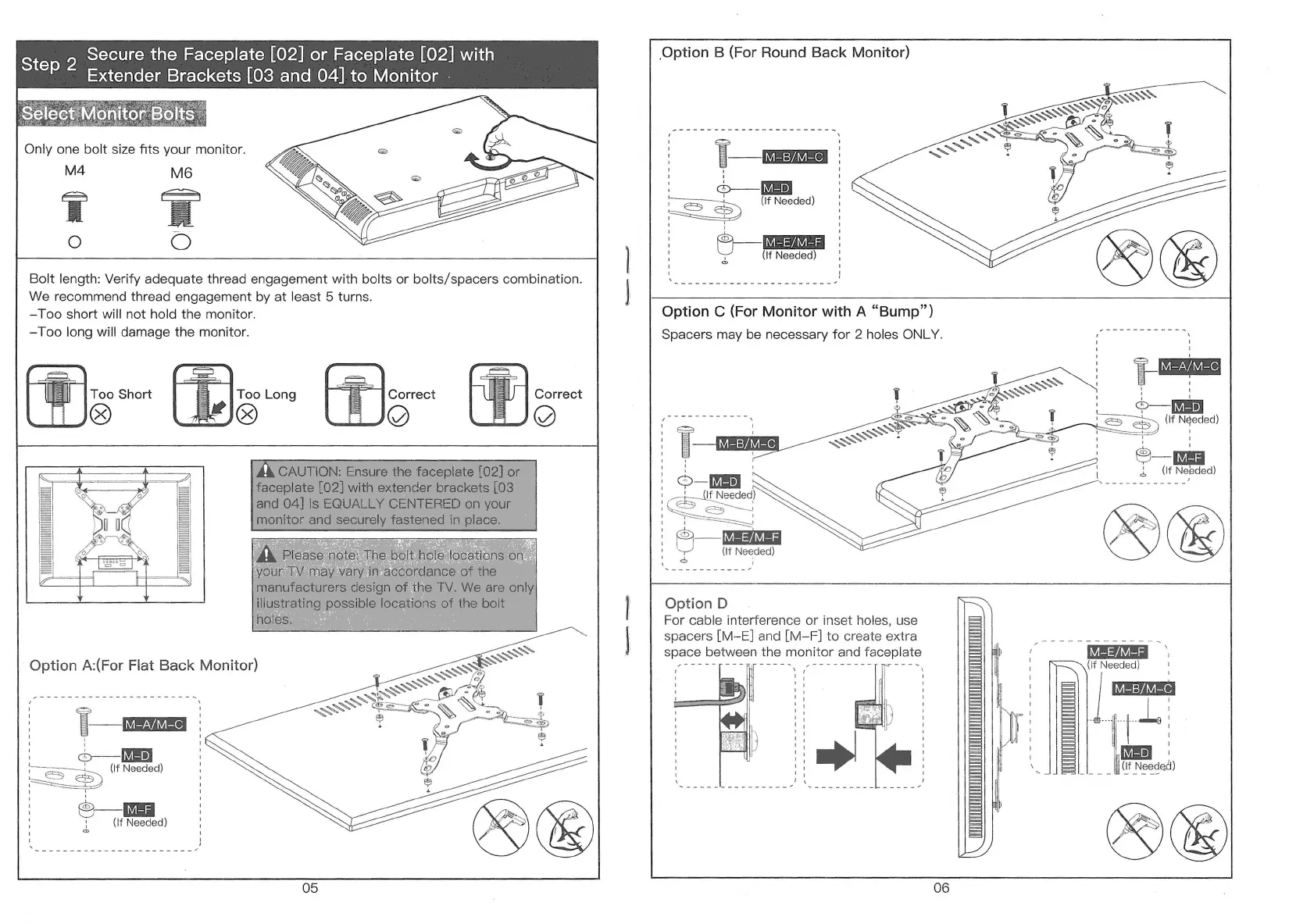
BONTEC GWM01 - Step 2: Secure Faceplate to Monitor; Option A: Flat Back Monitor Mounting; Option B: Round Back Monitor Mounting; Option C: Monitor with Bump Mounting

BONTEC GWM01
7 pages
Print Icon
To Next Page IconTo Next Page
To Previous Page IconTo Previous Page
Loading...
Secure
the
Faceplate
[02]
or
Faceplate
[02]
with
Extender
Brackets
[03
and
04]
to
Monitor
-
Step
2
Only
one
bolt
size
fits
your
monitor.
M4
O
Bolt
length:
Verify
adequate
thread
engagement
with
bolts
or
bolts/spacers
combination.
We
recommend
thread
engagement
by
at
least
5
turns.
—Too
short
will
not
hold
the
monitor.
—Too
long
will
damage
the
monitor.
Too
Short
Too
Long
Correct
©)
L
)
=
p
L
o—[NE
!
(If
Needed)
&
05
Option
B
(For
Round
Back
Monitor)
iy
(If
Needed)
.
O—EEER
Option
C
(For
Monitor
with
A
“Bump”)
Spacers
may
be
necessary
for
2
holes
ONLY.
O—1V/=b)
premmeeees
(If
Néeded)
!
g
T
!
a
O
b
(1f
Needed)
R
-
N
-
'
' ;
If
Needed
ES
| :
R\:
|
@
(if
Needed)
L
L
:
Option
D
For
cable
interference
or
inset
holes,
use
spacers
[M-E]
and
[M-F]
to
create
extra
space
between
the
monitor
and
faceplate
M-E/M-F
(If
Needed)
i
|
=
M-B/M-C
1
1
1
!
1
1
i
_.T..Lm
%
ER
JIE|
|
_li0f
Needed)
X
06

Related product manuals