26
26MANAGE Mode
26
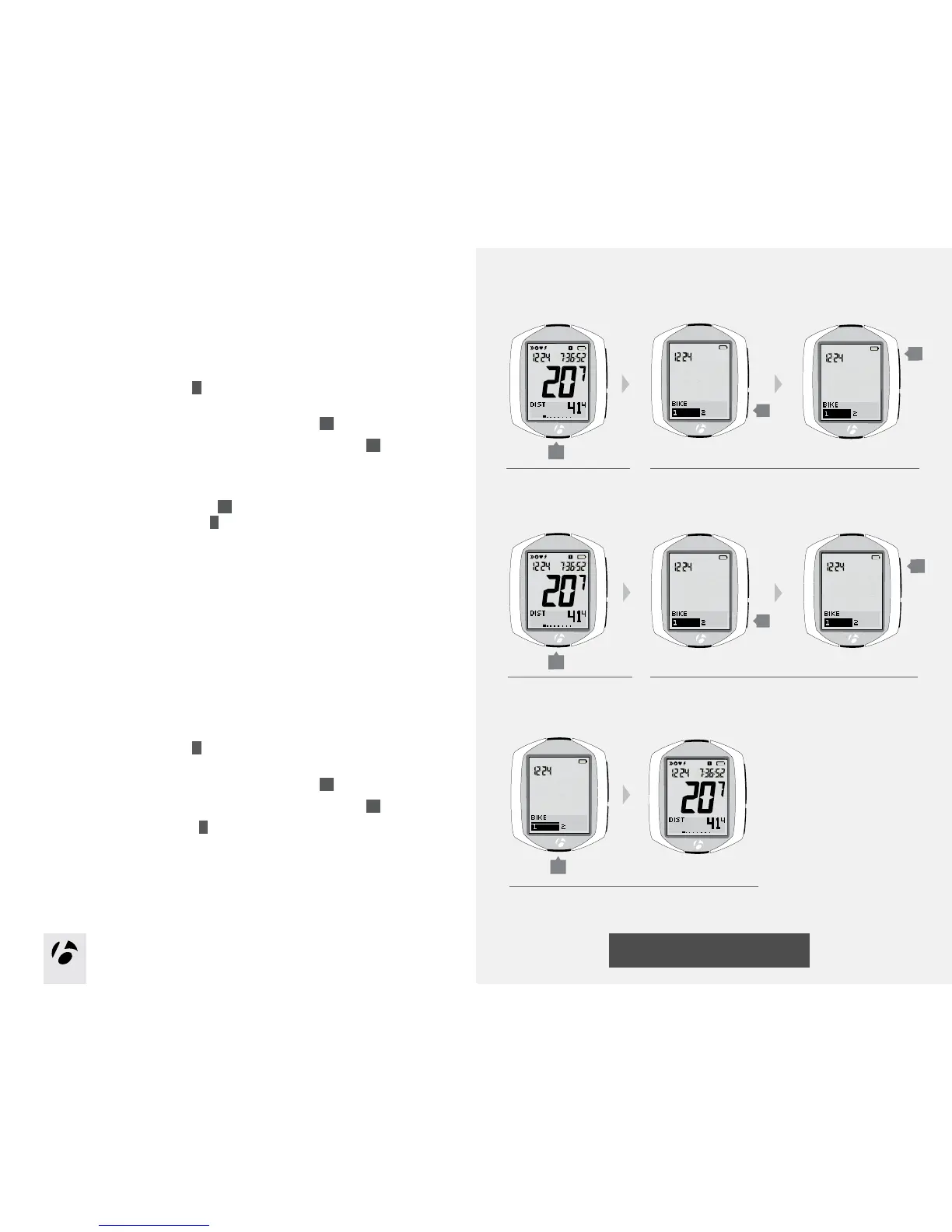
Bike Selection
Setup second bike
1. Enter MANAGE mode. Hold
B
for three seconds.
The Manage mode starts with the Bike Selection display.
2. To change the selection (choose bike1 or bike2), press
s2
.
To save the Bike and proceed to the Wheel Size function, press
s1
.
3. Choose one of the following:
•Followtheinstructionsonthenextpagetosetupthewheelsize.
•Toseeotherfunctions,browse
s1
.
•ToreturntoRIDEmode,hold
B
for three seconds.
Switch bike1 to bike2
If you have already setup bike1 and bike2 but want to choose the other bike,
follow these steps.
1. Enter MANAGE mode. Hold
B
for three seconds.
The computer shows the BIKE display.
2. To change the selection (choose bike1 or bike2), press
s2
.
To save the Bike and proceed to the Wheel Size function, press
s1
.
3. To return to RIDE mode, hold
B
for three seconds.
s1
1. 2.
B
s2
s1
1. 2.
B
s2
(3 seconds)
(3 seconds)
3.
B
(3 seconds)











 To Next Page